IBM Maximo Application Suite · AI Service · A guide for Maximo people
Maximo AI Service, end to end: what it is, how it runs, and how to use it
The Maximo Assistant answers a question in plain English. A work order gets a suggested problem code. An asset page explains in five sentences why it needs attention. Behind all three is one component that most Maximo administrators have never opened: AI Service. This guide follows it from the screen in Manage down to the pods on OpenShift and out to watsonx.ai, on a live system, with the real numbers.
- What AI Service is, and what is not AI Service.
- The architecture: Manage, the AI broker, the model pods, and watsonx.ai, with a diagram of a real installation.
- What it looks like on OpenShift: namespaces, pods, and how much CPU and memory it really takes.
- The AI configurations: the ten on our system, what each one does, and which ones are trained on your data.
- One configuration opened up: training filter, training data, model status, accuracy.
- Two features in use: the Maximo Assistant and asset insights.
- How to check it, and what the usual error codes mean.
Reading time: about 20 minutes.
| You know | In AI Service |
|---|---|
| An external system and its end point | The AI Service connection: URL, tenant and API key, set once in the AI configuration app |
| Object structure | What a configuration reads: MXAPIWODETAIL for work orders, MXAPITKSRVAD for tickets |
| Invocation channel | Exactly that: each configuration has one channel to send training data and one to ask for a prediction |
| A saved query / where clause | The training filter: which records the model learns from |
| Cron task | Training and re-training runs, logged in the model training log |
| A report or KPI that summarises an asset | An insight: text written by a language model from the asset's own data |
| QBE search in a list tab | A question to the Assistant, which builds the query for you |
Part 1What AI Service is
AI Service is a separate component of Maximo Application Suite that hosts machine-learning models and makes them available to the applications. Manage does not contain the models. It sends data to AI Service to train a model, and later sends one record and gets a prediction back.
Three ideas are enough to start:
- A template is a kind of model that IBM ships: "classify a problem code", "find similar records", "turn a question into a query". You do not write models; you pick templates.
- An AI configuration is a template applied to your data: this template, on this object structure, for this attribute, trained on these records.
- A model is the result: a running program with an ID such as
kmai1899753a0ba9711f, ready to answer.
Some templates are classic machine learning: they learn from your history and run entirely on your cluster.
Others use a large language model, which AI Service does not host: it calls IBM watsonx.ai for it. On our
system the template versions that end in -gpt are the ones that use the language model. Knowing which is
which tells you where your data goes and what breaks when a key expires.
What AI Service is not: it is not Maximo Predict (failure prediction from sensor and history data, on Cloud Pak for Data), not Monitor's anomaly detection, and not Visual Inspection. Those are separate applications with their own models.
Part 2The architecture
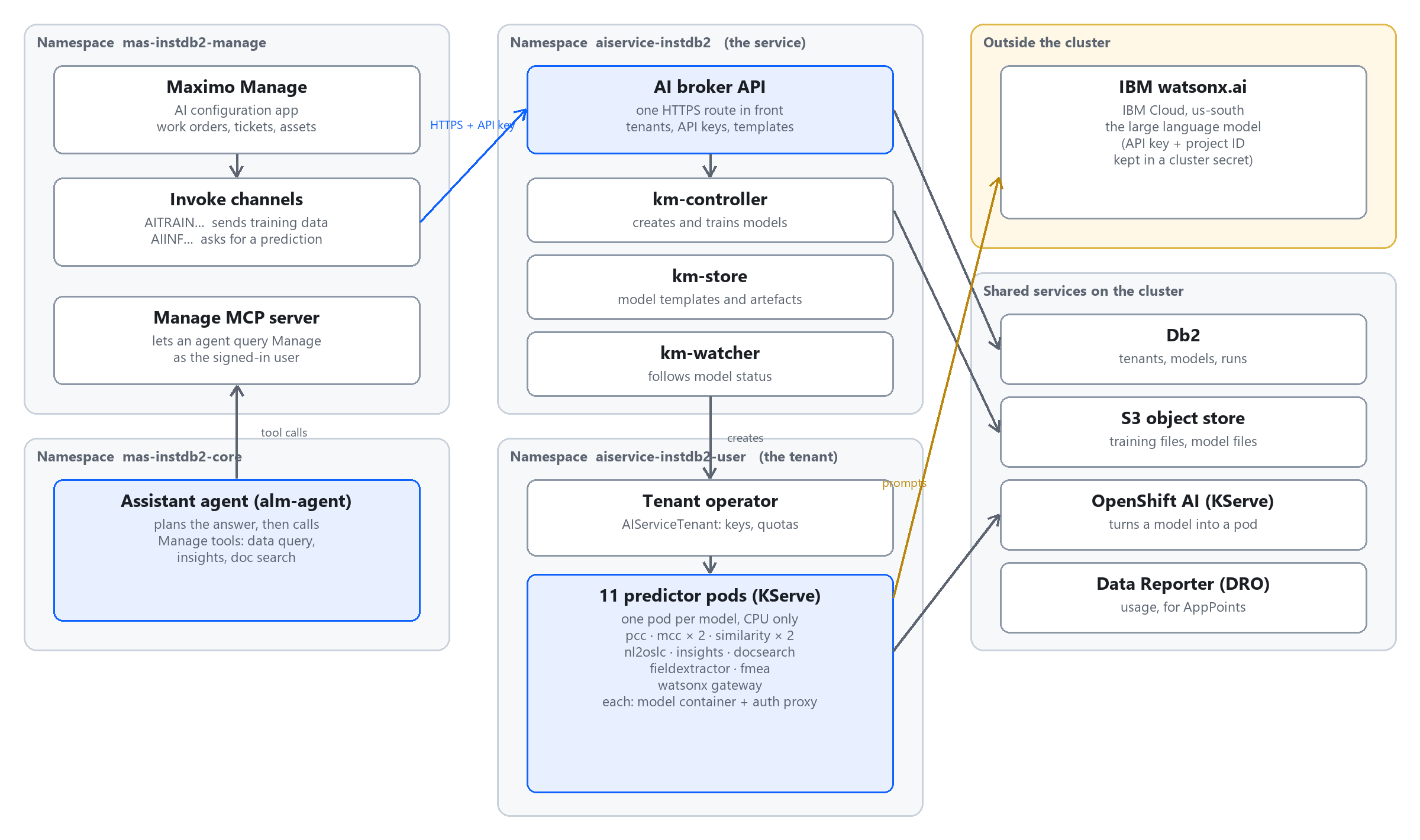
Read it from left to right.
| Piece | Where | What it does |
|---|---|---|
| Manage | mas-instdb2-manage | Holds the AI configurations. Sends training data and prediction requests through invoke channels. |
| AI broker API | aiservice-instdb2 | The front door: one HTTPS route. Knows the tenants and their API keys, lists the templates, forwards requests. |
| km-controller, km-store, km-watcher | aiservice-instdb2 | The model manager ("km"): creates and trains models, stores templates and model files, follows their status. |
| Tenant operator | aiservice-instdb2-user | Looks after one tenant: its keys, its quota, its models. A tenant is one customer of the service, here our MAS instance. |
| Predictor pods | aiservice-instdb2-user | One pod per model. This is where a prediction is computed. |
| OpenShift AI (KServe) | cluster-wide | The standard that turns "a model" into "a pod that answers HTTP". Each model is an InferenceService. |
| Db2 and an S3 object store | shared | Db2 keeps the registry of tenants, models and runs. The object store keeps the training files and the model files. |
| IBM watsonx.ai | IBM Cloud | The large language model. AI Service holds an API key and a project ID for it in a secret. |
| Data Reporter (DRO) | shared | Reports usage, for licensing in AppPoints. |
| Assistant agent and Manage MCP server | mas-instdb2-core, Manage | The newer, "agentic" assistant: an agent plans how to answer, then calls tools that Manage exposes (data query, insights, document search). |
Think of AI Service as an external system that happens to live on the same cluster. Manage integrates with it the way it integrates with anything: an end point, a key, and invocation channels. That is why it has its own namespaces, its own version (9.2.2 here, next to Manage 9.2.3) and its own upgrade path.
Part 3On OpenShift: namespaces, pods and sizing
This is what oc get pods shows in the two AI Service namespaces of our cluster.
NAMESPACE aiservice-instdb2            (the service)
  ibm-aiservice-operator-…             1/1 Running
  instdb2-aibroker-api-…               1/1 Running     the front door
  instdb2-km-controller-…              1/1 Running     model manager
  instdb2-km-store-…                   1/1 Running
  instdb2-km-watcher-…                 1/1 Running
  ibm-truststore-mgr-…                 1/1 Running

NAMESPACE aiservice-instdb2-user       (the tenant)
  ibm-aiservice-tenant-operator-…      1/1 Running
  kmai1899753a0ba9711f-predictor-…     2/2 Running     problem code (pcc)
  kmai1fe613fd0ba8c11f-predictor-…     2/2 Running     assistant (nl2oslc)
  kmai11e421fb0ba8611f-predictor-…     2/2 Running     work order similarity
  kmai1170a6fe0ba8611f-predictor-…     2/2 Running     ticket similarity
  kmai1f958f320ba8c11f-predictor-…     2/2 Running     insights
  kmai1c8eb99a0ba8b11f-predictor-…     2/2 Running     document search
  kmai1c7d9db80ba8b11f-predictor-…     2/2 Running     lease field extractor
  kmai193828120ba8b11f-predictor-…     2/2 Running     FMEA
  kmai1dd3f2600ba9611f-predictor-…     2/2 Running     incident group (mcc)
  kmai1d8d5d870ba9611f-predictor-…     2/2 Running     incident type (mcc)
  kmai1almwatsonx-…-predictor-…        2/2 Running     gateway to watsonx.ai
Two things to notice. The pod name starts with the Model ID you see in Manage, so you can go from a
configuration to its pod in one step. And every predictor shows 2/2: the model container, plus a small
proxy container that checks who is calling.
How much does it take?
| Model | Predictor image | CPU requested | Memory requested / limit | Memory used, idle |
|---|---|---|---|---|
| Assistant | maximo-nl2oslc-predictor 1.4.2 | 8 | 12 Gi / 12 Gi | 2.6 Gi |
| Document search | maximo-docsearch-predictor 1.0.5 | 2 | 8 Gi / 12 Gi | 1.1 Gi |
| FMEA | maximo-fmea-predictor 1.3.2 | 2 | 8 Gi / 16 Gi | 0.2 Gi |
| Insights | maximo-insights-predictor 1.3.2 | 2 | 4 Gi / 12 Gi | 0.2 Gi |
| Problem code | maximo-pcc-predictor 1.8.2 | 1 | 4 Gi / 5 Gi | 0.8 Gi |
| Incident group, incident type | maximo-mcc-predictor 1.7.1 (two pods) | 1 each | 4 Gi / 5 Gi each | 0.8 Gi each |
| Lease field extractor | maximo-fieldextractor-predictor 1.0.2 | 1 | 4 Gi / 20 Gi | 0.7 Gi |
| Work order and ticket similarity | maximo-similarity-predictor 1.1.1 (two pods) | 1 each | 2 Gi each | 0.6 Gi each |
| watsonx gateway | maximo-watsonx-predictor 1.0.2 | 0.5 | 1 Gi / 2 Gi | 0.2 Gi |
Reserved. CPU: 8 + 2 + 2 + 2 + 1 + 1 + 1 + 1 + 1 + 1 + 0.5 = 20.5 cores. Memory: 12 + 8 + 8 + 4 + 4 + 4 + 4 + 4 + 2 + 2 + 1 = 53 Gi.
Actually used while idle: about 8.3 Gi of memory and a few thousandths of a core per pod.
The cluster must reserve 20 cores and 53 Gi for these eleven models even though they sit idle most of the day, because a request is a reservation. On our cluster that is two thirds of one 32-core worker. The assistant alone is 8 cores and 12 Gi.
Every active configuration costs a pod. Ten configurations you do not use are ten pods you pay for. And none of these pods uses a GPU: our workers have none. The heavy language model runs at IBM, on watsonx.ai, not here.
Part 4The AI configuration application
In Manage, open the AI configuration application (search for it in the navigation). This one screen is the administrator's view of everything above.
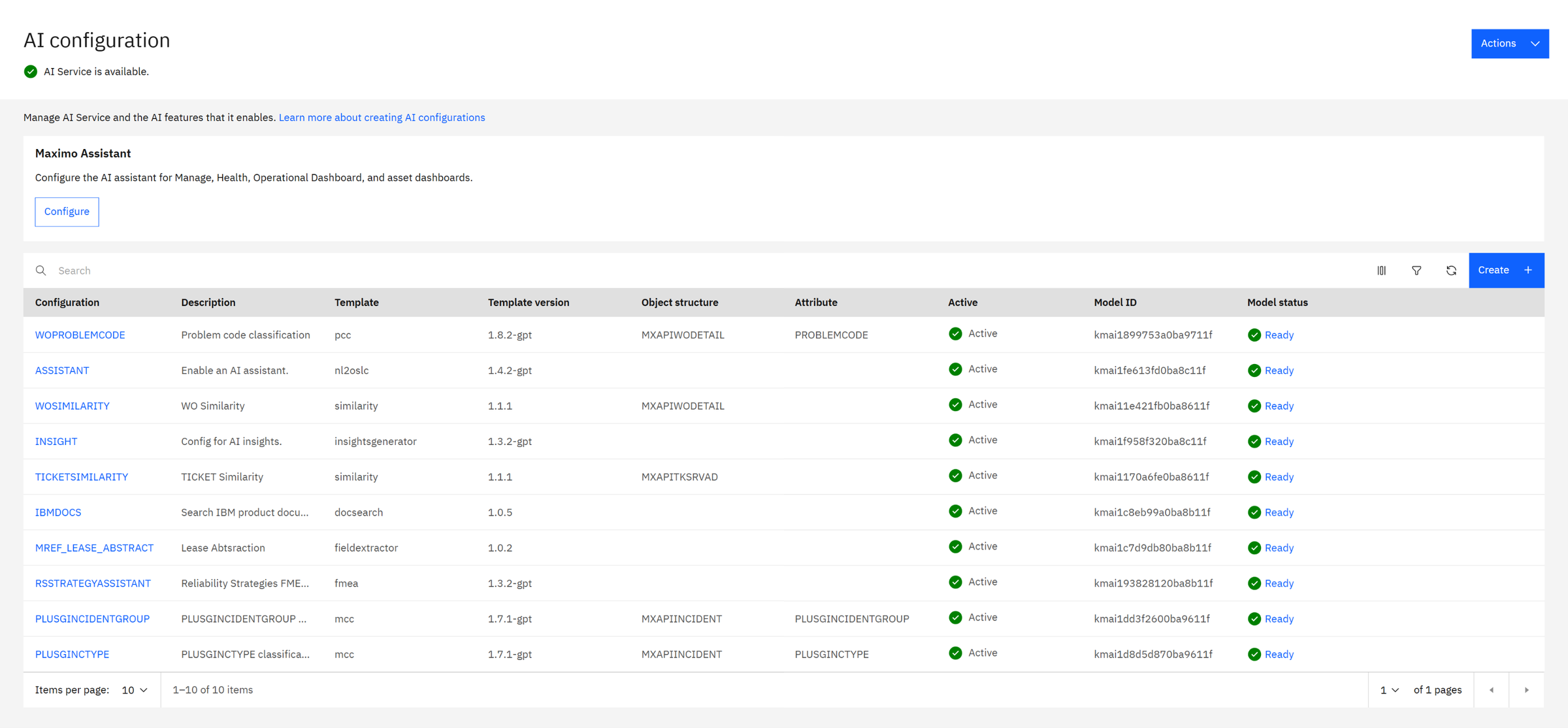
| Column | What it tells you |
|---|---|
| Configuration | Your name for it. IBM's own ones have fixed names that the applications look for. |
| Template, Template version | The kind of model, and its version. -gpt marks the versions that use the language model. |
| Object structure, Attribute | For templates that learn from records: which records, and which field they predict. |
| Active | Whether Manage uses it. Only an inactive configuration can be edited. |
| Model ID, Model status | The model behind it, and whether it is ready to answer. |
The Actions menu at the top has the three service-level checks.
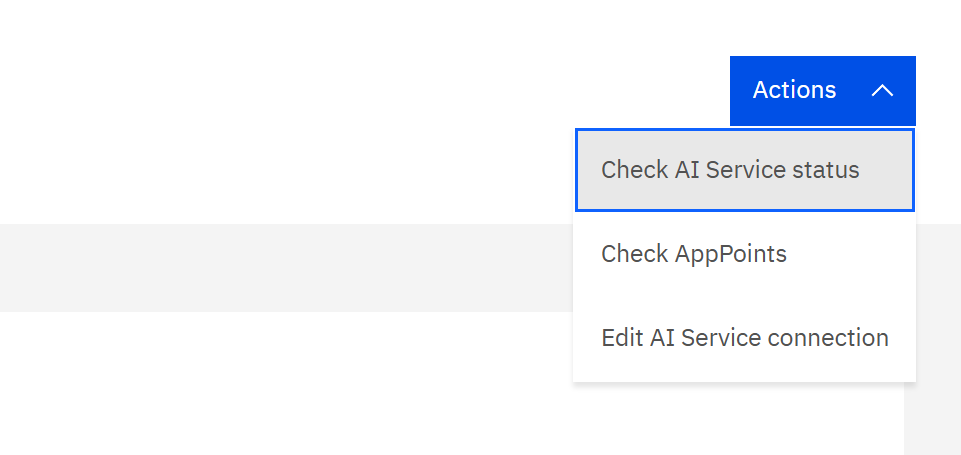
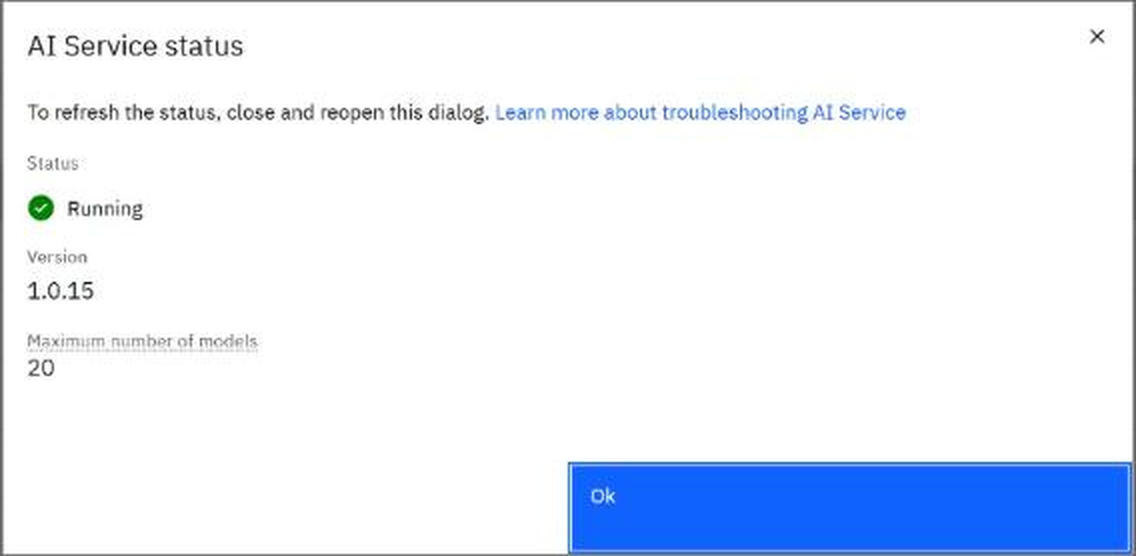
- Check AI Service status calls the broker. "Maximum number of models: 20" is the tenant's quota: we use 11.
- Check AppPoints shows what the AI features consume from the licence.
- Edit AI Service connection is where the URL, tenant and API key live. Change it only when the service moves.
Part 5The ten configurations
| Configuration | Template | What it does for the user | Learns from your data? |
|---|---|---|---|
| WOPROBLEMCODE | pcc 1.8.2-gpt | Suggests the problem code of a work order from its description. | Yes: past work orders |
| PLUSGINCIDENTGROUP, PLUSGINCTYPE | mcc 1.7.1-gpt | Suggests the group and the type of an HSE incident. Same idea as above, for other fields. | Yes: past incidents |
| WOSIMILARITY | similarity 1.1.1 | Finds past work orders that look like this one. | Yes: indexes work orders |
| TICKETSIMILARITY | similarity 1.1.1 | The same for service requests and tickets. | Yes: indexes tickets |
| ASSISTANT | nl2oslc 1.4.2-gpt | The Maximo Assistant: turns a question into a query on Manage data. | No training; uses the language model |
| INSIGHT | insightsgenerator 1.3.2-gpt | Writes the condition summary, insights and recommendations of an asset. | No training; uses the language model |
| IBMDOCS | docsearch 1.0.5 | Answers "how do I…" questions from IBM's product documentation. | No |
| RSSTRATEGYASSISTANT | fmea 1.3.2-gpt | Drafts failure modes and effects (FMEA) for Reliability Strategies. | No training; uses the language model |
| MREF_LEASE_ABSTRACT | fieldextractor 1.0.2 | Reads a lease document and extracts its fields, for Maximo Real Estate and Facilities. | No |
"Learns from your data" matters twice. Those configurations are only as good as your history, and they must be re-trained as the history grows. The others work on day one, but need watsonx.ai to be reachable.
The applications look for these exact names: the Assistant looks for ASSISTANT, the insights for INSIGHT. A configuration with a different name is a model nobody calls.
Part 6Example 1: one configuration opened up
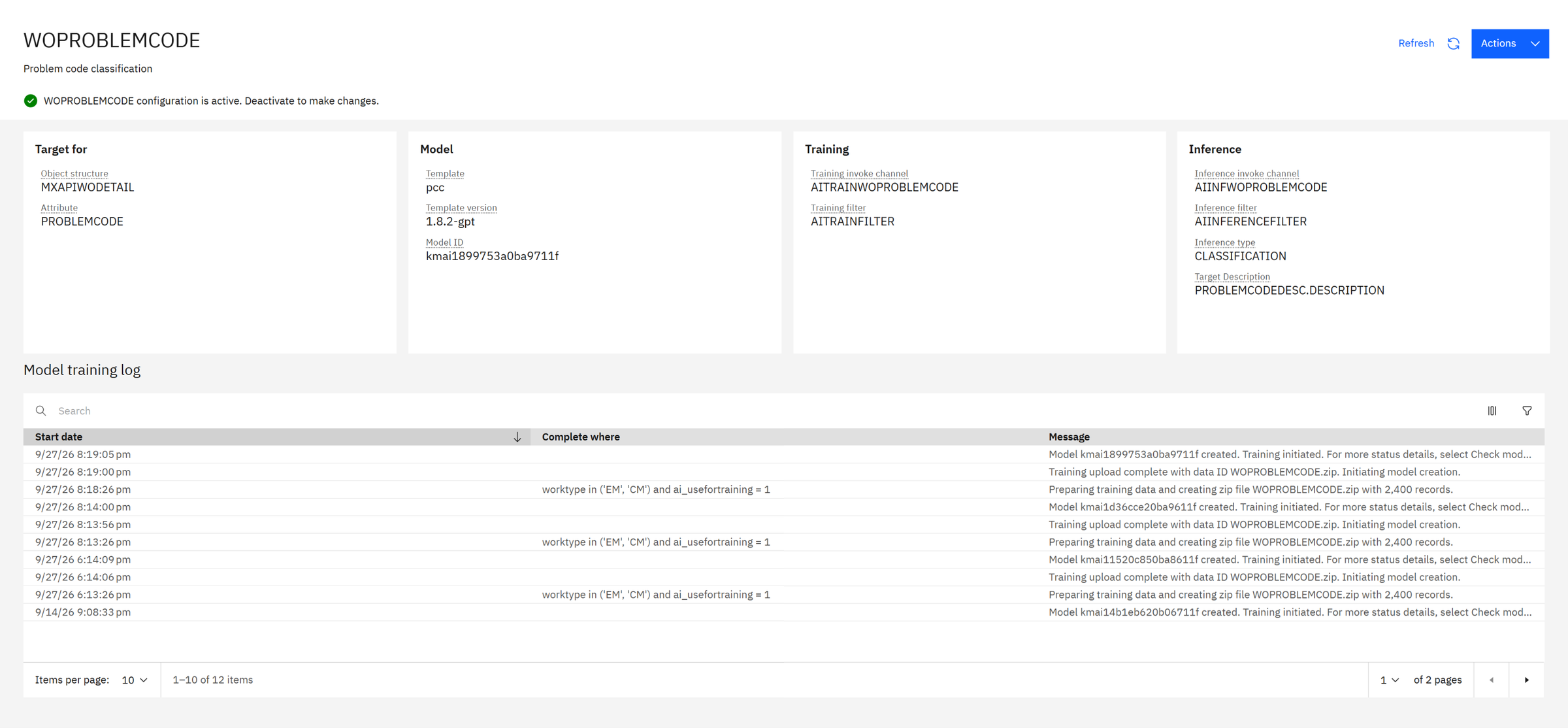
Click WOPROBLEMCODE. The four cards read like a sentence: for this field, with this model, trained like this, asked like this.
| Card | On our system | Meaning |
|---|---|---|
| Target for | MXAPIWODETAIL · PROBLEMCODE | The model predicts the problem code of work orders. |
| Model | pcc 1.8.2-gpt · kmai1899753a0ba9711f | The template and the current model. |
| Training | channel AITRAINWOPROBLEMCODE · filter AITRAINFILTER | How the training data leaves Manage, and which records are chosen. |
| Inference | channel AIINFWOPROBLEMCODE · type CLASSIFICATION · target description PROBLEMCODEDESC.DESCRIPTION | How a prediction is asked for, and that the answer is one class out of a list, shown with its description. |
What it learned from
The training log gives the filter and the volume: worktype in ('EM', 'CM') and ai_usefortraining = 1, and
"creating zip file WOPROBLEMCODE.zip with 2,400 records". In words: emergency and corrective work orders that
someone flagged as good examples. A few of them:
| Work order description (the input) | Problem code (the answer to learn) |
|---|---|
| Ground connection has a loose terminal near the compressor | ELEC |
| Power supply unit has no power at startup | ELEC |
| Sprinkler line drips constantly on second floor | PLUMB |
| Network switch config fails to sync data for shift reports | SOFT |
| Cutting station scrap rate increased after changeover | PROD |
| Assembly cell output below target for batch 4471 | PROD |
The 2,400 records are spread over six codes: ELEC, MECH, PLUMB, PROD, SAFETY and SOFT, 400 each.
Is the model any good?
On the configuration, Actions › Check model status:
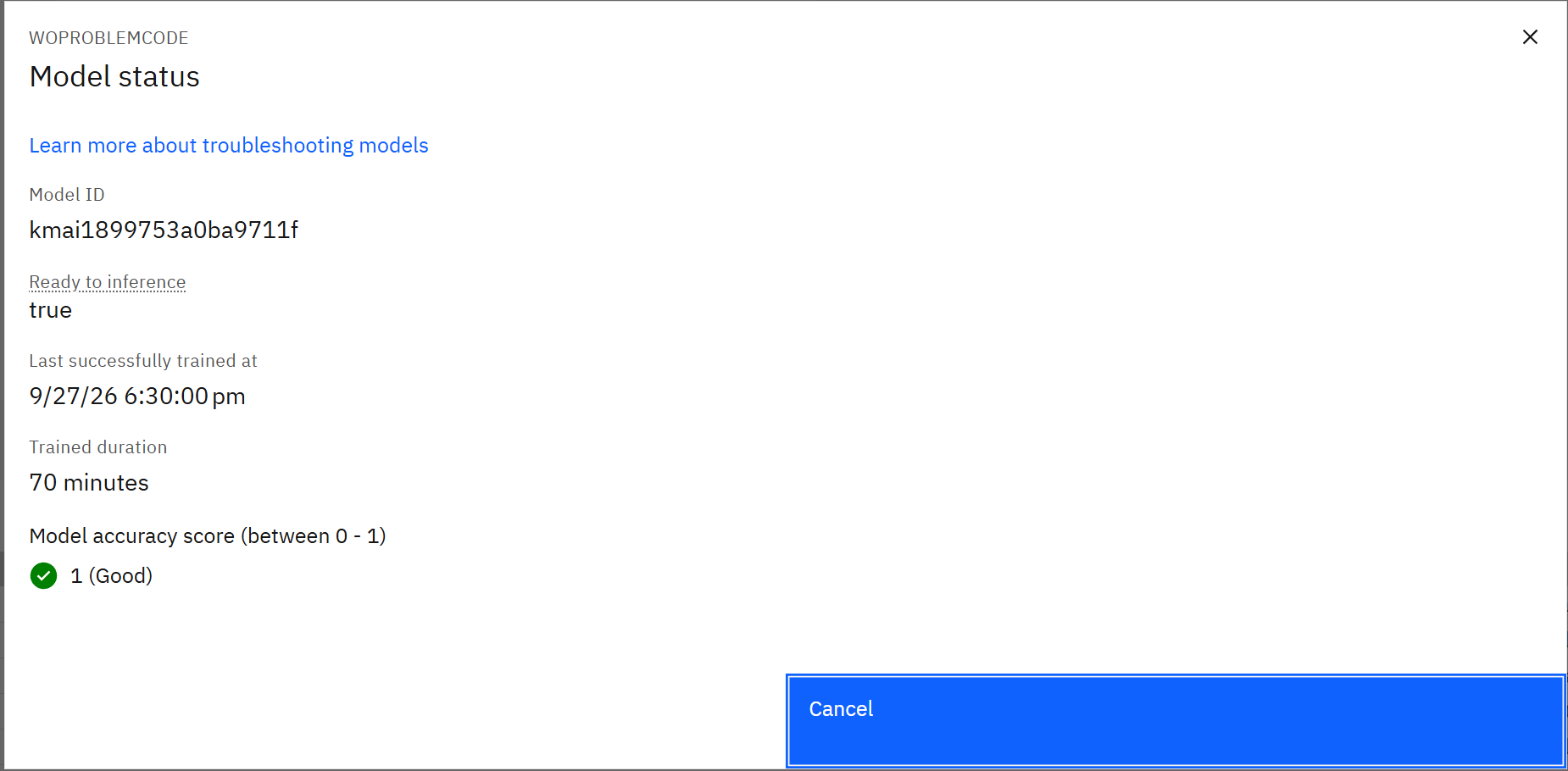
A perfect score means the model never made a mistake on the test examples. That happens with demo data like ours: exactly 400 tidy examples per code, written to be distinguishable. Real work orders say "pump broken again" and are coded by tired people. Expect less on your data, and be suspicious if you get 1: it often means the answer leaked into the description, or the test set is too easy.
And before training, Actions › Check data requirement tells you whether there is enough data at all:
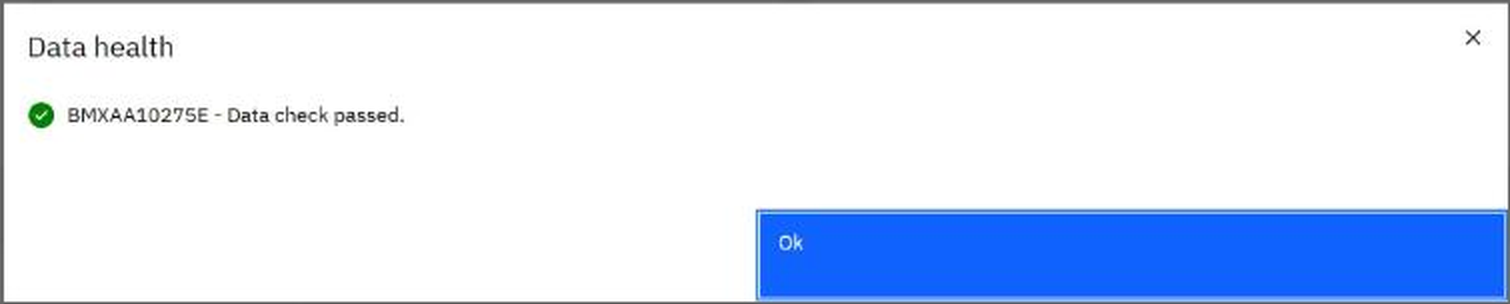
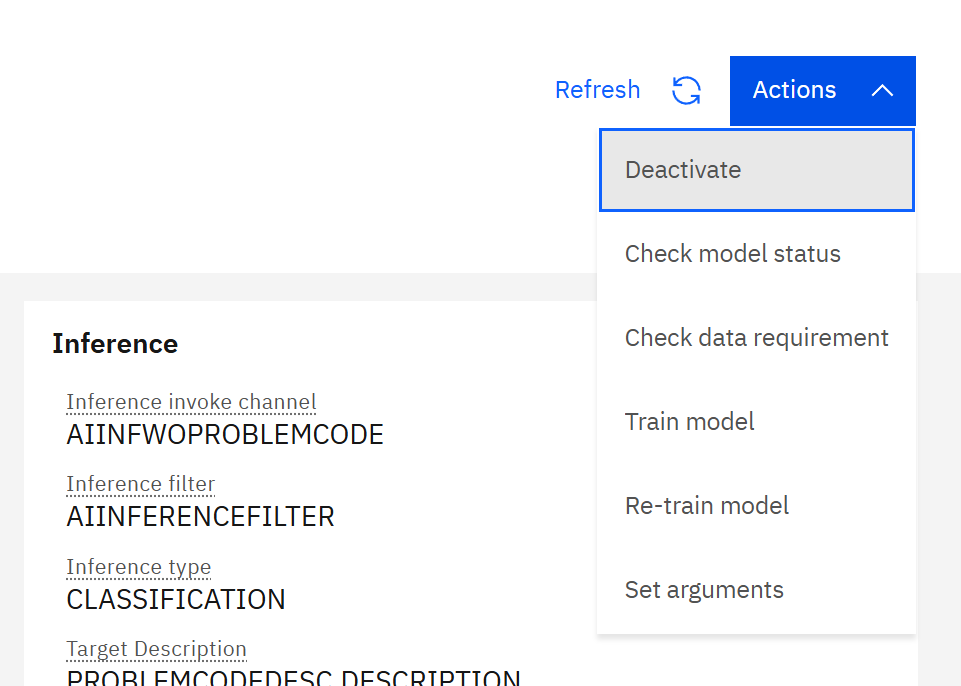
The quality of this feature is decided long before AI: by how consistently problem codes were entered. If half your
corrective work orders have no problem code, or always the same one, the model learns exactly that. The
ai_usefortraining flag exists so you can train on the records you trust.
Part 7Example 2: asking the Maximo Assistant
The assistant icon is in the top bar of every Manage application. We typed a question as a planner would say it:
Show me the open corrective work orders with priority 1
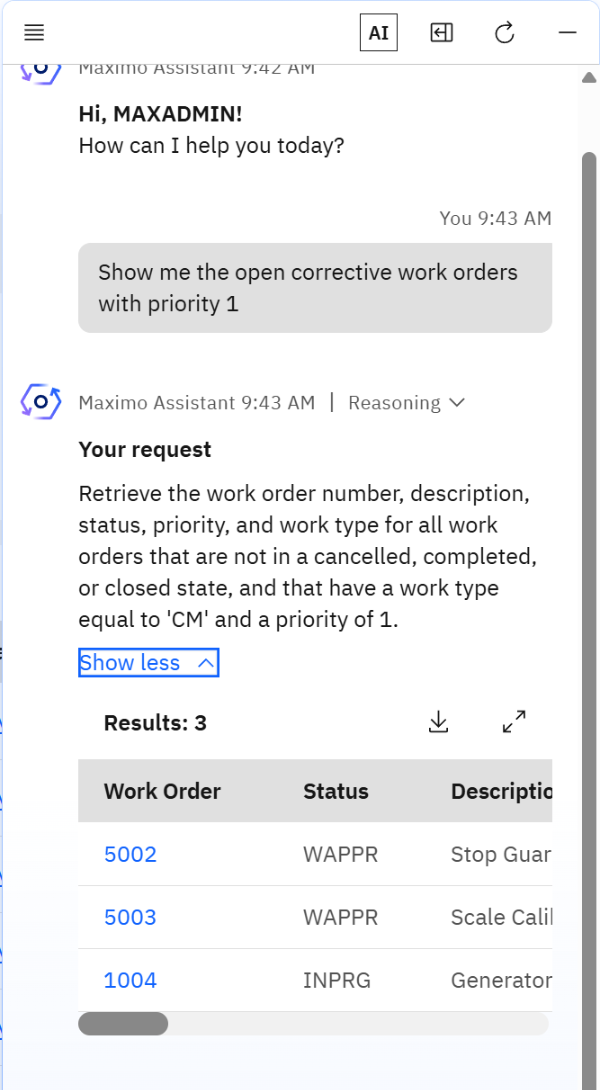
Three things happen, and the panel shows all three:
- Reasoning. While it works, the panel lists its steps: analysing the request, planning, data retrieval.
- "Your request". The assistant writes back what it understood, in precise terms: "Retrieve the work order number, description, status, priority, and work type for all work orders that are not in a cancelled, completed, or closed state, and that have a work type equal to 'CM' and a priority of 1."
- Results. A real table from Manage: work orders 5002 (Stop Guard on Shipping Dock), 5003 (Scale Calibration on Dock Mis-reading) and 1004 (Generator Overhaul), with links to the records, a download button and an expand button.
The language model does not answer from memory. It translates your sentence into a query, and Manage runs the query with your security. So the numbers are real, but the translation can be wrong. "Open" became "not cancelled, completed or closed", and "corrective" became work type CM. If your site calls corrective work something else, this is where you would see it.
It took about a minute on our system. The template is called nl2oslc: natural language to OSLC, the query
language of the Manage API.
This is the QBE filter row, written for you. The result is the same as typing =CM in Work Type,
=1 in Priority and a status filter in the Work Order Tracking list, and it is limited by the same security
groups and sites.
Part 8Example 3: asset insights
In Maximo Health, an asset page has an Insights panel. It is the INSIGHT configuration at work.
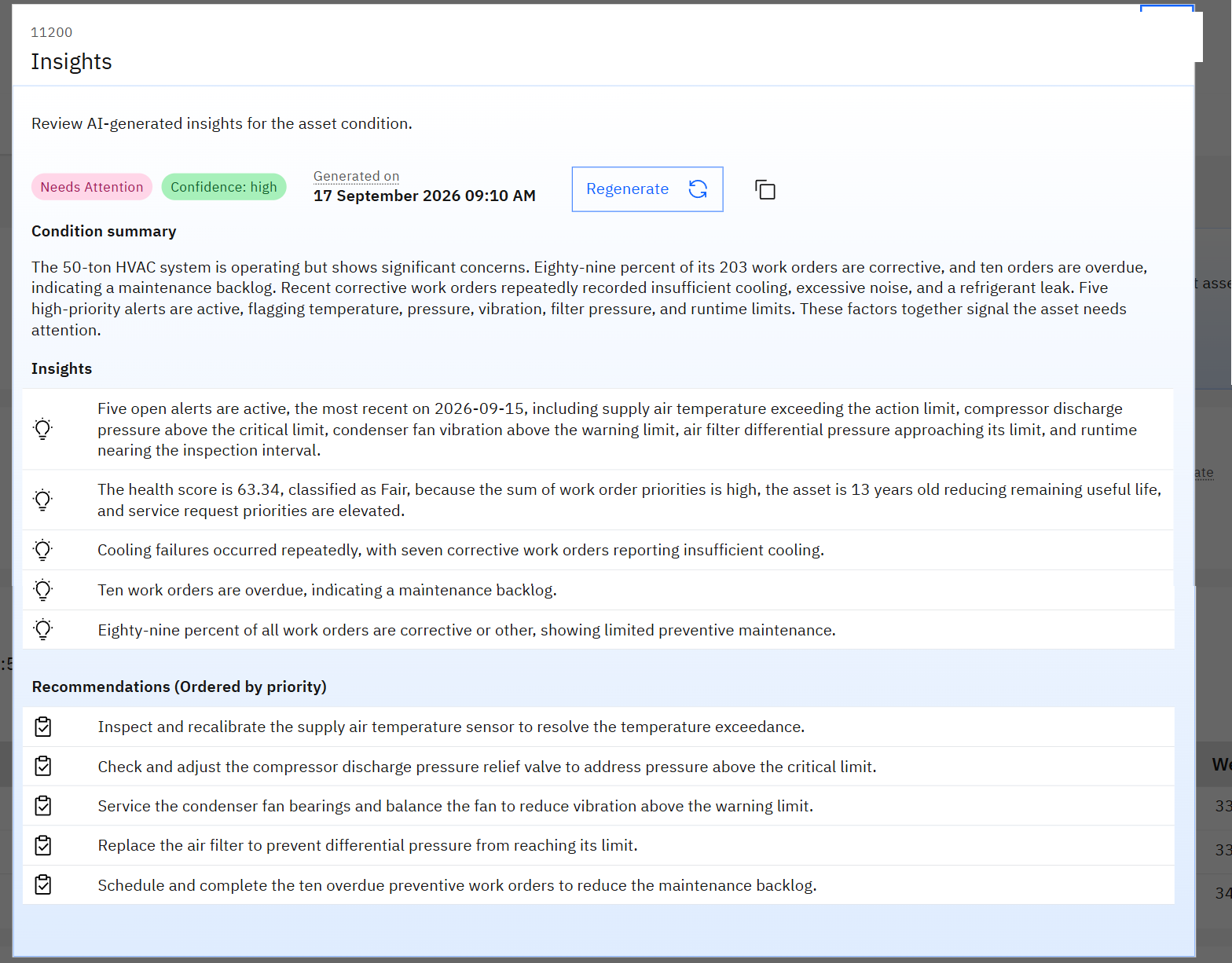
Read what it is made of. Every statement is a fact Manage already had: 203 work orders of which 89% corrective, ten overdue, five open alerts, a health score of 63.34, an asset 13 years old. The language model did not discover anything. It read the record the way an experienced engineer would, and wrote the paragraph that engineer would write.
- The text is stored with the date it was generated. Opening the page does not call the model again; Regenerate does.
- Because it is stored, old insights still display when the model is unreachable. Only generating new ones fails.
- The recommendations are suggestions. Nothing is created from them unless a person decides so.
Part 9The life of a model
| Step | Where | What happens |
|---|---|---|
| 1. Create | Create button | Choose a template and version, the object structure and attribute, the training filter. |
| 2. Check data requirement | Actions | Is there enough data, and enough per class? |
| 3. Train model | Actions | Manage zips the records and uploads them; the model manager trains and starts a predictor pod. Ours took 70 minutes for 2,400 records. |
| 4. Check model status | Actions | Ready to inference, and the accuracy score. |
| 5. Activate | Actions | The applications start using it. |
| 6. Re-train | Actions, or on a schedule | A new model is trained on newer data and replaces the old one. |
The training log of WOPROBLEMCODE shows step 6 in practice: four different model IDs in two weeks
(kmai14b1…, kmai1152…, kmai1d36…, kmai1899…). Each training creates a
new model with a new ID, and so a new pod name on OpenShift. Do not hard-code a model ID anywhere.
Part 10Checks and troubleshooting
Go from the outside in: is the service there, is the model ready, is the language model reachable.
| What you see | Likely cause | Where to look |
|---|---|---|
| "AI Service is not available" on the AI configuration page | The connection: URL, tenant or key. | Actions › Check AI Service status; then the aibroker-api pod. |
BMXAA1477E, with "PKIX path building failed" | Manage does not trust the AI Service certificate. | The AI Service CA must be in Manage's truststore; after it is added, allow several minutes for it to reload. |
BMXAA1482E … Internal Server Error | The broker itself failed, usually because watsonx.ai refused the API key. | The watsonx key and project in the AI Service secret; a key that IBM Cloud has disabled looks exactly like this. |
BMXBH0159E "An error occurred while generating insights" | Same cause: the language model cannot be reached. | Old insights still show; fix the key, then Regenerate. |
| Model status is not Ready | The predictor pod is not running. | oc get pods -n aiservice-<instance>-user: find the pod that starts with the Model ID. |
| Predictor pod Pending | Not enough CPU or memory left to honour its request. | Part 3: the assistant alone asks for 8 cores. |
| Training fails at upload | The object store is unreachable. | The S3 configuration of AI Service. |
| Suggestions are poor | The training data. | The training filter, and how the field was filled in the past. |
We lived this one. An API key that IBM Cloud no longer accepted was still sitting in the cluster secret. Everything
looked installed and green, the classic models answered, and every feature that needs the language model failed with a
generic server error: the assistant, the insights, the FMEA builder. The fix was a new key from IBM Cloud, put into the
secret in both namespaces, and a restart of the broker and the predictors. If several -gpt features fail at
once, check the key first.
On our cluster a pod in the minio namespace cannot pull its image, and AI Service is perfectly healthy.
The object store was moved to OpenShift Data Foundation, and the old MinIO was left behind. A red pod is only a problem
if something still points at it: check what the AI Service S3 configuration really uses before you chase it.
oc get pods -n aiservice-<instance>-user | grep <Model ID> and
oc adm top pods -n aiservice-<instance>-user. You have just linked a line in Manage to a pod, and seen
what it costs.Check yourself
1. Where does the large language model run?
On IBM watsonx.ai, outside the cluster. AI Service calls it with an API key and a project ID.
2. You activate five more configurations. What changes on OpenShift?
Five more predictor pods in the tenant namespace, each reserving its own CPU and memory.
3. The assistant returns the wrong work orders. Where do you look first?
At "Your request" in the answer: it shows how the question was translated into a query.
4. The assistant and the insights both fail, but problem-code suggestions still work. What do they have in common?
The first two need the language model. Check the watsonx.ai key.
5. A model reports an accuracy of 1. Good news?
Be careful. It usually means the test data was easy or the answer leaked into the input. Check with real records.
6. Why does the Model ID of a configuration change?
Each training or re-training creates a new model, with a new ID and a new pod.
Glossary
- AI Service
- The MAS component that hosts models and serves predictions to the applications.
- AI broker
- Its API: the single address Manage talks to.
- Tenant
- One customer of an AI Service; here, one MAS instance. It has its own namespace, keys and quota.
- Template
- A kind of model shipped by IBM: pcc, mcc, similarity, nl2oslc, insightsgenerator, docsearch, fmea, fieldextractor.
- AI configuration
- A template applied to your data in Manage.
- Model ID
- The identifier of one trained model, also the start of its pod name.
- Predictor
- The pod that computes predictions for one model.
- KServe / InferenceService
- The OpenShift AI standard that runs a model as a service.
- Training / inference
- Teaching a model from many records / asking it about one.
- Classification
- Choosing one value out of a fixed list, such as a problem code.
- watsonx.ai
- IBM's cloud service for large language models.
- nl2oslc
- "Natural language to OSLC": the template behind the Assistant.
- MCP
- Model Context Protocol: a standard way for an AI agent to call tools, here the tools that Manage exposes.
- AppPoints
- The MAS licence unit; AI features consume them.
Planning AI Service, or stuck on a model that will not train? Send me a message and we can go through it on a live system.
Screens and figures: IBM Maximo Application Suite 9.2 with AI Service 9.2.2 on Red Hat OpenShift, demo data. Pod names, sizes and timings are those of one demo cluster and will differ on yours.