IBM Maximo Application Suite · Manage · AI Service · Model Context Protocol
Give the Maximo Assistant a tool of your own: an automation script, published through MCP, that runs SQL queries
I pasted a SQL statement into the Maximo Assistant and asked it to run it. It answered, politely, that it cannot run commands. That is the right answer out of the box: the Assistant only uses the tools it has been given. This guide adds one. An automation script in Manage becomes a tool on Manage's MCP server, and the Assistant's agent calls it. The example tool runs a read-only SQL query and returns the rows. Everything below was built and tested on a running system.
- How Manage 9.2 turns an automation script into a tool on its Model Context Protocol (MCP) server.
- The three records that make a script a tool, and how the tool's inputs and output are defined.
- A complete example: a read-only SQL query tool, with its guard rails.
- How to check the tool from an MCP client, and what the Assistant's agent needs before it will use it.
- What a tool like this bypasses, and why it belongs in a lab or behind an administrator-only check.
Reading time: about 12 minutes.
The idea in one picture
The Assistant does not talk to the database, or even to Manage's business objects, directly. It hands the request to an agent. The agent plans, picks a tool, and calls it through Manage's MCP server. The MCP server turns the call into an ordinary Manage API request, and Manage runs whatever sits behind that route. For a script tool, that is your script.
Manage can publish three kinds of tool of your own making: an object structure action, a workflow process, and an automation script. The script is the most flexible, because the tool does exactly what the script does.
What makes a script a tool
Three records, all in Manage:
| Record | What it gives the tool |
|---|---|
| The automation script, active | The behaviour. Its description becomes the tool's description, which is what the language model reads when it decides whether to use the tool. |
| One script variable per input | The input schema. A variable of type IN with a literal binding becomes one property of the tool's input; its literal data type becomes the JSON type (text, integer, number, boolean, date-time). |
| An MCP tool record for the script | The switch that publishes it, plus the hints an MCP client sees: a title, whether the tool is read-only, and whether it changes data. |
In the Automation Scripts application the third record is behind two actions in the More Actions list: Add/Modify MCP Tool and Delete MCP Tool. Without that record the script is just a script.
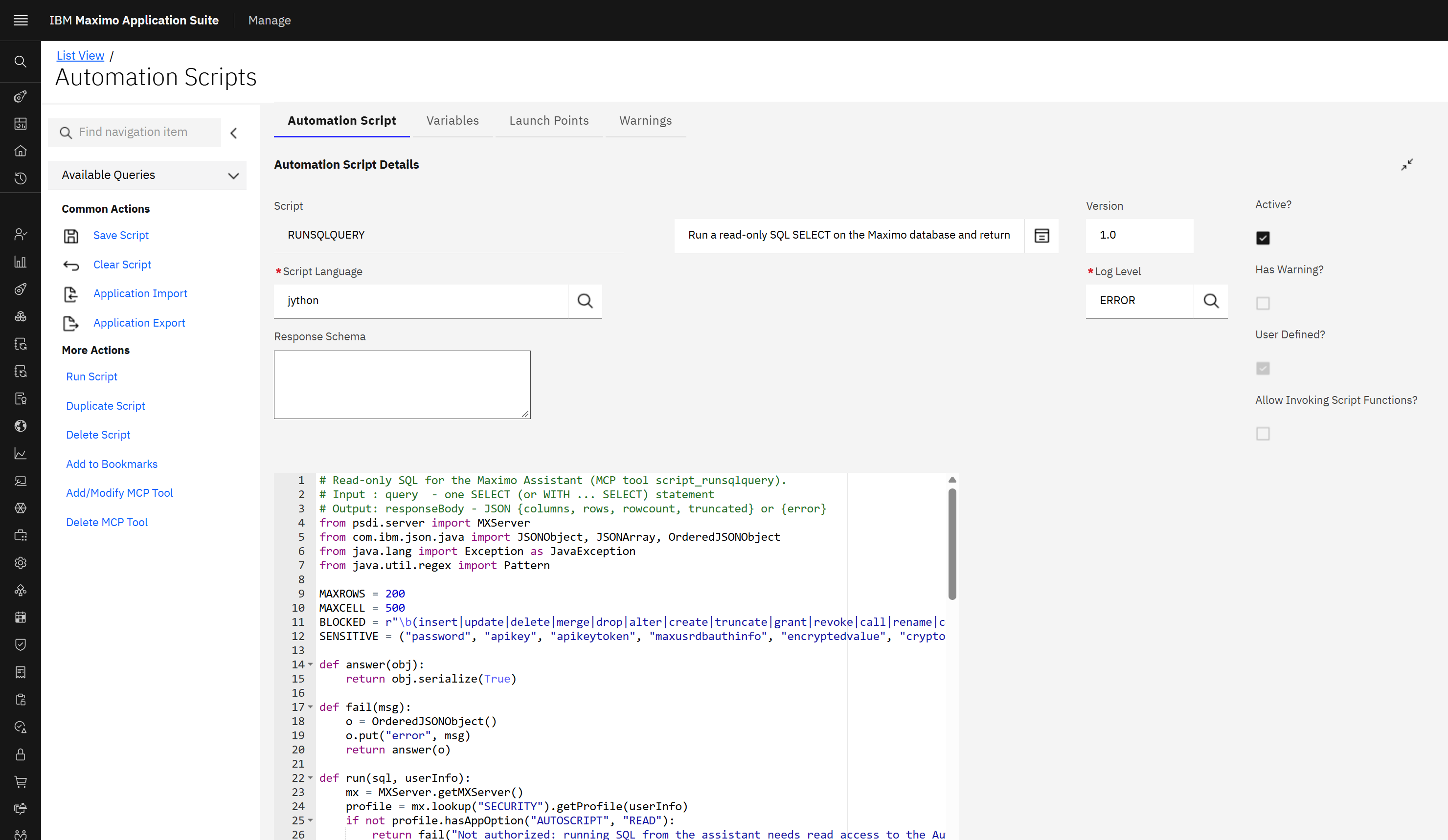
Inside the script, two things matter:
- Inputs arrive as variables. A variable called
queryis simplyqueryin the script. The caller's identity arrives asuserInfo. - The answer leaves through
responseBody. Set it to a string (JSON is the sensible choice) and that is what the tool returns.
Manage then exposes the script as an API route named after it, in lower case with a script_ prefix. A script
called RUNSQLQUERY becomes the route and the tool script_runsqlquery.
The example: a read-only SQL tool
The tool takes one input, the SQL text, and returns the rows as JSON. A tool that runs SQL deserves guard rails, so the script refuses more than it accepts:
- One statement only, and it must start with
SELECTorWITH. - No semicolons and no comments, so a second statement cannot ride along.
- No keyword that changes data or structure, anywhere in the text.
- No password, API key or encrypted-value columns.
- At most 200 rows, each value cut at 500 characters, with a 60-second query timeout.
- Only for users who can read the Automation Scripts application, which in practice means administrators.
# Read-only SQL for the Maximo Assistant (MCP tool script_runsqlquery).
# Input : query  - one SELECT (or WITH ... SELECT) statement
# Output: responseBody - JSON {columns, rows, rowcount, truncated} or {error}
from psdi.server import MXServer
from com.ibm.json.java import JSONObject, JSONArray, OrderedJSONObject
from java.lang import Exception as JavaException
from java.util.regex import Pattern

MAXROWS = 200
MAXCELL = 500
BLOCKED = r"\b(insert|update|delete|merge|drop|alter|create|truncate|grant|revoke|call|rename|comment|lock|refresh|reorg|runstats|export|import|load)\b"
SENSITIVE = ("password", "apikey", "apikeytoken", "maxusrdbauthinfo", "encryptedvalue", "cryptokey")

def answer(obj):
    return obj.serialize(True)

def fail(msg):
    o = OrderedJSONObject()
    o.put("error", msg)
    return answer(o)

def run(sql, userInfo):
    mx = MXServer.getMXServer()
    profile = mx.lookup("SECURITY").getProfile(userInfo)
    if not profile.hasAppOption("AUTOSCRIPT", "READ"):
        return fail("Not authorized: running SQL from the assistant needs read access to the Automation Scripts application.")
    if sql is None:
        sql = ""
    sql = (u"%s" % sql).strip()
    while sql.endswith(";"):
        sql = sql[:-1].strip()
    low = sql.lower()
    if low == "":
        return fail("No SQL statement was given.")
    if not (low.startswith("select") or low.startswith("with")):
        return fail("Only SELECT statements can be run.")
    if ";" in sql or "--" in sql or "/*" in sql:
        return fail("Only one statement without comments can be run.")
    if Pattern.compile(BLOCKED).matcher(low).find():
        return fail("The statement contains a keyword that changes data or structure; only read-only SELECT is allowed.")
    for word in SENSITIVE:
        if word in low:
            return fail("The statement touches credential data (" + word + "), which this tool does not return.")
    key = userInfo.getConnectionKey()
    con = mx.getDBManager().getConnection(key)
    st = None
    rs = None
    try:
        st = con.createStatement()
        st.setMaxRows(MAXROWS + 1)
        st.setQueryTimeout(60)
        rs = st.executeQuery(sql)
        md = rs.getMetaData()
        n = md.getColumnCount()
        names = []
        cols = JSONArray()
        for i in range(1, n + 1):
            nm = md.getColumnLabel(i)
            names.append(nm)
            cols.add(nm)
        rows = JSONArray()
        count = 0
        truncated = False
        while rs.next():
            if count >= MAXROWS:
                truncated = True
                break
            r = OrderedJSONObject()
            for i in range(n):
                v = rs.getString(i + 1)
                if v is not None and len(v) > MAXCELL:
                    v = v[:MAXCELL] + "..."
                r.put(names[i], v)
            rows.add(r)
            count = count + 1
        out = OrderedJSONObject()
        out.put("rowcount", count)
        out.put("truncated", truncated)
        out.put("columns", cols)
        out.put("rows", rows)
        if truncated:
            out.put("note", "Only the first " + str(MAXROWS) + " rows are returned. Add a filter or FETCH FIRST n ROWS ONLY.")
        return answer(out)
    except JavaException, e:
        return fail("SQL error: " + str(e.getMessage()))
    except Exception, e:
        return fail("Error: " + str(e))
    finally:
        try:
            if rs is not None:
                rs.close()
        except:
            pass
        try:
            if st is not None:
                st.close()
        except:
            pass
        mx.getDBManager().freeConnection(key)

responseBody = run(query, userInfo)No Python standard library. The Jython engine in Manage does not ship it: import re fails with
"No module named re". Use the Java classes instead, here java.util.regex.Pattern.
Catch Java exceptions by name. A SQL error is a Java exception, and a bare Python except Exception
does not catch it. Import java.lang.Exception and catch both.
Give the connection back. The script borrows the database connection of the user's session and must free it
in a finally block, or the connection pool slowly drains.
The three records as a database script
I delivered the tool as a Maximo database script (a DBC file), so that it can be reviewed, versioned and applied to another environment. These are its statements for Db2, with the script source left out:
insert into autoscript (autoscript, description, status, createddate, statusdate, changedate, changeby,
       autoscriptid, hasld, langcode, scriptlanguage, userdefined, loglevel, interface, active, aitool, version, source)
values ('RUNSQLQUERY', 'Run a read-only SQL SELECT on the Maximo database and return the rows (max 200).',
       'Active', current timestamp, current timestamp, current timestamp, 'MAXADMIN',
       autoscriptseq.nextval, 0, 'EN', 'jython', 1, 'ERROR', 0, 1, 1, '1.0', <script source>);

insert into autoscriptvars (autoscriptvarsid, autoscript, varname, varbindingtype, vartype, description,
       allowoverride, literaldatatype, accessflag)
values (autoscriptvarsseq.nextval, 'RUNSQLQUERY', 'query', 'LITERAL', 'IN',
       'The SQL SELECT statement to run, exactly as the user wrote it. One statement, no semicolon.', 1, 'ALN', 0);

insert into mcptool (name, type, mcpreadonly, title, queryapiasresp, userdefined, mcptoolid, mcpdml)
values ('RUNSQLQUERY', 'AUTOSCRIPT', 1, 'Run SQL query', 0, 1, mcptoolseq.nextval, 0);Line breaks. The database script runner collapses every run of white space, including inside a quoted string.
A Python script arrives as one line, does not compile, and Manage silently skips it at start-up. Build the source from
one string per line joined with CHR(10), and write indentation as SPACE(n).
Caches. A database script goes around the running server. Manage reads scripts and routes at start-up, and the MCP server reads Manage's tool list when it starts. After the script, restart the Manage server pods, then the MCP pod. I did not test creating the same records through the application; saving there goes through the server, so it should not need the restarts.
Check the tool from an MCP client
Any MCP client connected to Manage's MCP server now lists the tool. In essence, this is what the client sees:
{
  "name": "script_runsqlquery",
  "title": "Run SQL query",
  "description": "Run a read-only SQL SELECT on the Maximo database and return the rows (max 200).",
  "annotations": { "readOnlyHint": true, "destructiveHint": false, "toolType": "AUTOSCRIPT", "custom": true },
  "inputSchema": { "type": "object", "properties": { "query": { "type": "string" } } }
}
And these are real calls and answers from the test system. First a query that is allowed, then four that are not:
query : select wonum, description, status, siteid from maximo.workorder w
        where not exists (select 1 from maximo.wpmaterial m where m.wonum = w.wonum)
        fetch first 3 rows only
answer: {"rowcount":3,"truncated":false,"columns":["WONUM","DESCRIPTION","STATUS","SITEID"],
         "rows":[{"WONUM":"W102957_DT_US_1A999","DESCRIPTION":null,"STATUS":"CLOSE","SITEID":"DETROIT"}, ...]}

query : select count(*) as n from workorder
answer: {"rowcount":1,"truncated":false,"columns":["N"],"rows":[{"N":"67501"}]}

query : update workorder set description='x' where wonum='1'
answer: {"error":"Only SELECT statements can be run."}

query : select userid, password from maxuser
answer: {"error":"The statement touches credential data (password), which this tool does not return."}

query : select wonum from workorder; delete from workorder
answer: {"error":"Only one statement without comments can be run."}

query : select nosuchcol from workorder
answer: {"error":"SQL error: \"NOSUCHCOL\" is not valid in the context where it is used.. SQLCODE=-206, SQLSTATE=42703"}
Each call took four to five seconds on this cluster, almost all of it outside the database.
Let the Assistant use it
Publishing the tool is not quite enough for the Assistant. Its agent does not use every tool the MCP server lists: it
keeps only the tool types on an allow list. On Maximo Application Suite 9.2.7 that list holds the three AI
configuration tools (natural-language query, insights and documentation search). A script tool has the type
AUTOSCRIPT, so the agent drops it, and the Assistant keeps saying it cannot run commands.
On my lab system I added AUTOSCRIPT to the agent's allow list (the ALLOWED_TOOL_TYPES
environment variable of the agent deployment). After the agent restarted, its log showed the tool among the ones it
kept:
Filtered tools | original=18 | filtered=6 | tools=['alm_mcp__aicfg_ibmdocs', 'alm_mcp__aicfg_insight',
  'alm_mcp__aicfgasmd_assistant', 'alm_mcp__aicfgasmdtors_assistant', 'alm_mcp__script_runsqlquery',
'internal_mcp__textual_data_analyzer']The agent deployment is created and owned by the suite's operator. I found no documented option for the allow list, and the operator can put its own value back when it reconciles. Do this on a test system to learn how the pieces fit; for a real environment, ask IBM Support how custom tools are meant to be enabled for the Assistant in your version.
The tool itself needs no such change: it is on the MCP server for any MCP client that is allowed to connect.
The result
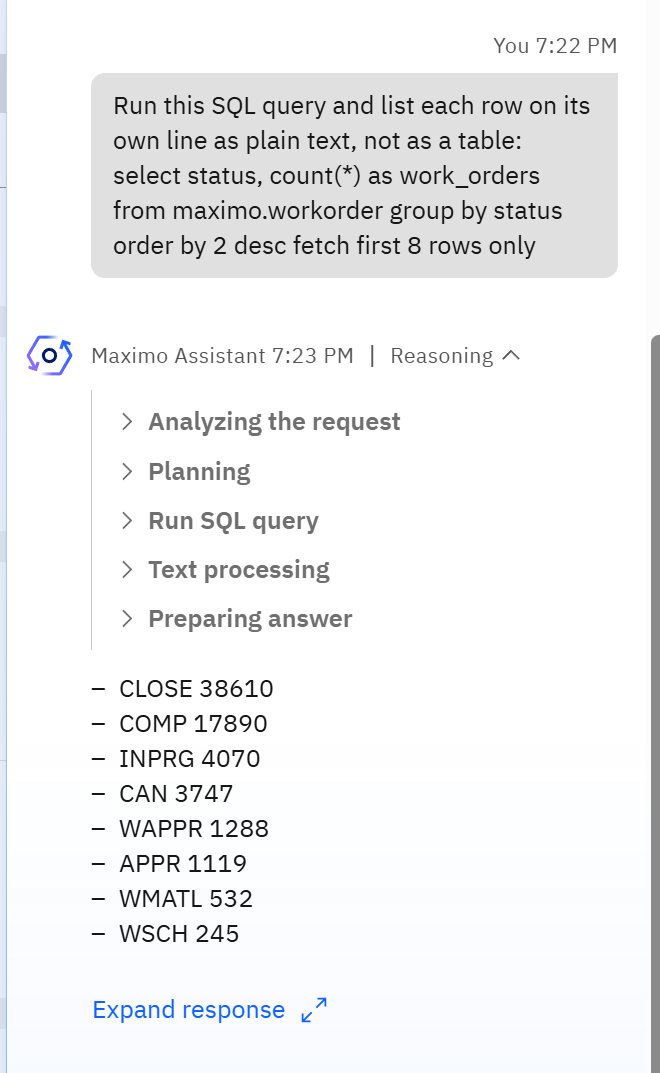
Back in the Assistant, I asked it to run a query. The reasoning steps show what happened: the agent analysed the request, planned, and ran a step named Run SQL query, which is the title of the MCP tool record. Then it wrote the answer from the rows the script returned.
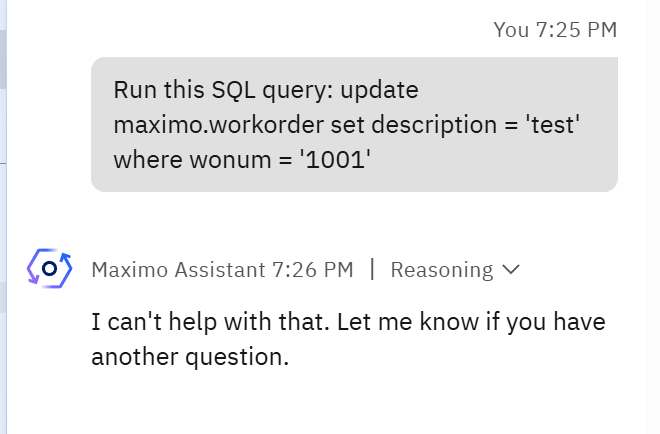
The language model adds a layer of its own. When I asked it to run an UPDATE, it did not call the tool at
all. Had it tried, the script would have refused, as the direct calls above show. Do not rely on the model for this:
the guard rails belong in the script.
A wording tip: the model decides from the tool's description, so say what you want. "Run this SQL query" followed by the statement was enough here.
What this tool goes around
Read this before building anything like it for real users.
- It bypasses Maximo's data security. SQL runs with the database user of the Manage server. Site and organization restrictions, data restrictions and conditional security do not apply: a user who can call the tool can read every row of every table. That is why the script checks for administrator-level access first.
- A keyword filter is not a security boundary. It stops accidents and obvious misuse. The real protection would be a separate read-only database user, which this example does not use.
- Rows go to the language model. Whatever the query returns is sent to the model so it can write the answer. Treat the result set as data leaving the database.
- A heavy query is still a heavy query. The row limit caps what comes back, not what the database has to do.
For everyday questions the Assistant already has a safer path: its natural-language query tool goes through Manage's object structures, so Maximo security applies. A script tool earns its place when you need something the object structures cannot express, or an action that is your own business logic. The SQL tool is the simplest example that shows every part of the mechanism.
The same pattern, other tools
Nothing above is specific to SQL. The pattern is: describe the tool in one clear sentence, declare each input as a
variable with a description, do the work under the caller's identity, and return JSON through
responseBody. A tool that returns the open work orders of an asset with their failure history, one that
checks a storeroom's stock against a job plan, or one that starts a specific escalation, are all the same three records
with a different script.
Checklist
| Step | Check |
|---|---|
| Script is active and compiles | The server log has no "script did not compile" line for it after start-up. |
| One variable per input, type IN, literal binding, with a description | The tool's input schema lists them. |
| MCP tool record exists for the script | The tool script_<name> appears in the MCP server's tool list. |
The script sets responseBody | A direct tool call returns your JSON. |
| The script checks who is calling | A user without the right gets your refusal, not data. |
| The agent is allowed to use the tool type | The agent's log lists the tool after filtering. |
Built and tested on IBM Maximo Application Suite 9.2.7 with Manage 9.2.4 and AI Service 9.2 on Red Hat OpenShift, Db2 12.1, demo data, October 2026. Tool names, timings and log lines are those of one demo cluster. How Manage publishes tools is described here as observed on that system; the IBM documentation prevails.