IBM Maximo Application Suite · Predict · A worked example, told as it happened
Maximo Predict, one full example: from a Jupyter notebook to a predicted failure date
Most Predict material stops at the slide that says "train a model in Watson Studio". This post does the whole exercise on a live system: load IBM's sample pumps, train the Predicted Failure Date model in a notebook, register it, and get scores into the database. It also reports the seven things that went wrong on the way, because those are what will cost you a day if nobody tells you.
- What Predict is made of, and where its data lives (it has its own schemas, not its own database).
- The three things IBM's notebooks need that the README does not say.
- Loading the sample data: assets, failure history, a device type and 296,857 sensor readings.
- Training, registering and scheduling the model, cell by cell.
- Reading the scores: in the notebook, in the database, and in Health and Predict.
- Four defects I hit after registration, how I confirmed each one, and what worked around them.
Reading time: about 15 minutes. System: MAS 9.2 (Manage, Monitor, Health, Predict 9.2.x) on OpenShift 4.21, Cloud Pak
for Data with Watson Studio and Watson Machine Learning, Db2. Library: pmlib 9.2.6.dev10800.
1. What Predict is, in one picture
Predict has almost no screen of its own. It is a small API server plus a Python library, and it borrows everything else from its neighbours.
| Piece | What it does in this example |
|---|---|
| Manage | Holds the five pumps, their installation dates and their failure history. |
| Monitor | Holds the sensor readings, and later runs the trained model on a schedule. |
| Watson Studio (Cloud Pak for Data) | Runs the Jupyter notebooks. This is where you train. |
| pmlib | IBM's Python library. It reads from Manage and Monitor, trains, and talks to the Predict API. |
| Predict API | Two pods. Keeps the list of registered models and hands credentials to the notebook. |
| Health and Predict | The application in Manage where a reliability engineer reads the result. |
2. Where Predict keeps its data
A fair question when you first see a table called MAS_INSTDB2_PREDICT.PMITENANT: does Predict have its own
database? On this system, no. It has its own schemas inside the same Db2 database that Manage and Monitor use.
Predict was bound to the suite's system JDBC configuration at install time, so it landed next to them.
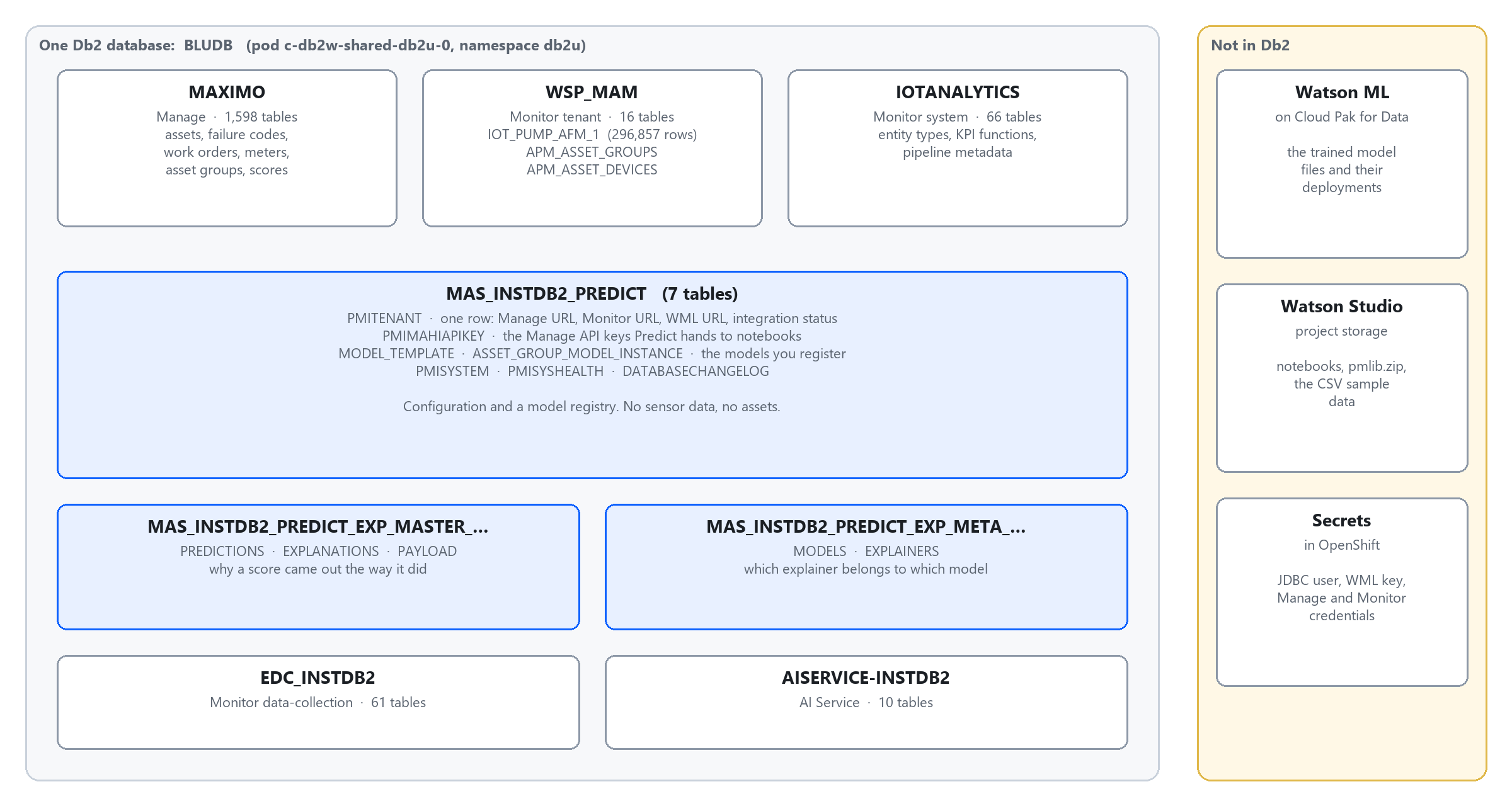
| Schema | Owner | What is in it |
|---|---|---|
MAS_<inst>_PREDICT | Predict | 7 tables. PMITENANT: one row with the Manage, Monitor and Watson ML addresses and an integration status. MODEL_TEMPLATE and ASSET_GROUP_MODEL_INSTANCE: the models you register. PMIMAHIAPIKEY: Manage API keys. |
MAS_<inst>_PREDICT_EXP_MASTER_…MAS_<inst>_PREDICT_EXP_META_… | Predict | Explainability: predictions, explanations, payloads, models, explainers. |
MAXIMO | Manage | Assets, failure reports, asset groups. Later, the scores shown in Health (APMVALUE). |
<workspace>_MAM (here WSP_MAM) | Monitor | One table of readings per device type (IOT_PUMP_AFM_1) and one table of results per asset group (DM_DEVICE_TYPE_NEW_AFMGRP_…). |
PMITENANT row still points at the system it came from. That last point is problem 4 below.3. Before the first cell: three fixes
Predict creates a Watson Studio project with IBM's notebooks, sample CSV files and a README. Three things in it did not match the system.
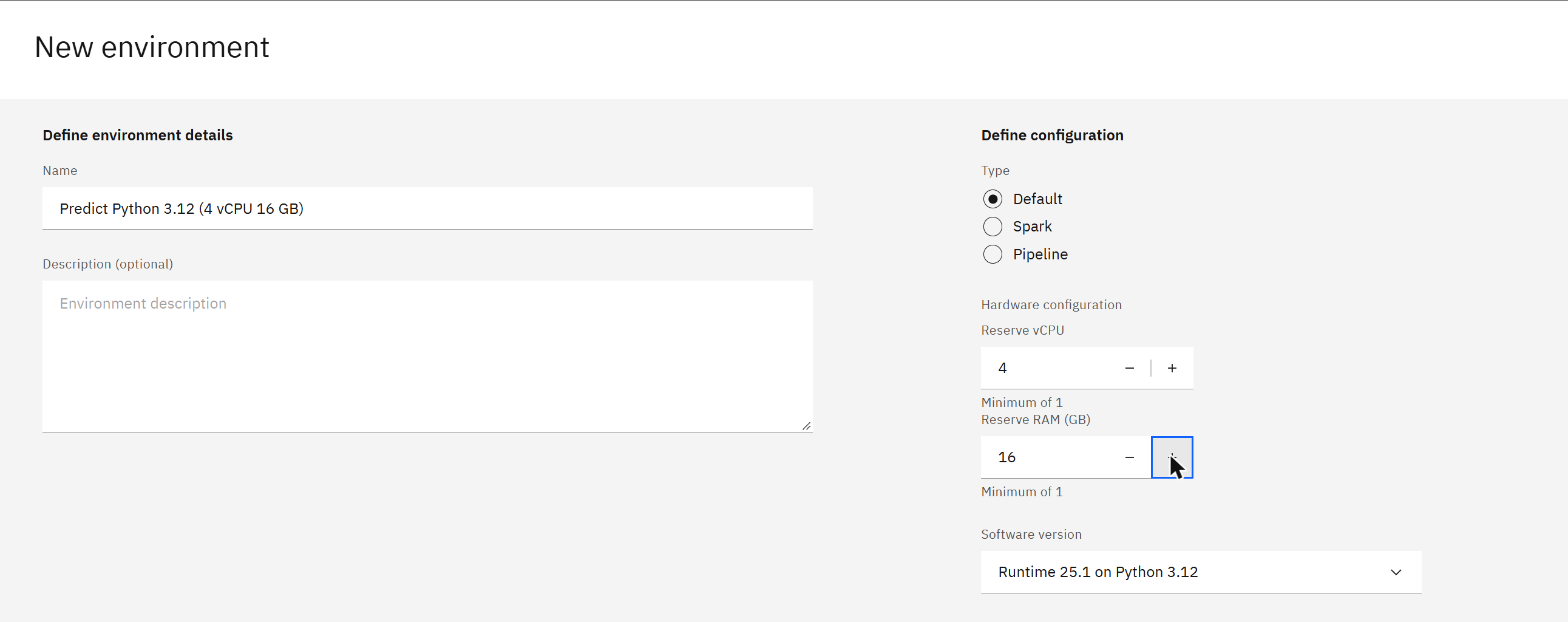
3.1 The runtime must be Python 3.12
The README says Python 3.10. The default notebook environment is 3.11. The library ships a compiled part built for 3.12, so on anything else the install fails:
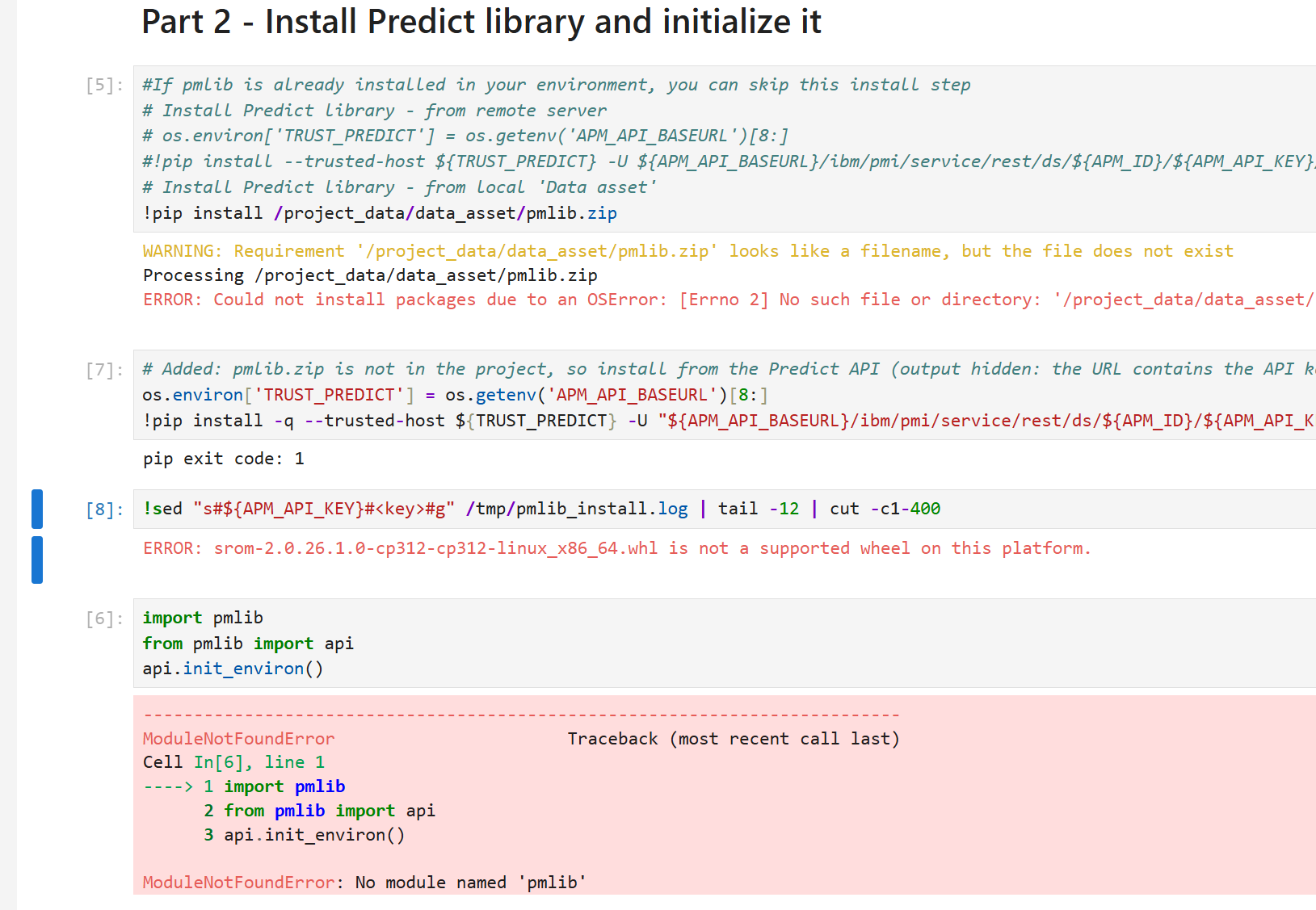
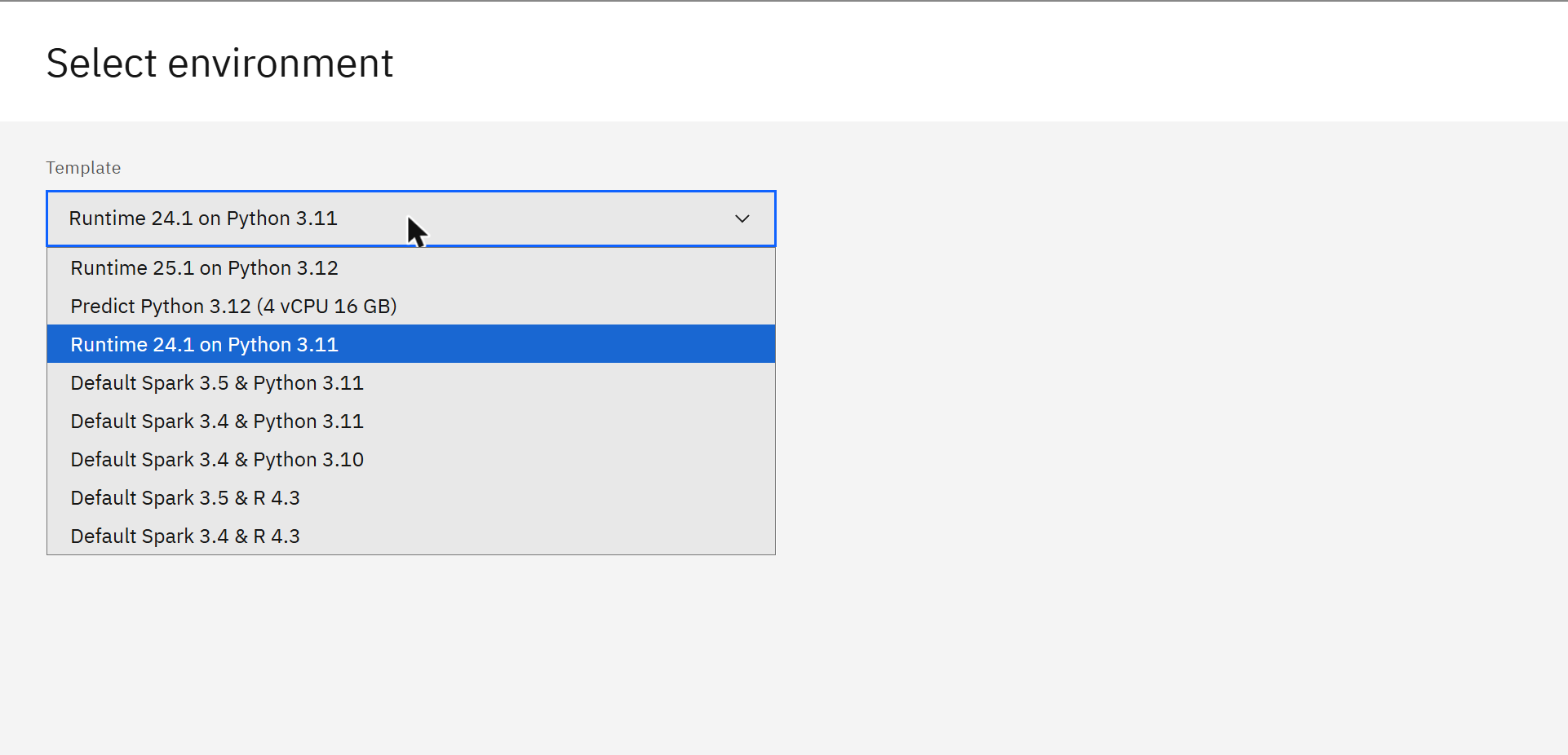
cp312 in the file name means Python 3.12 only.Create an environment template on Runtime 25.1 on Python 3.12 (Manage › Environments › Templates › New template; 4 vCPU and 16 GB is enough), then give it to each notebook from the project's Assets list: row menu › Change environment. The runtime must be stopped first.
3.2 Tell the notebook where Monitor is
The notebooks read the Monitor address from an environment variable that nothing sets, and stop with a
TypeError a few cells later. Add one cell before the cell that reads Predict_Envs.json:
import os
os.environ['API_BASEURL'] = 'https://<workspace>.api.monitor.<instance>.<cluster domain>'
3.3 Put pmlib.zip in the project
The project lists a data asset called pmlib.zip, but the file behind it was missing. Download it once from
the Predict API into the project's data folder (196 MB); every notebook then installs from the local copy:
!curl -sk -o /project_data/data_asset/pmlib.zip \
  "${APM_API_BASEURL}/ibm/pmi/service/rest/ds/${APM_ID}/${APM_API_KEY}/lib/download?filename=pmlib"
The last prerequisite is the file Predict_Envs.json: three values (APM_ID,
APM_API_BASEURL, APM_API_KEY) that you copy from Health and Predict and save in the project.
4. Step 1: load the sample data
Notebook: FastStart2021Loader-New. It runs 46 cells and builds the whole scenario.
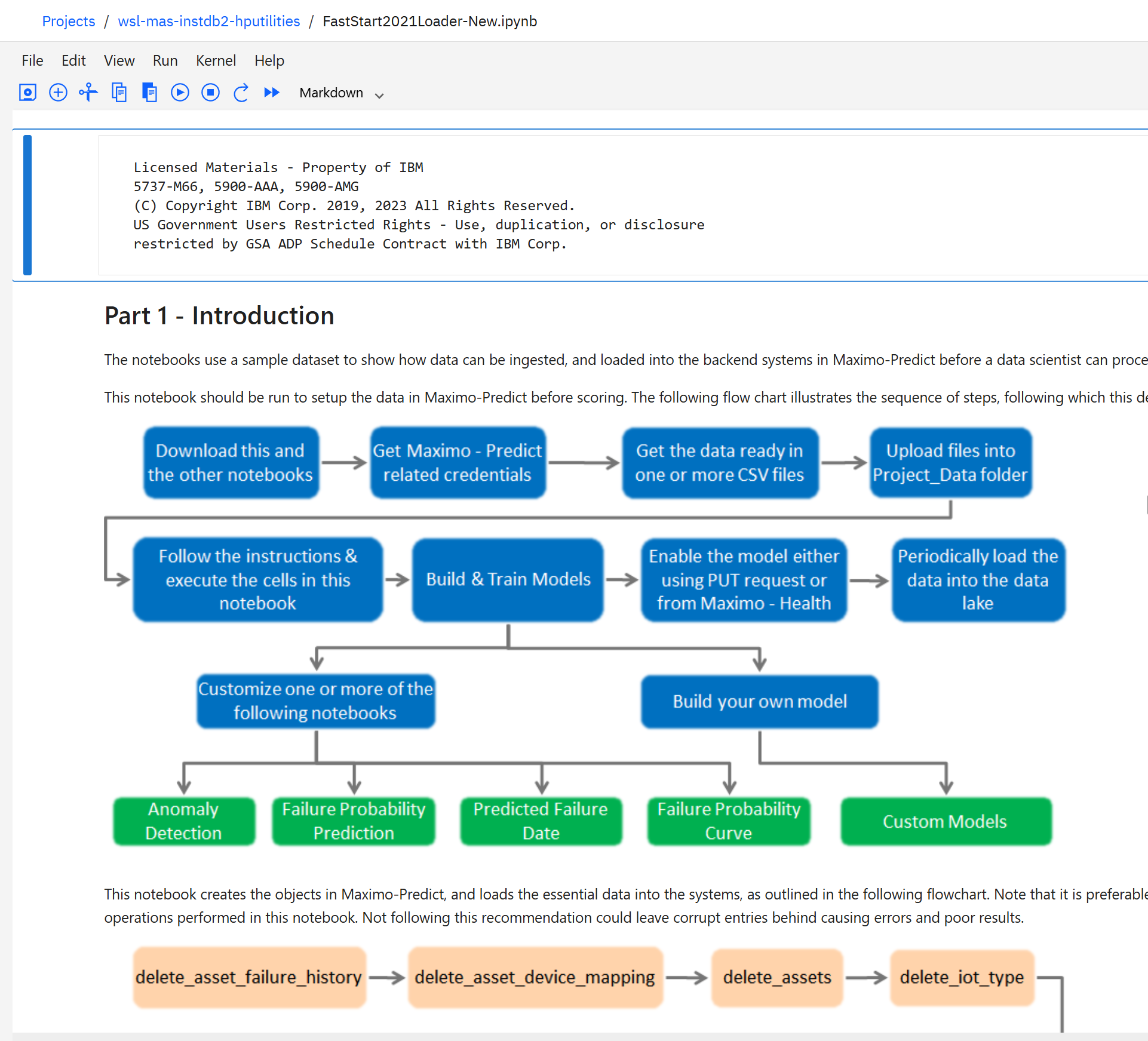
| What it creates | Where | On our system |
|---|---|---|
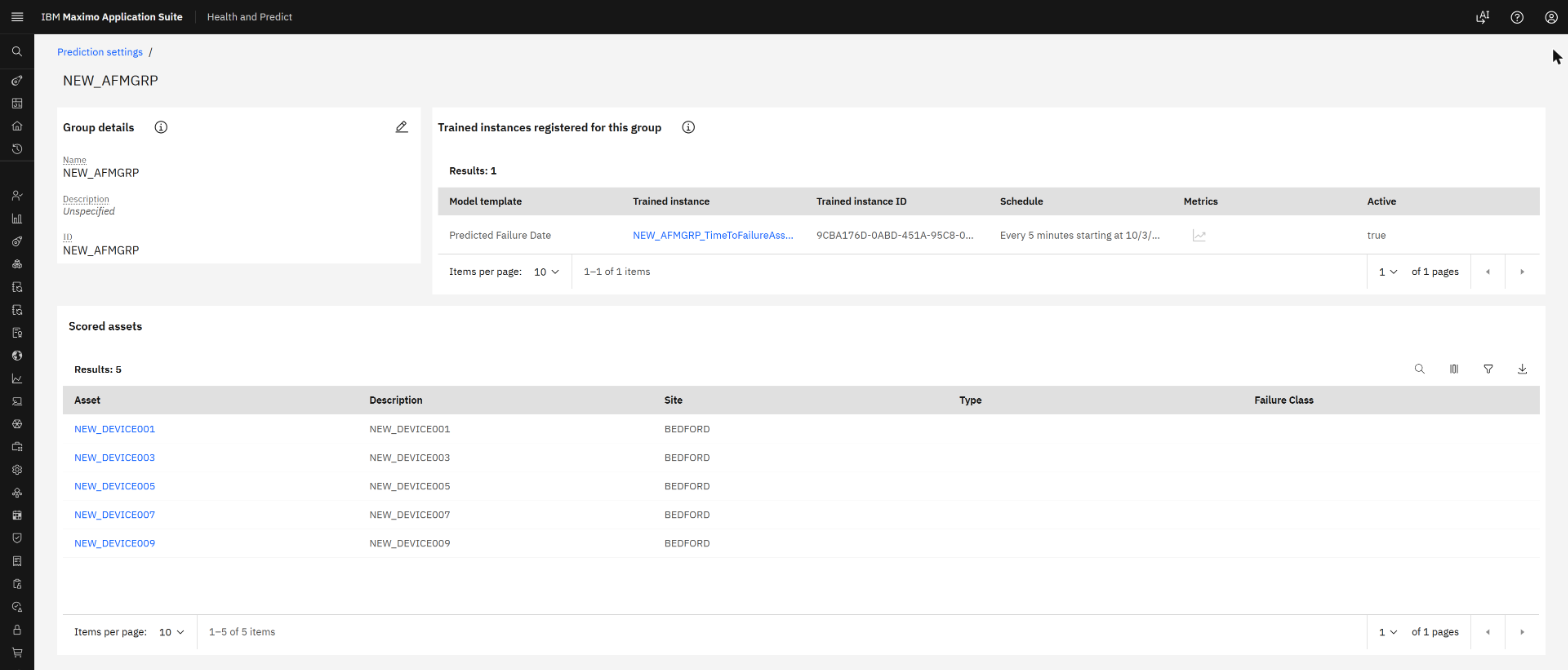
| Five assets | Manage | NEW_DEVICE001, 003, 005, 007, 009 at site BEDFORD, installed 2010 to 2016 |
| Failure history | Manage | Failure class PUMPS, problem STOPPED |
| An asset group | Manage | NEW_AFMGRP |
| A device type with 8 readings | Monitor | Pump_AFM: velocity X, Y, Z, motor temperature, winding temperature, current, pressure, load |
| Sensor history | Monitor | 296,857 rows in WSP_MAM.IOT_PUMP_AFM_1 |
| The link asset ↔ device | Predict / Monitor | 5 rows in APM_ASSET_DEVICES |
The sample data is from 2008 onwards. The loader shifts every date forward so the history ends near today; here the shift was 6,553 days and the readings ended on 3 August 2026.
5. Step 2: train the model
Notebook: PMI - Predicted Failure Date. The cell that matters describes the model in one Python dictionary: which readings to use, how to summarise them, and what to predict.
group = TimeToFailureAssetGroupPipeline(
    asset_group_id=asset_group_id,                      # NEW_AFMGRP
    model_pipeline={
        "features": ['Pump_AFM:velocityx', 'Pump_AFM:velocityy', 'Pump_AFM:velocityz'],
        "features_resampled": {'Pump_AFM': {'${freqency}': '1D',
            'velocityx': {'mean': None}, 'velocityy': {'mean': None}, 'velocityz': {'mean': None}}},
        "predictions": ['predicted_time_to_failure', 'predicted_failure_date'],
    })
df = group.execute()
In plain words: take the three vibration readings, average them per day, join them with each pump's installation and failure dates, and learn how long a pump with that vibration pattern has left. Training took about one minute.

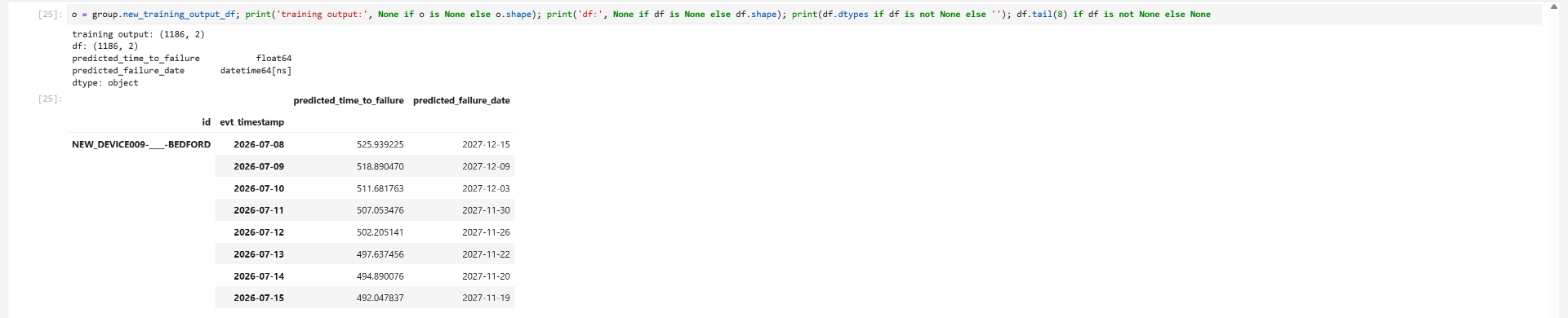
df now holds 1,186 predictions: one per pump per day.
6. Step 3: register and schedule
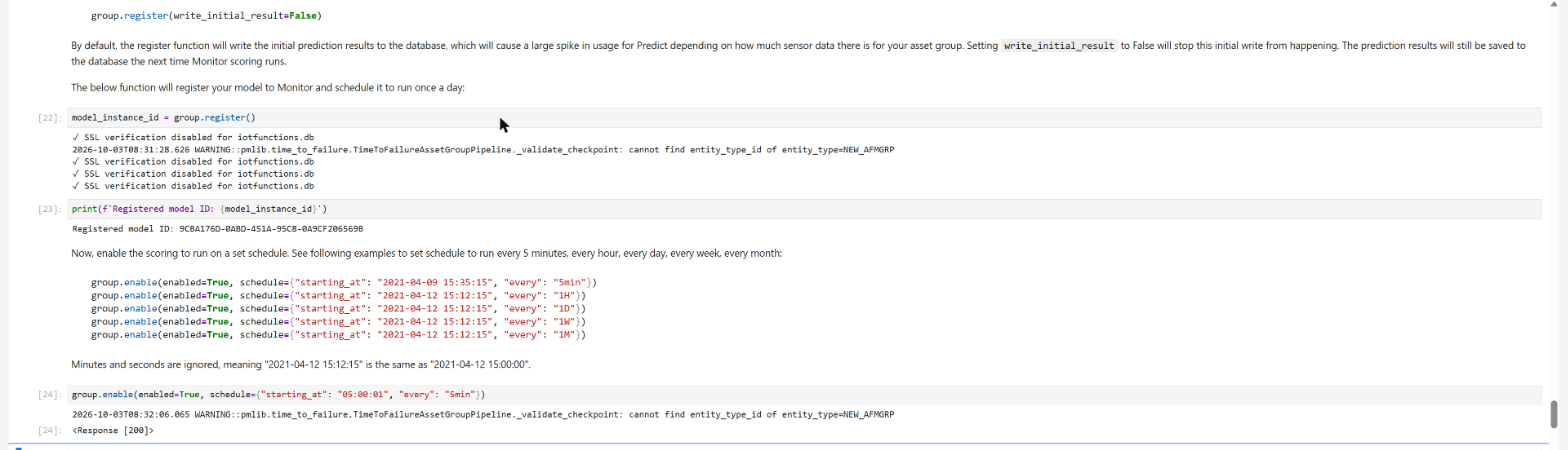
model_instance_id = group.register()
group.enable(enabled=True, schedule={"starting_at": "05:00:01", "every": "5min"})
register() stores the model files in Watson Machine Learning, writes one row in Predict's
MODEL_TEMPLATE and one in ASSET_GROUP_MODEL_INSTANCE, and creates the two output items in Monitor.
enable() asks Monitor to run the model on a schedule.
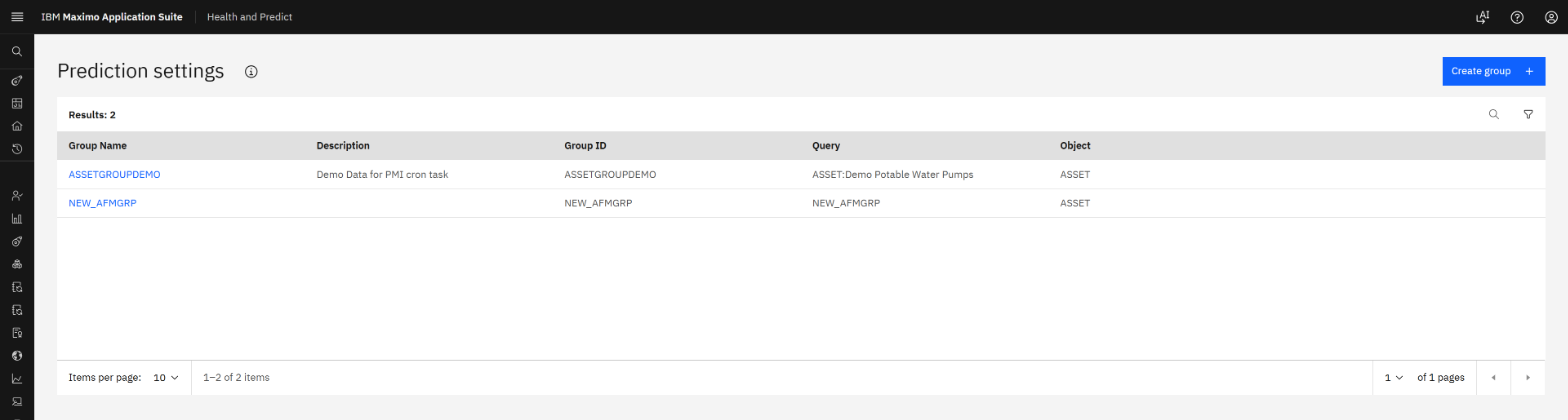
The model is then visible in Manage under Health and Predict › Prediction settings:
7. Step 4: get the scores
This is where the run stopped being smooth. register() is meant to save the first predictions to Monitor.
It reported success and saved nothing: both result tables had zero rows. The cause is problem 5 in the log below. With a
two-line patch in the notebook, the write went through:
from pmlib import api as _api
_t = _api.get_new_monitor_table_name_for_prediction_result
_api.get_new_monitor_table_name_for_prediction_result = lambda db, name, cols: _t(db, asset_group_id, cols)
group._write(df)
The database confirms it: 2,372 rows in each of the two result tables in Monitor's schema (1,186 timestamps × 2 outputs; one table for the raw output, one for the daily summary). The latest score for each pump:
| Asset | Installed | Last scored day | Days to failure | Predicted failure date |
|---|---|---|---|---|
| NEW_DEVICE001 | 2016-03-01 | 2026-06-09 | 515.6 | 2027-11-06 |
| NEW_DEVICE003 | 2012-05-01 | 2026-07-04 | 524.6 | 2027-12-10 |
| NEW_DEVICE005 | 2010-10-01 | 2026-08-03 | 521.6 | 2028-01-06 |
| NEW_DEVICE007 | 2011-08-01 | 2026-07-24 | 523.6 | 2027-12-29 |
| NEW_DEVICE009 | 2014-12-01 | 2026-07-15 | 492.0 | 2027-11-19 |
select ENTITY_ID, KEY, VALUE_N, VALUE_T, TIMESTAMP
from WSP_MAM.DM_DEVICE_TYPE_NEW_AFMGRP_3_0L
where KEY in ('predicted_time_to_failure', 'predicted_failure_date')
order by ENTITY_ID, TIMESTAMP desc;
Monitor result tables are tall: one row per asset, timestamp and output name, with the value in VALUE_N
(number) or VALUE_T (date).
8. Step 5: what Health and Predict shows
The honest state at the end of this run:
| Item | State |
|---|---|
| Model trained in the notebook | Yes |
| Model registered, listed in Prediction settings | Yes |
| Predictions in Monitor's result tables | Yes, 2,372 rows per table, after the notebook patch |
| Scheduled scoring every 5 minutes | No. Every run fails (problem 6) |
| "Next failure" card on the asset's Predict tab | No. Still empty (problem 7) |
So on this build the example gets from a notebook to scores in the database, and stops one step short of the card a reliability engineer would look at. I am publishing it at that point on purpose: the last two rows are product defects, confirmed in the logs and in the library source, and they belong in a support case rather than in more workarounds.
9. The field log: seven problems, in order
| # | Symptom | Cause | What I did |
|---|---|---|---|
| 1 | TypeError in the environment cell | API_BASEURL is not set, so the Monitor address is empty | One added cell (section 3.2) |
| 2 | No such file: pmlib.zip | The data asset exists but has no file | Downloaded it once (section 3.3) |
| 3 | "not a supported wheel on this platform" | The library is built for Python 3.12; the default runtime is 3.11 | New environment template (section 3.1) |
| 4 | group.register() returns HTTP 500 | The database had been restored from another cluster. PMITENANT still held that cluster's Monitor address, with status COMPLETE | Set the status to PENDING; Predict re-ran its integration within 30 seconds |
| 5 | Register succeeds, no predictions in the database | pmlib takes the asset group ID from the table name by splitting on "_". dm_new_afmgrp becomes new. The error is caught and logged at debug level only | Notebook patch (section 7). Or use a group ID without an underscore |
| 6 | Scheduled scoring fails every run | On the first run Monitor passes an end time and no start time; pmlib rejects that when the model uses features_resampled. A failed run leaves no checkpoint, so the next run is a "first run" again | Open. Training without resampling should avoid it; not tested here |
| 7 | "Next failure" stays empty | Predict's background job that copies results into Manage stops with java.lang.String incompatible with JSONObject while reading the model's outputs | Open |
Problem 4 in detail: a restored database remembers its old home
Predict integrates with Monitor once, stores the result in PMITENANT, and marks it COMPLETE.
A background job looks only for rows marked PENDING. After a restore from another environment, the row is
complete and wrong. Predict's own log says what to do (it suggests changing the status to PENDING). Take a copy first:
create table CRBKP.PREDICT_PMITENANT_BAK as (select * from MAS_INSTDB2_PREDICT.PMITENANT) with data;
update MAS_INSTDB2_PREDICT.PMITENANT set MAS_INTG_STATUS = 'PENDING' where PMI_TENANT_ID = 1;
Within half a minute the row carried this cluster's Monitor address and was back to COMPLETE.
How I confirmed problems 5 and 6
Both are in the library you already downloaded. Unzip pmlib.zip and read pmlib/persist.py
(the split on "_") and pmlib/pipeline.py (search for "when resampling is used"). For problem 6, the log of
the failed job pod in the Monitor namespace ends with the same sentence. Reading the source took ten minutes and saved
guessing.
group.enable(enabled=False) returned HTTP 500 although
Monitor answered "updated": Predict could not read Monitor's reply. And a note from the keyboard: in Jupyter, typing
while a cell is selected but not in edit mode fires shortcuts. I restarted my own kernel that way and had to retrain.10. A checklist for your own run
- Monitor, Health and Predict are active, and Predict's
PMITENANTrow shows your Monitor address. - The notebook environment is Runtime 25.1 / Python 3.12.
Predict_Envs.jsonandpmlib.zipare both in the project's data assets.- The cell that sets
API_BASEURLis in each notebook. - Run the loader notebook fully before any model notebook.
- After
register(), count the rows in the group'sDM_DEVICE_TYPE_…tables. Zero means the first write failed silently. - After
enable(), look at the newest<workspace>.g1.…job pod in the Monitor namespace. Its log tells you in one line whether scoring ran. - Keep the API key out of notebook output, and rotate it when you finish.
PMITENANT.Written from a single run on a demo system on 3 October 2026. Versions and behaviour may differ on your build; the defects described here are as observed with pmlib 9.2.6.dev10800 and are not official IBM statements.