IBM Sterling Order Management · A guide for sellers and junior consultants
What happens after the customer clicks "Buy"
Sterling Order Management is often sold as a black box: "it orchestrates orders". This guide opens the box. We walk through the sixteen scenarios of IBM's own demo, screen by screen, and for each one explain what the product does, why it is hard to do without it, and how to say that to a customer.
- What an order management system (OMS) is, in one sentence, and where it sits between the web shop and the ERP.
- The five things Sterling does to every order: promise, capture, source, fulfil, serve.
- Sixteen real scenarios: warehouse, store pickup, ship from store, split orders, replenishment, suppliers and drop ship, customer service, returns, safety stock, B2B contracts, holds, and the AI agents.
- The differentiators, with the proof on screen, and the questions that uncover a need.
Reading time: about 35 minutes, or jump to the scenario you need. Screens are from IBM's Sterling OMS demo environment and from a local Sterling 25.3 Developer Toolkit, all with IBM demo data.
Before we startThe one-sentence version
An order is a promise. The customer was told "3 items, delivered Thursday, $124.97". Somebody now has to keep that promise using stock that is spread over warehouses, stores and suppliers, while the customer is still free to change their mind. An order management system is the software that keeps the promise.
Not the web shop (that sells). Not the ERP (that accounts and plans). Not the warehouse system (that moves boxes inside one building).
The brain in the middle: one record of every order from every channel, one view of inventory everywhere, and the rules that decide who ships what, from where, and when.
Sterling does five things to every order:
The demo world. Aurora is a retailer with warehouses (Aurora_WH1 is the primary one) and stores (Boston, Burlington and more). City Cool is its web storefront. Sarah is the customer. Fred is the fulfilment manager, Tim the store associate, Alison works the pickup counter, Anaya is the call center agent, Irina the inventory manager and Kim the B2B account manager.
The mapSixteen scenarios, one engine
Every scenario below is a ready-made use case in the demo. They look different, but they are the same engine with a different delivery method, a different node or a different user.
- 1Ship from warehouse
- 2Pickup in store (BOPIS)
- 3Ship from store
- 4Pickup and ship in one order
- 5Store receiving and putaway
- 6Cross-dock, transfer and drop ship
- 7Order modification
- 8Return order
- 9Product browsing by the agent
- 10Change fulfilment method
- 11AI-assisted appeasement
- 12Order search and appeasement
- 13Safety stock
- 14B2B contract order
- 15AI-assisted cancellation
- 16Order verifications (holds)
- AIAgentic AI tools in Order Hub
Created: the order exists. Scheduled: Sterling checked inventory and chose the node for each line. Released: the node received its instruction to fulfil. Shipment created: the node has pick, pack and ship work to do. Shipped: it left the building. Learn these five words and you can read any screen in this guide.
Part 1Fulfilment: getting the goods to Sarah
1Ship from warehouse
SarahFred
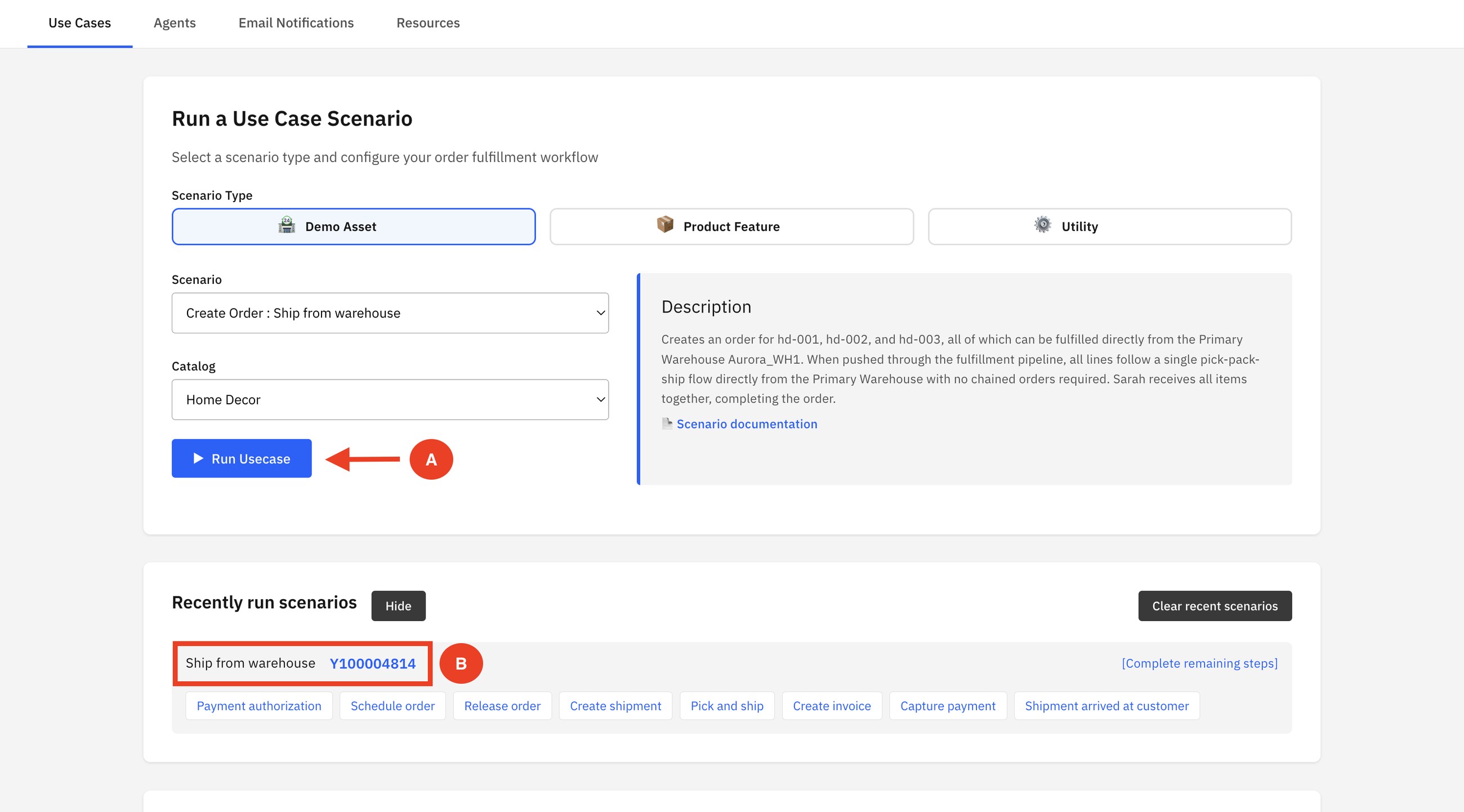
The simplest case, and the baseline for everything else. Sarah orders three home decor items for delivery. Sterling finds all three at the primary warehouse, so nothing needs to be bought, transferred or split.
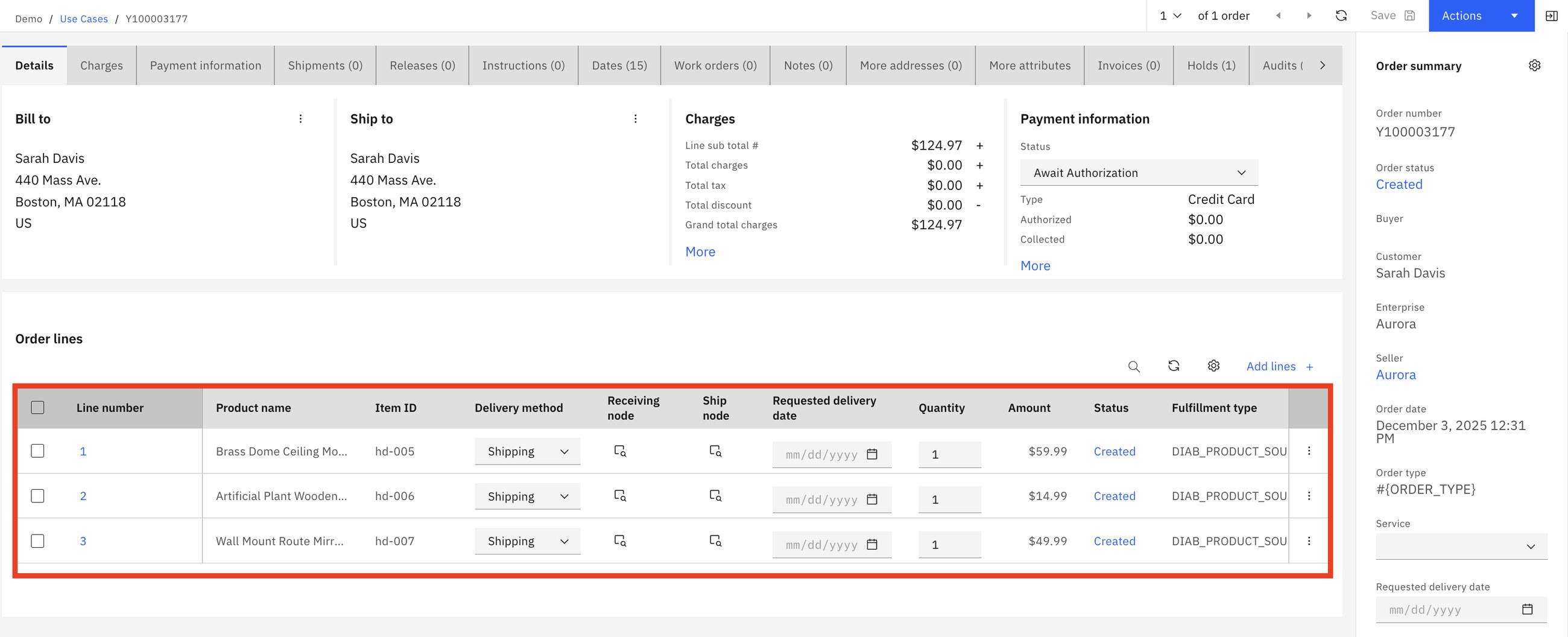
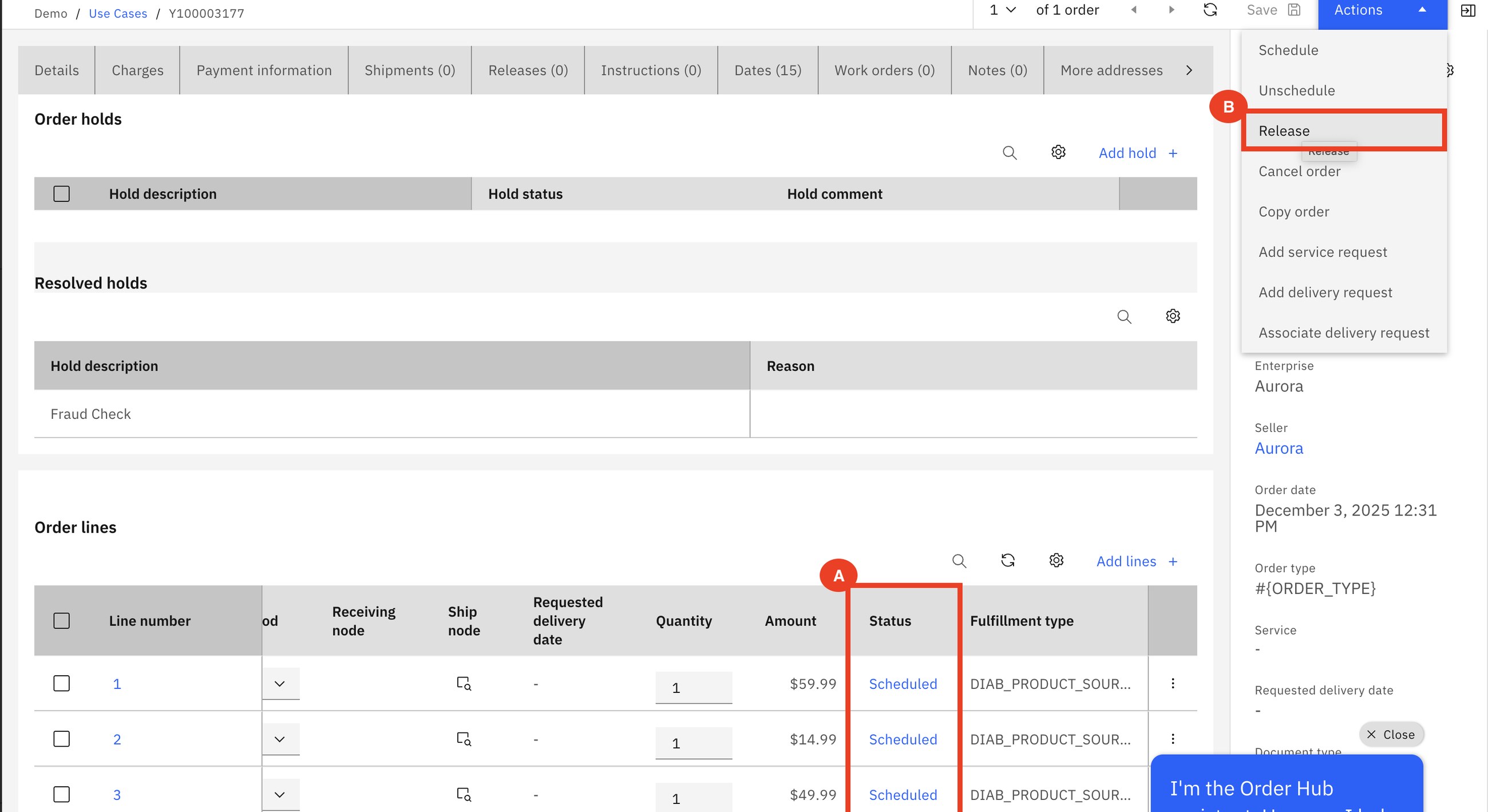
Fred schedules the order. Scheduling is the moment Sterling commits: it checks inventory and assigns a ship node to each line (here Aurora_WH1). Then he releases it, which sends the instruction to that warehouse.
One release is created because one node can ship everything. The warehouse creates the shipment, picks, packs and confirms it.
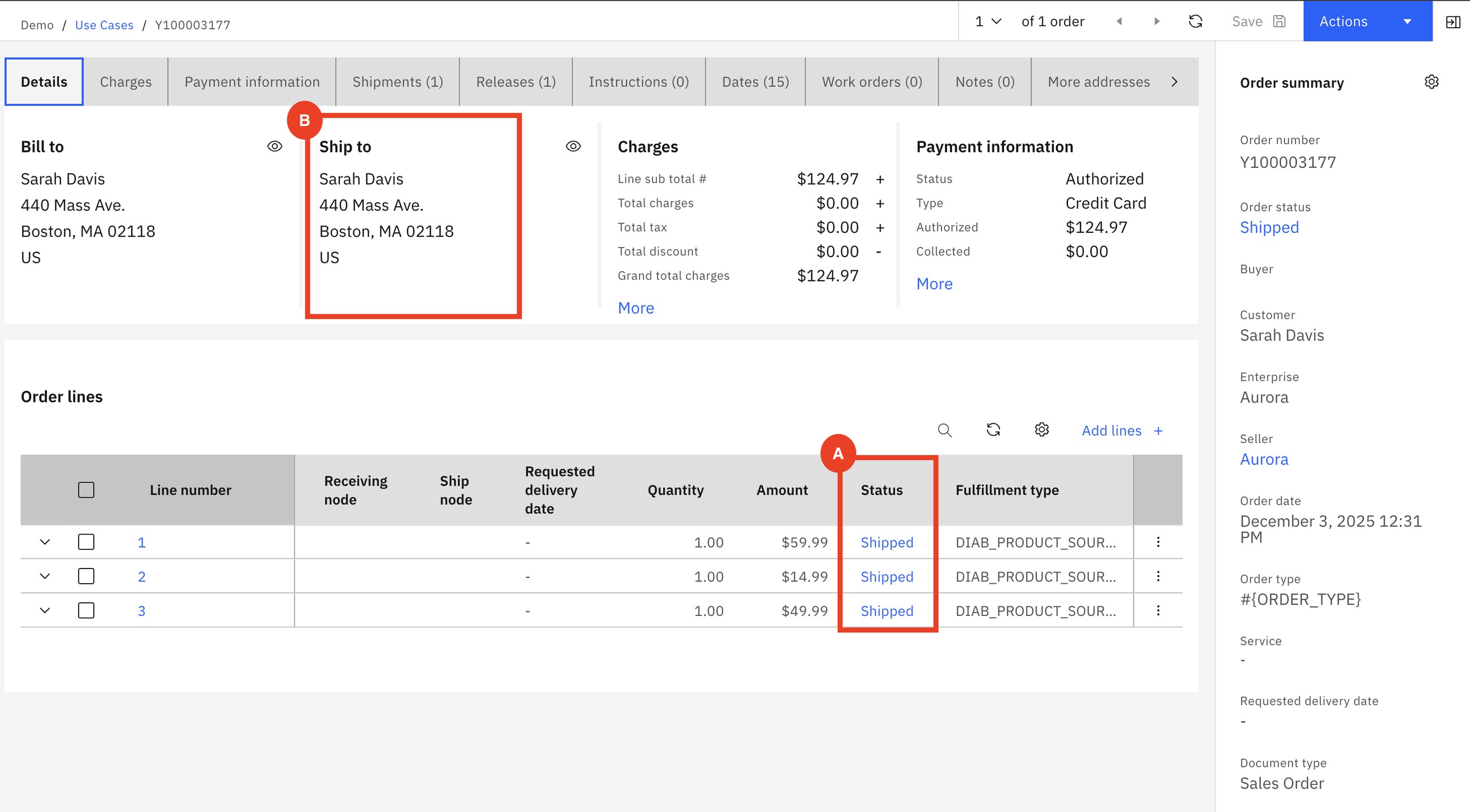
Scheduling decides who and when. Releasing tells the node to start. Between the two, the order can still be changed cheaply. That gap is what makes the customer-service scenarios in Part 3 possible.
How to say it: "When an order comes in today, who decides which warehouse ships it, and how long does it wait before the warehouse knows?"
2Pickup in store (BOPIS)
SarahFredTimAlison
Sarah buys two furniture items online and chooses to collect them at the Burlington store. The order looks the same as before with one difference: the delivery method is Pick Up and each line carries the store she chose.
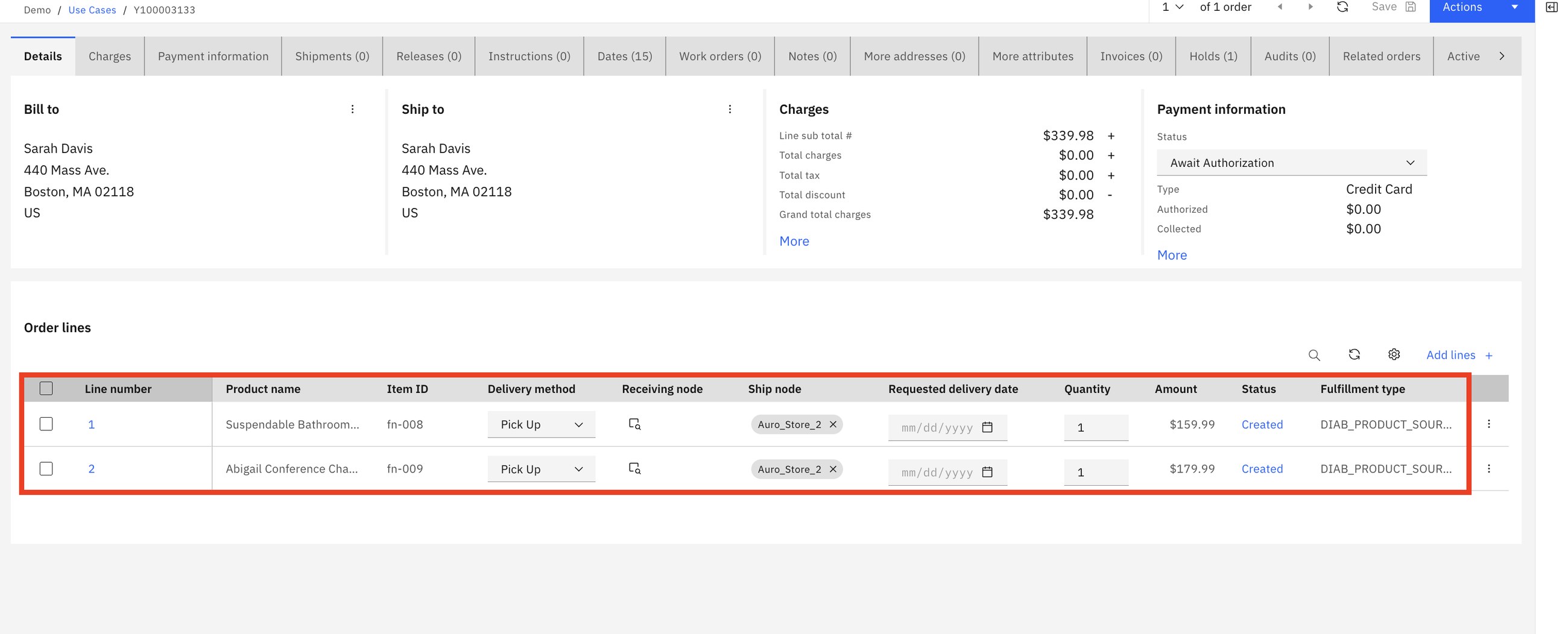
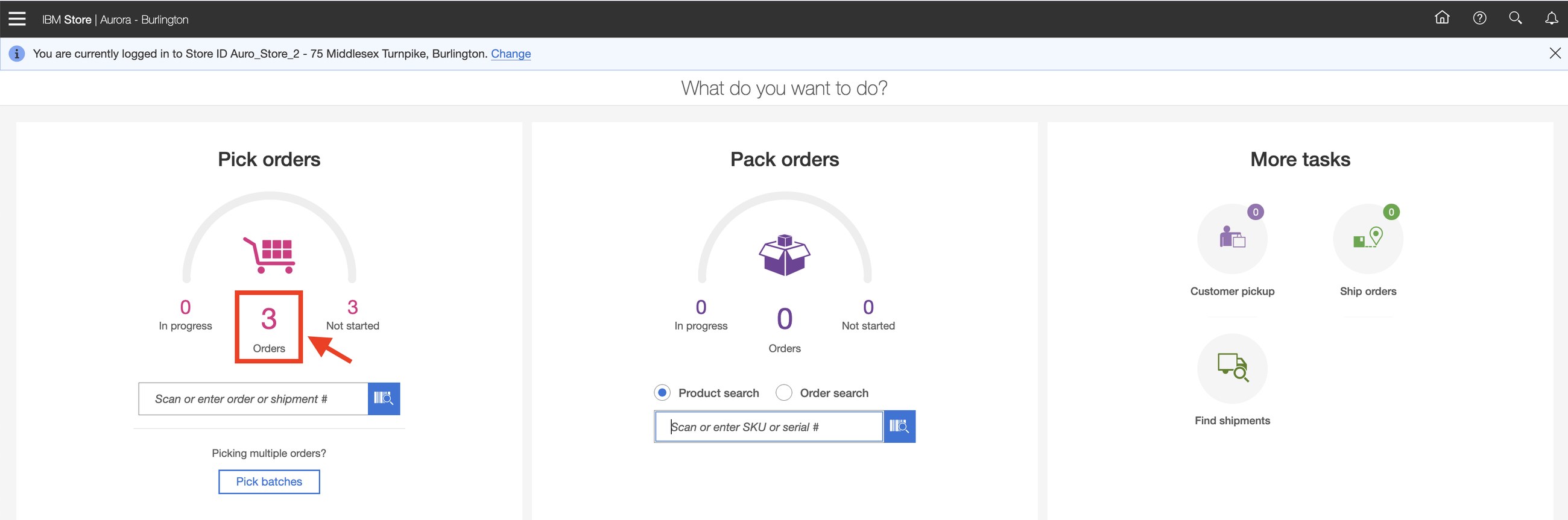
Fred resolves the fraud hold, schedules and releases. Creating the shipment drops a pick task into the store's app. Tim sees it on the Store Engagement home screen.
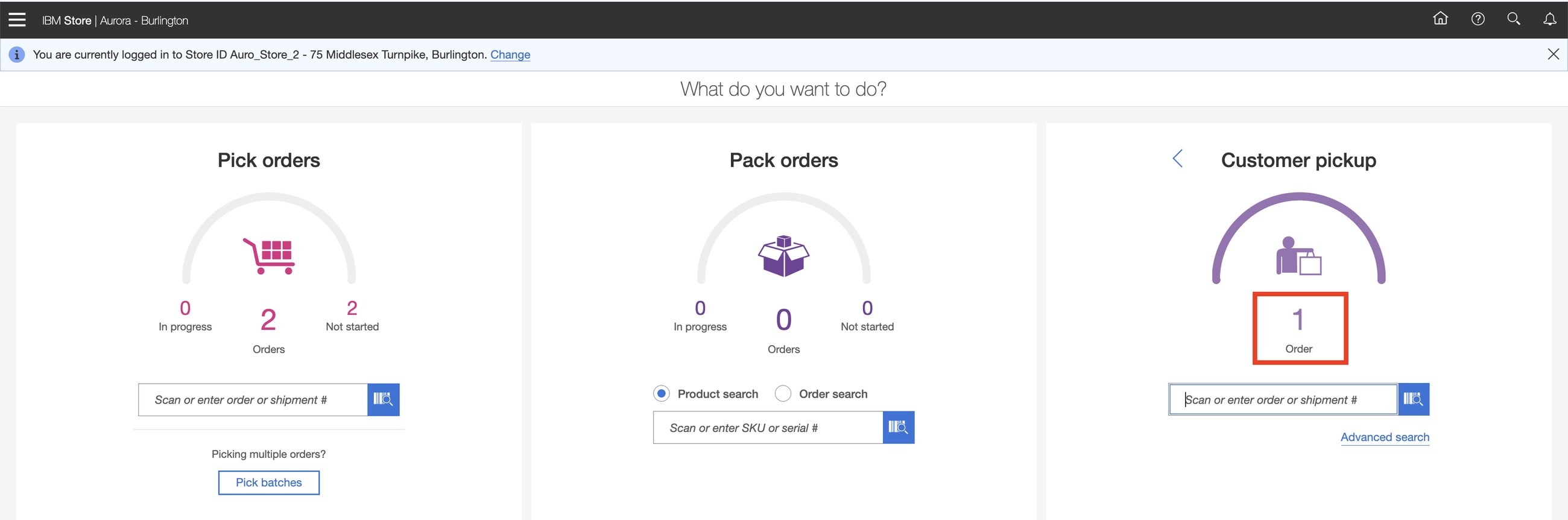
Tim picks the items (by scanning or tapping), puts them in a staging location and marks the order ready. Sarah gets her "ready for pickup" notification. When she arrives, Alison opens Customer pickup, verifies who she is and hands over the goods.
Pick, stage, verify the customer, hand over, print the acknowledgement: it is one guided flow on a tablet, and every tap updates the order that the web shop and the call center see.
How to say it: "If I buy online and come to your store in two hours, how does the store know, and how do you know I collected it?"
3Ship from store
SarahFredTim
Sarah orders two electronics items for home delivery. Sterling assigns both to the nearest store that has them, not to a warehouse. For Sarah nothing changes. For Aurora, a store just did a warehouse's job.
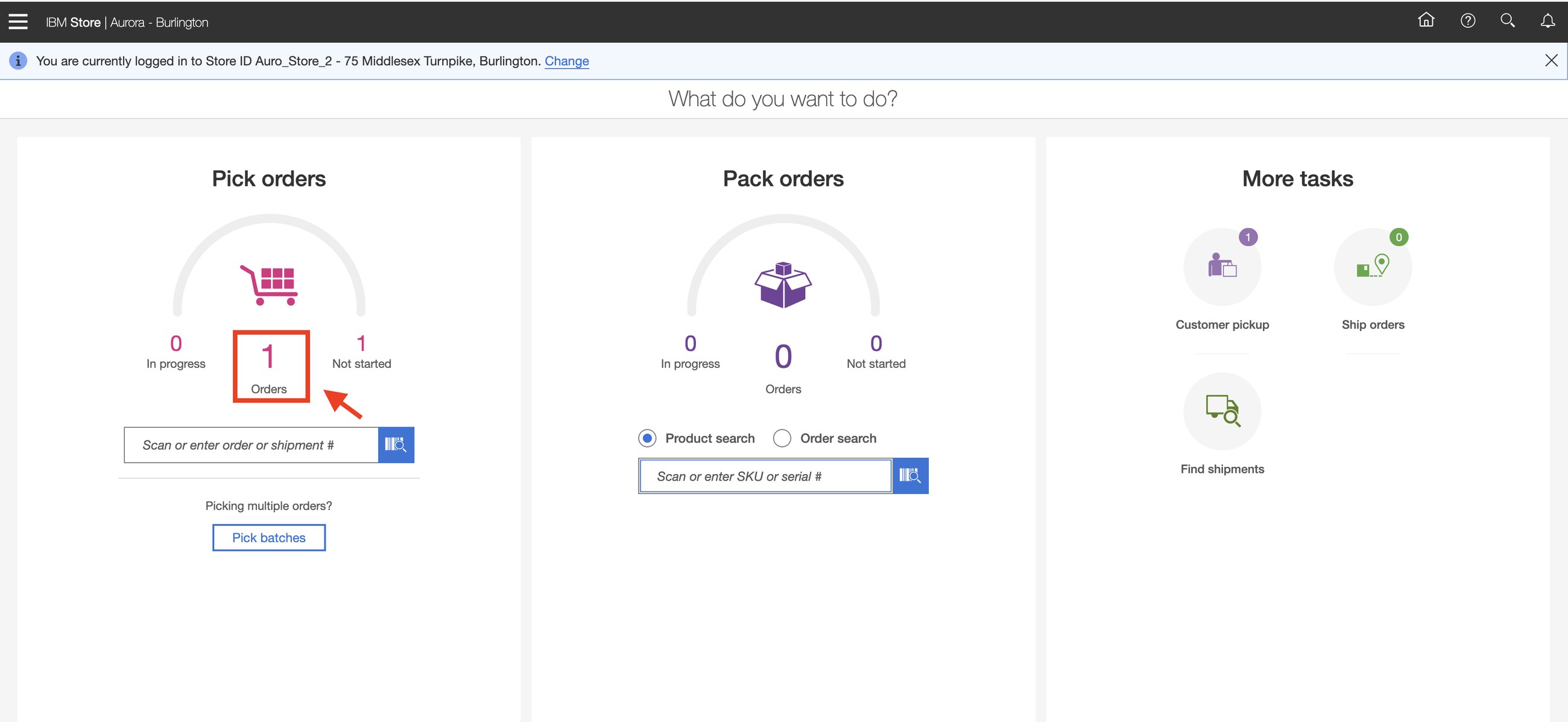
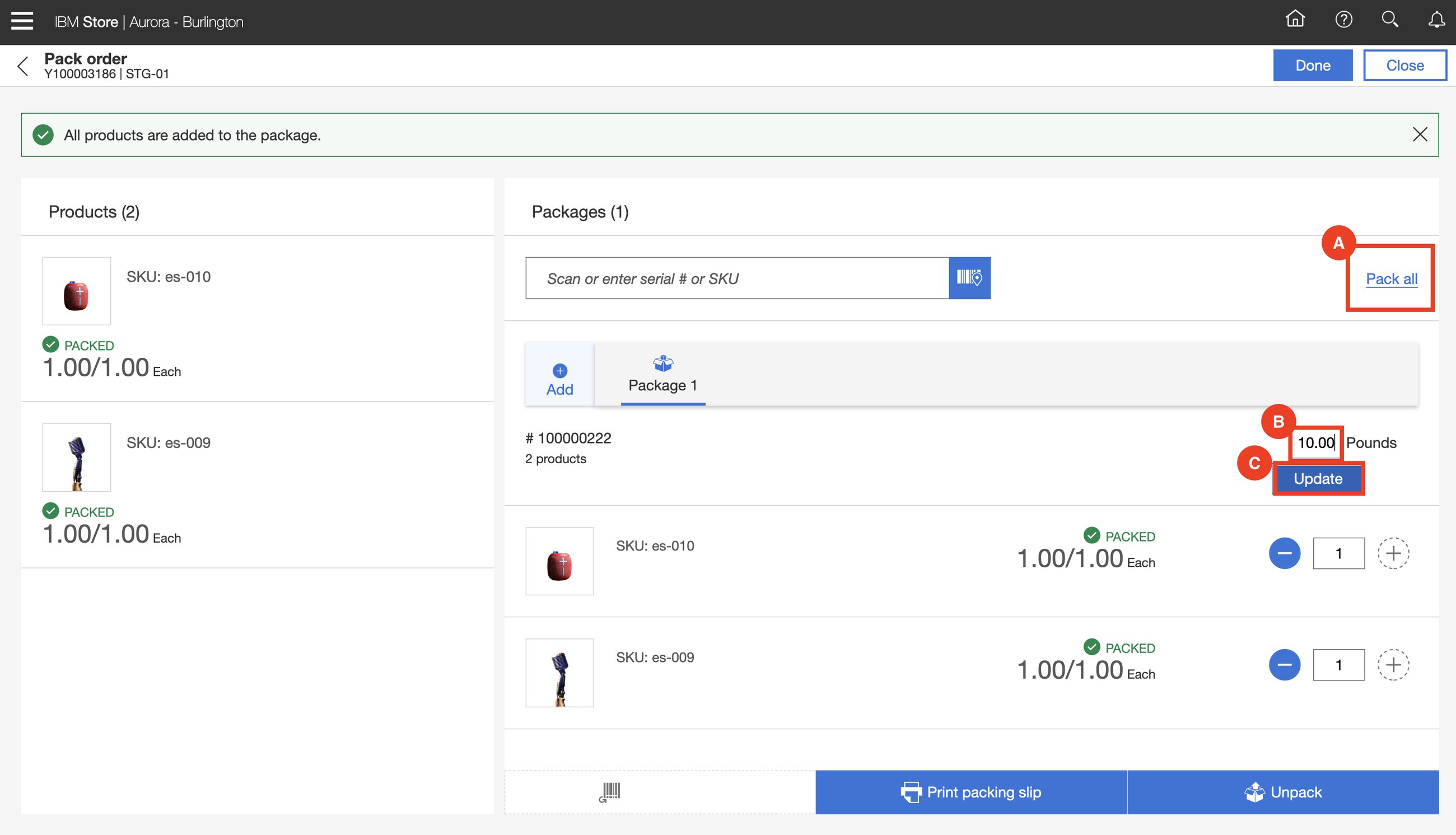
Tim picks, then packs: he puts both items in a package, enters the weight and can print the packing slip.
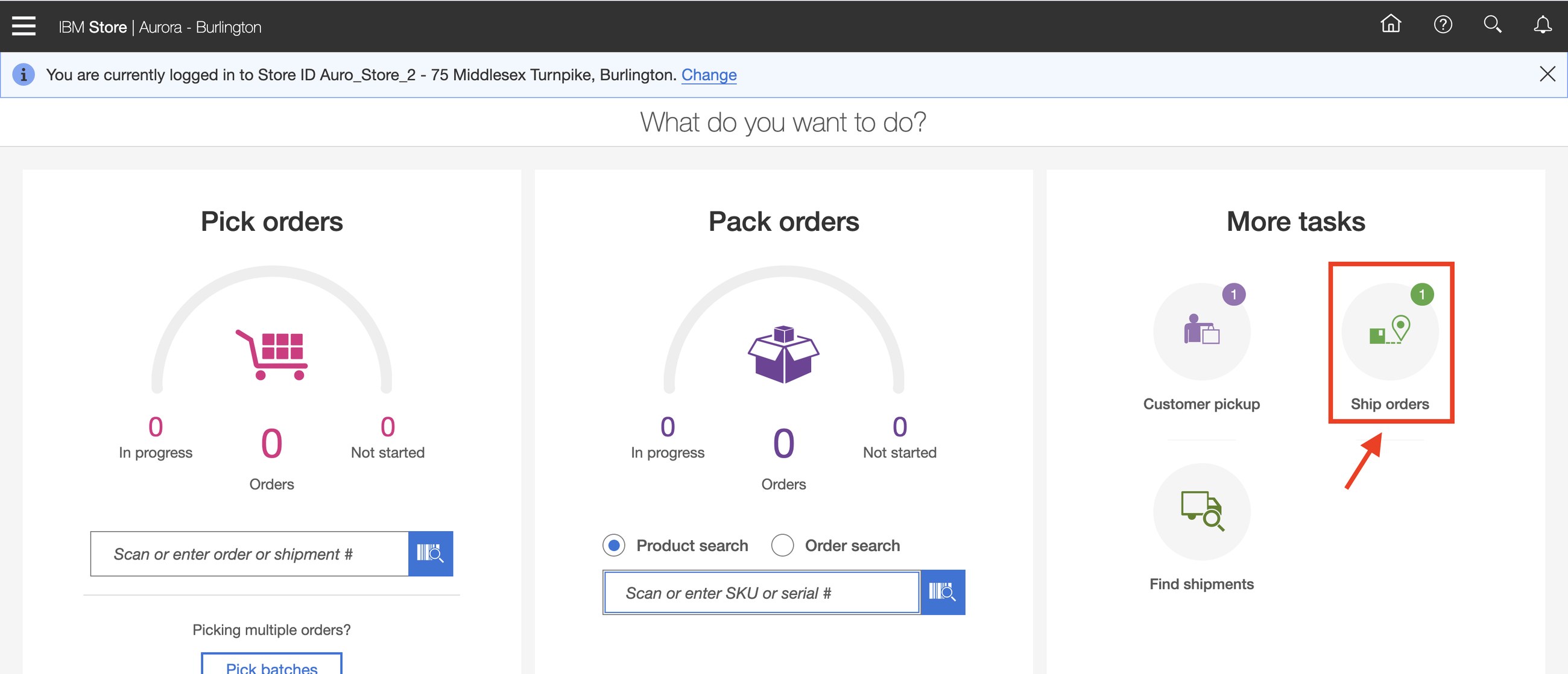
Finally he confirms the handover to the carrier under Ship orders, and the order becomes Shipped.
Store stock is already close to the customer. Shipping from it means shorter delivery times, lower shipping cost, and a way to sell stock that would otherwise be marked down at the end of the season.
How to say it: "How much of your inventory sits in stores where your online customers cannot buy it?"
4Pickup and ship in one order
SarahFredTimAlison
Now the two together. Sarah orders hiking shoes she needs today and a tent that her local store does not have. One order, two lines, two delivery methods.
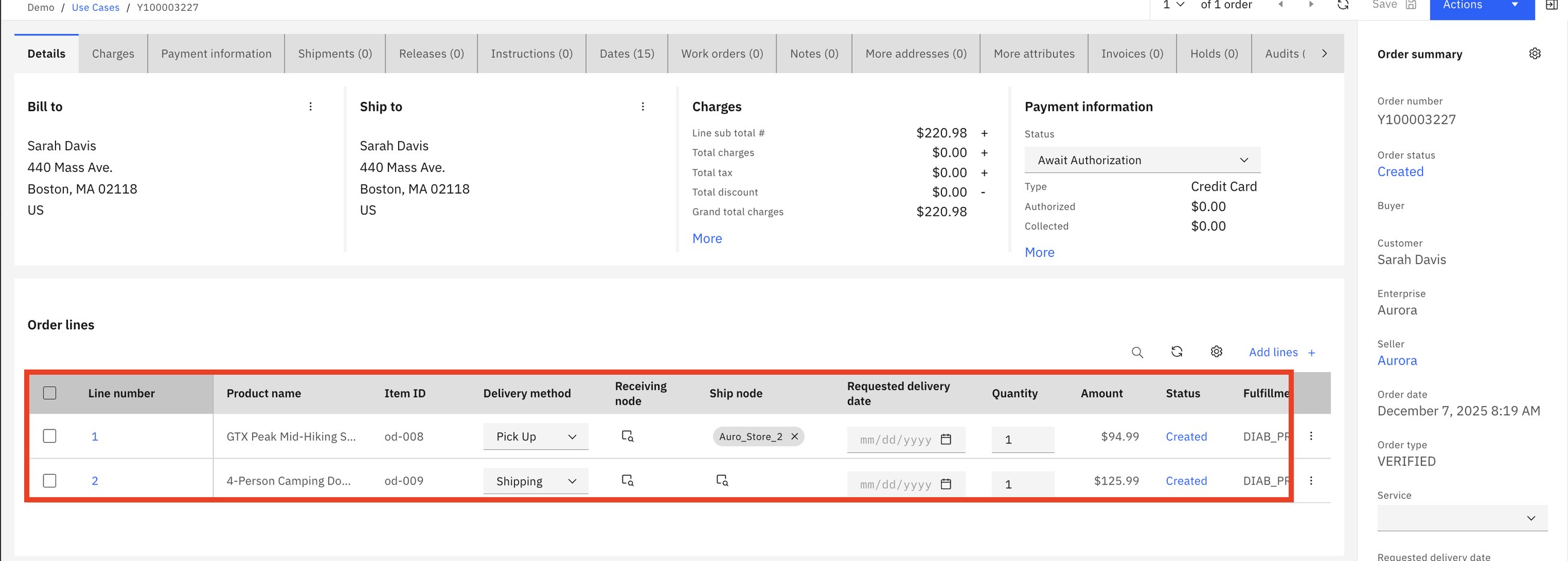
After scheduling, line 2 is assigned to another store, Auro_Store_3. Why? Fred checks with an inventory search:
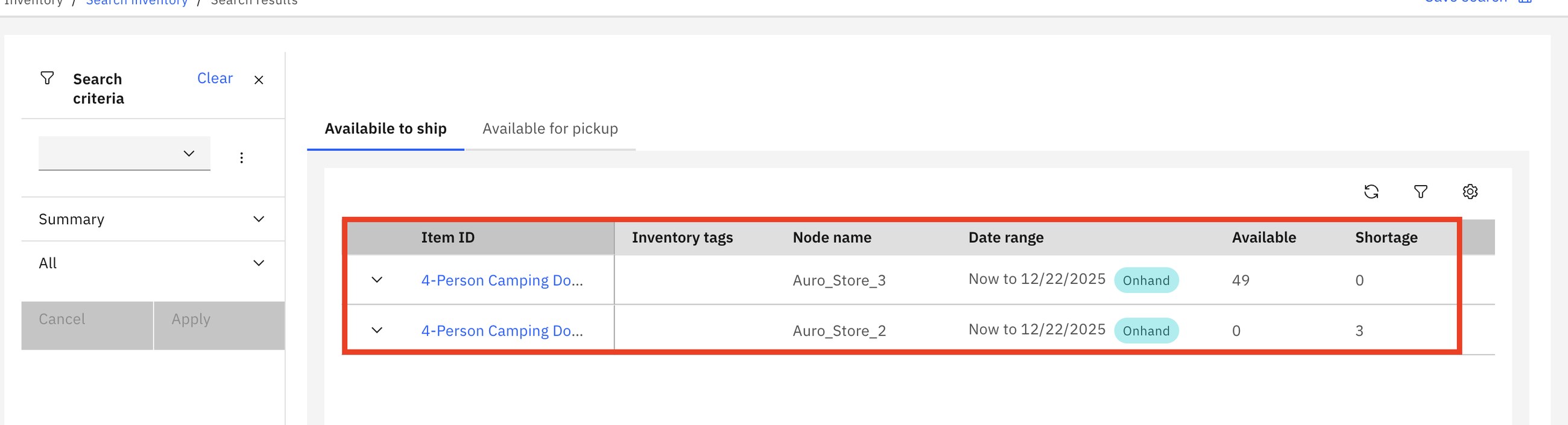
Sterling split the order by itself. Two releases, two shipments, two stores, one order for the customer.
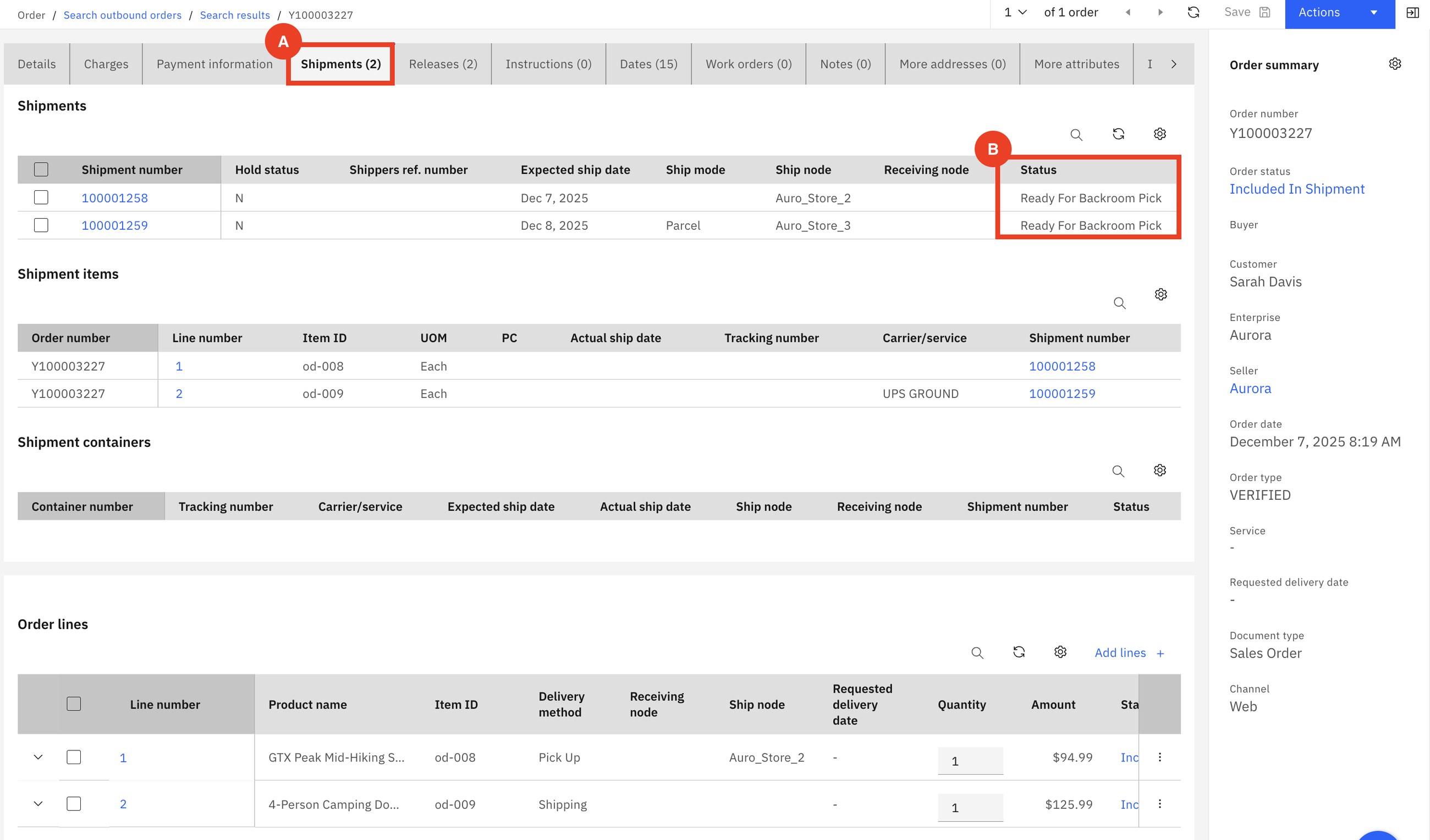
Sterling splits only when the rules allow it and it is needed. The business controls how far it may go: never split, split at most once, ship complete lines only, and so on.
How to say it: "What happens today when one item of a basket is not in the warehouse? Does the whole order wait, or is it cancelled?"
5Store receiving and putaway
FredTim
Stores also need to be filled. Aurora sends 500 units from the warehouse to the Boston store. For Sterling this is just another order: scheduled, released, shipped in cartons. The interesting part is the other end.
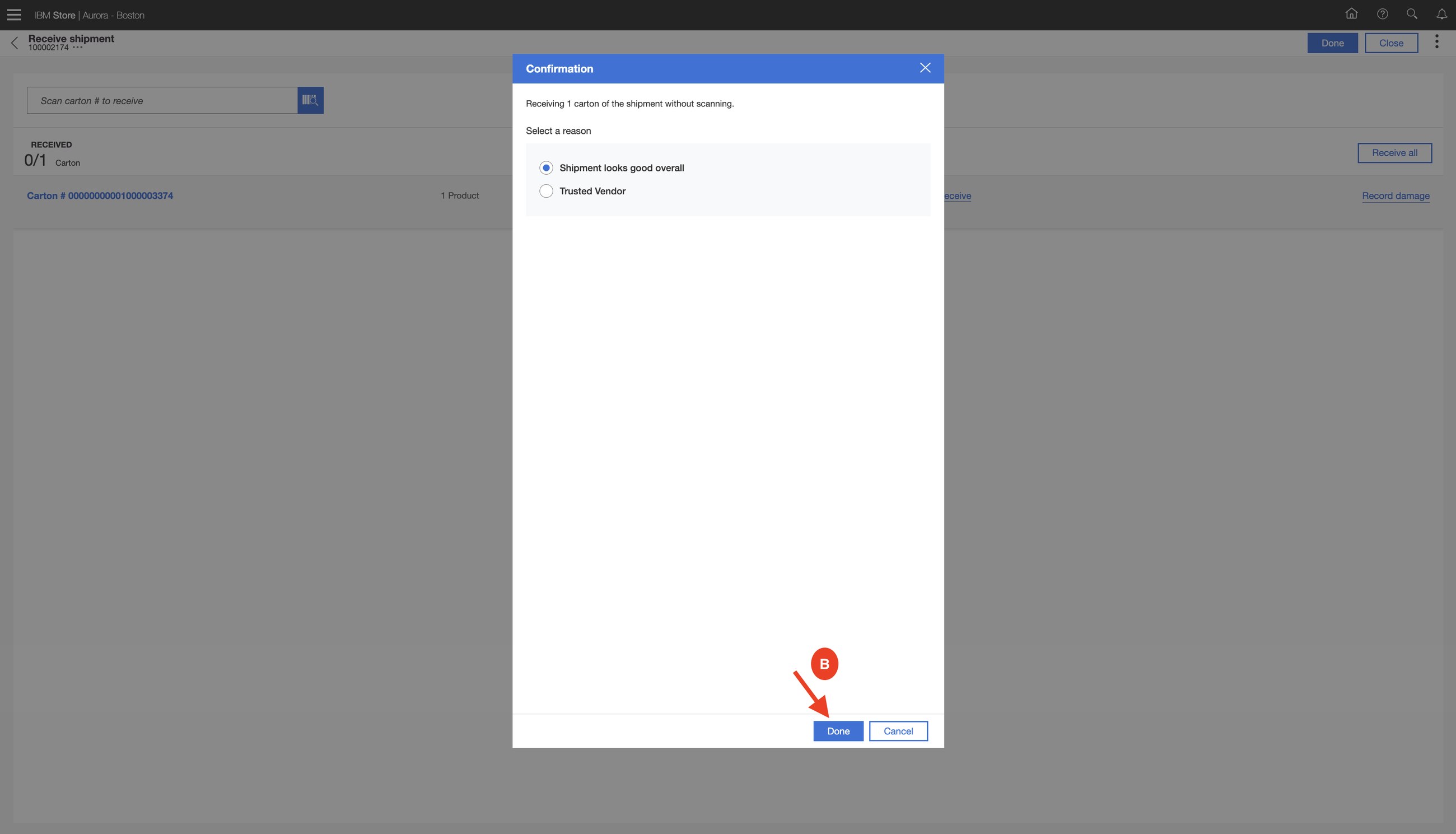
Tim receives the cartons, records damage, shortage or overage if any, then does the putaway: the app tells him to take the goods from the dock to a named shelf location and confirms each move by scan.
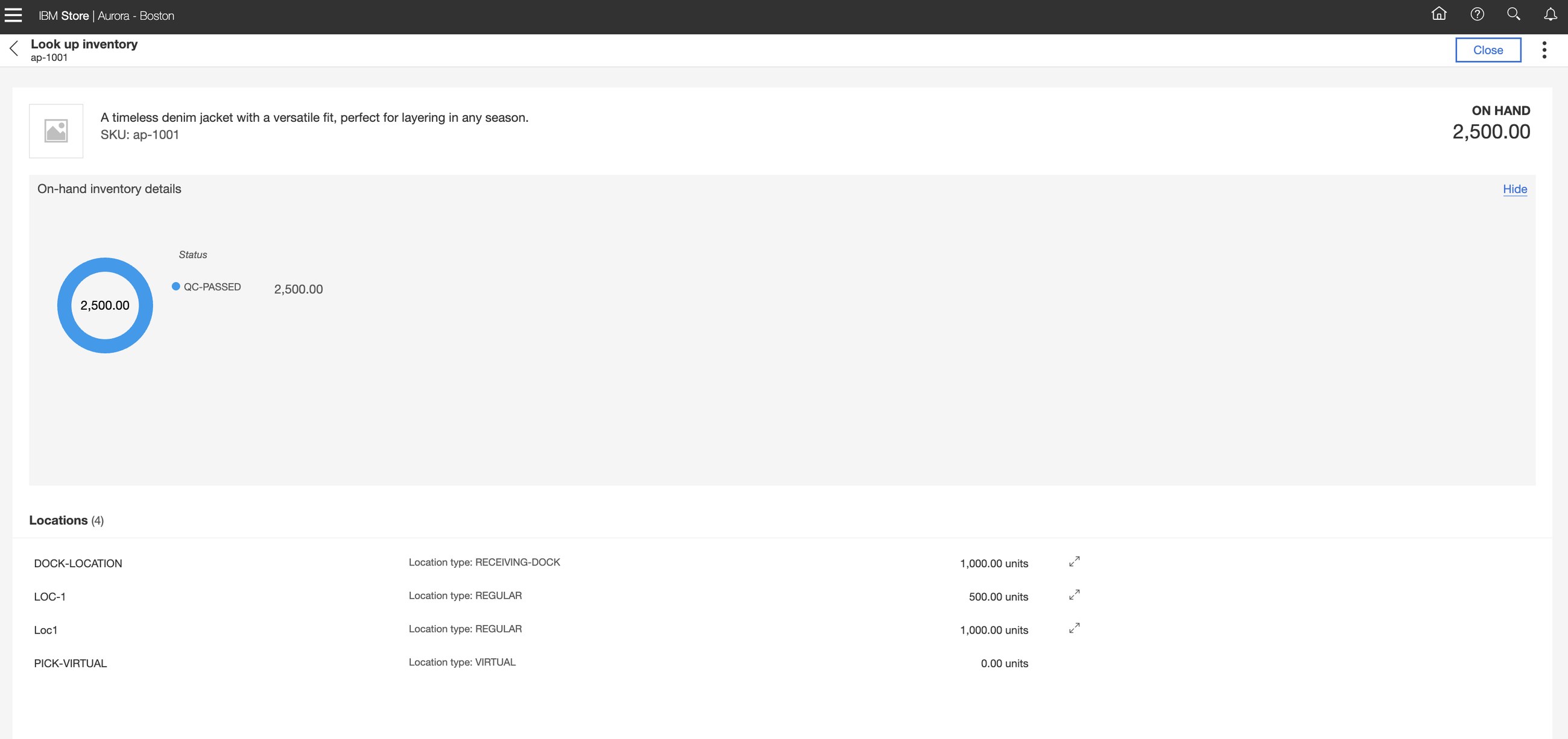
You can only promise store stock online if the store's numbers are right. Guided receiving and putaway are what make scenarios 2, 3 and 4 trustworthy.
How to say it: "How confident are you in your store inventory figures? Confident enough to promise them to an online customer?"
6Cross-dock, transfer and drop ship
SarahFred
The hardest fulfilment scenario and the best proof of the engine. Sarah orders four fashion items. Sterling works out a different path for each:
- Line 1 is in the primary warehouse: ship it.
- Line 2 is in no warehouse: buy it from a supplier (a purchase order).
- Line 3 is in another warehouse: move it (a transfer order).
- Line 4 is sent to Sarah directly by a vendor (drop ship).
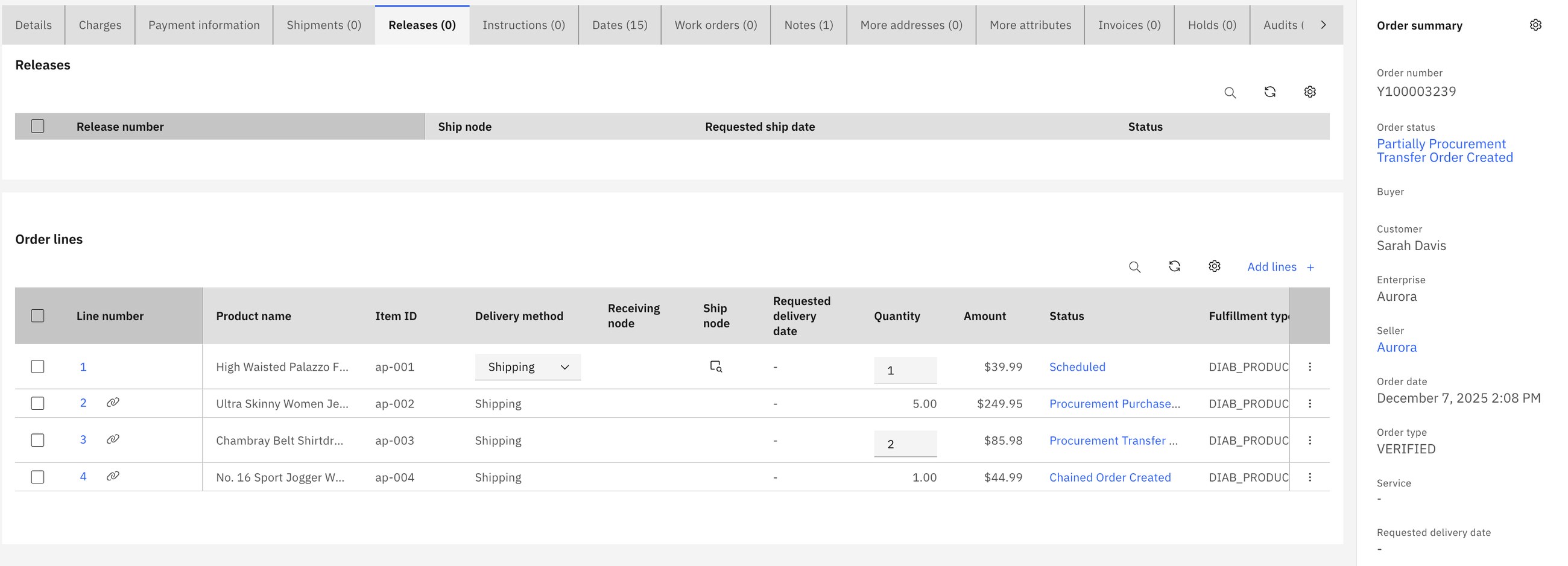
Sterling created three more orders automatically and linked them to Sarah's order. They are called chained orders. The chain icon on each line opens the related order.
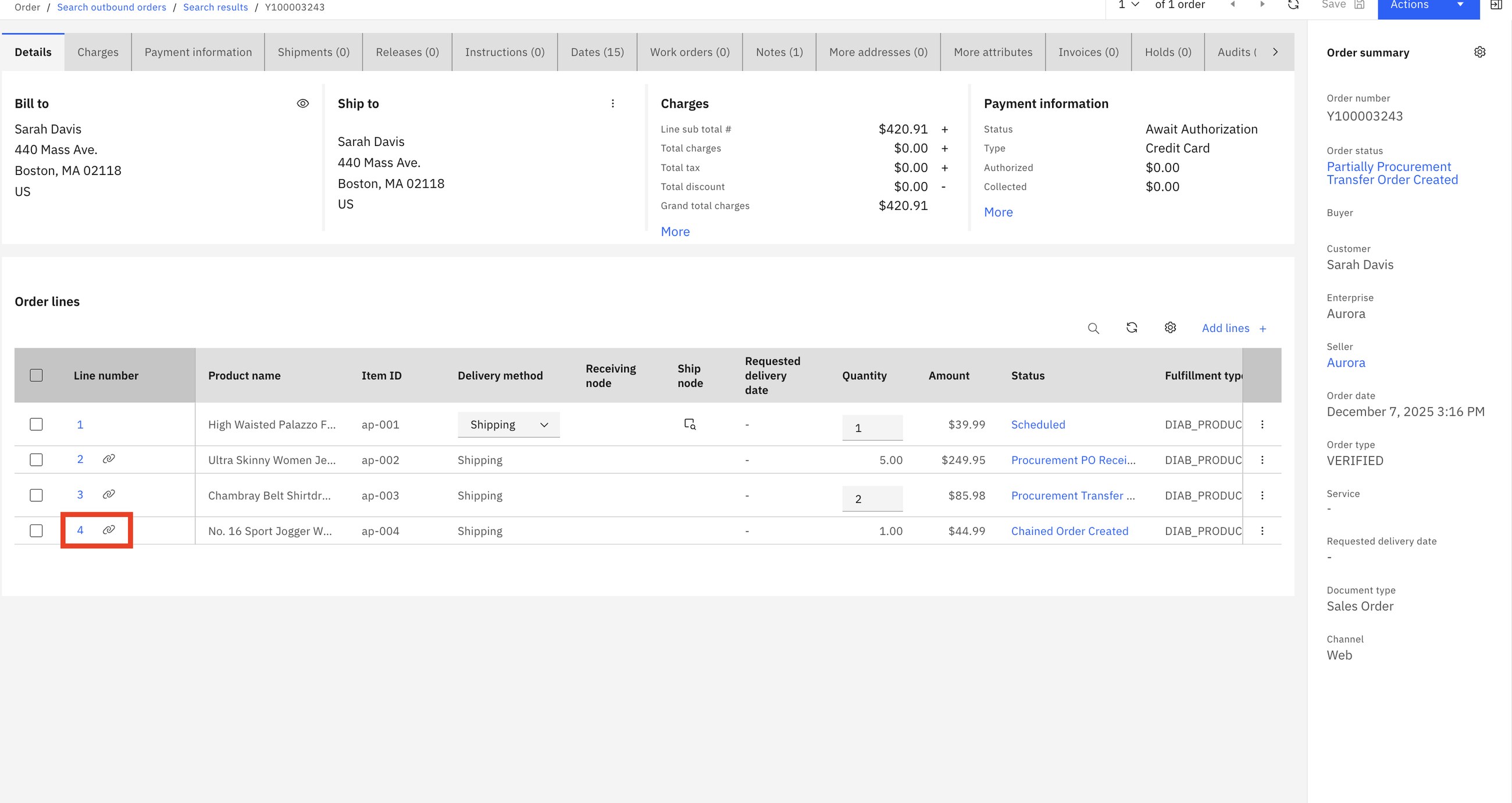
The supplier's goods and the transferred goods arrive at the primary warehouse and are not stored: they are received and go straight out with line 1. That is cross-docking. Sarah receives one parcel from the warehouse and one directly from the vendor.
1 sales order + 1 purchase order + 1 transfer order + 1 drop-ship order = 4 orders, 3 companies, 4 locations. The customer sees one order and one status. Nobody typed the other three.
How to say it: "When an item is not in stock, do you say no, or do you have a way to buy it, move it or have the vendor ship it, without a person re-keying orders?"
Part 2Inventory: deciding what may be promised
13Safety stock
Irina
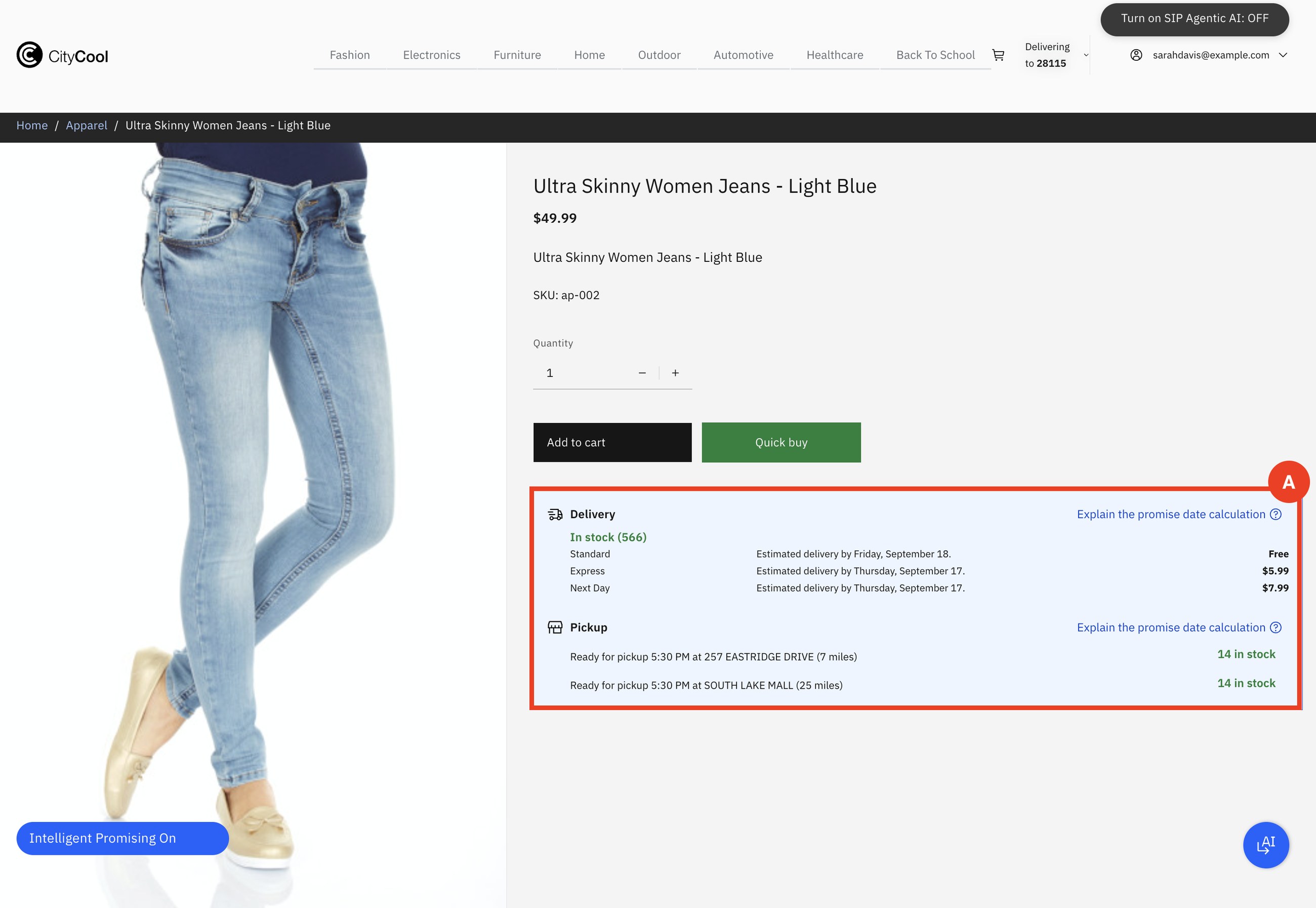
A pair of jeans goes viral. Irina wants to keep some for customers who walk into the store. First she looks at what the web shop is promising.
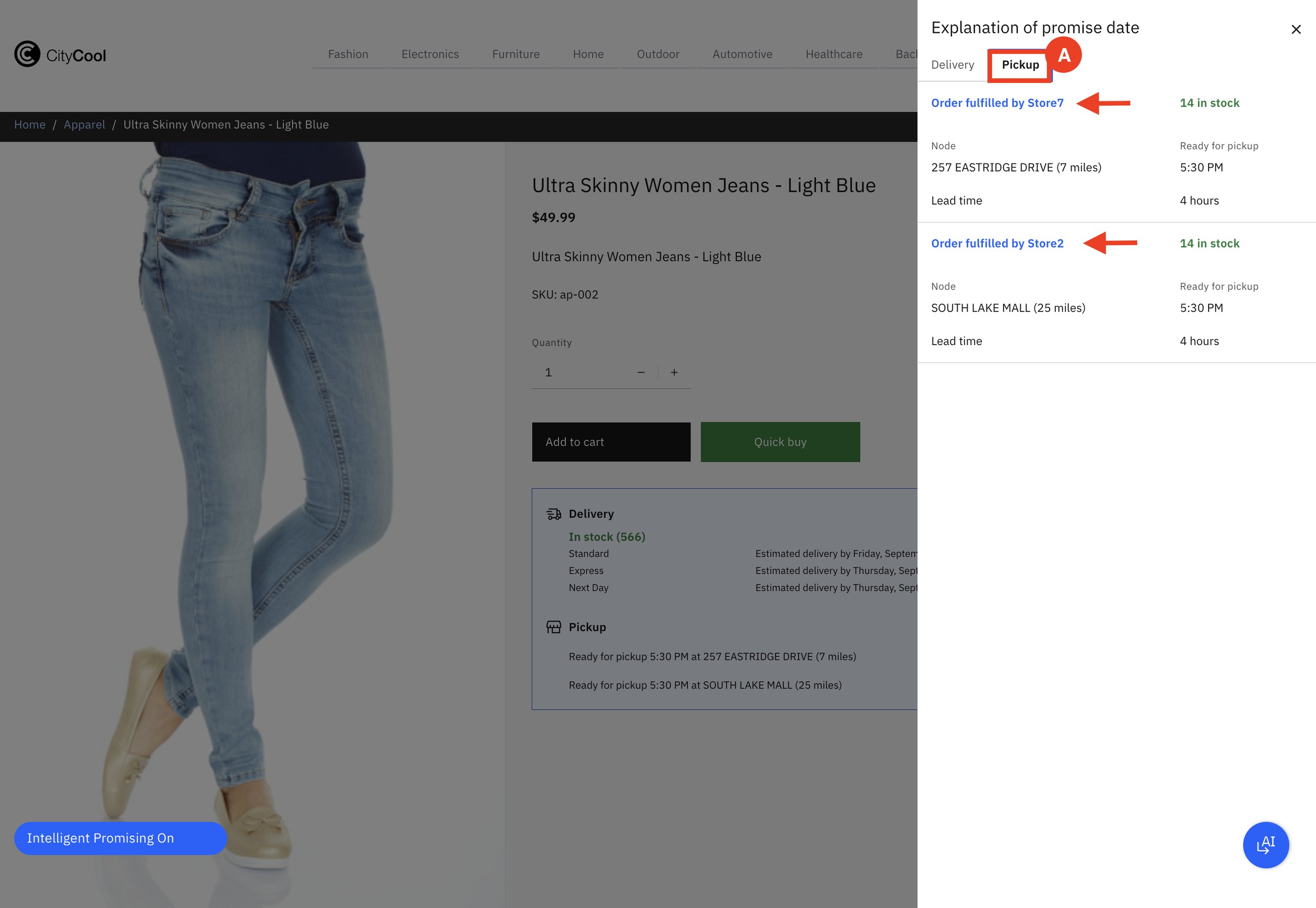
She creates a safety stock rule: for this item, for the Pick Up delivery method, at these two stores, hold back 10.
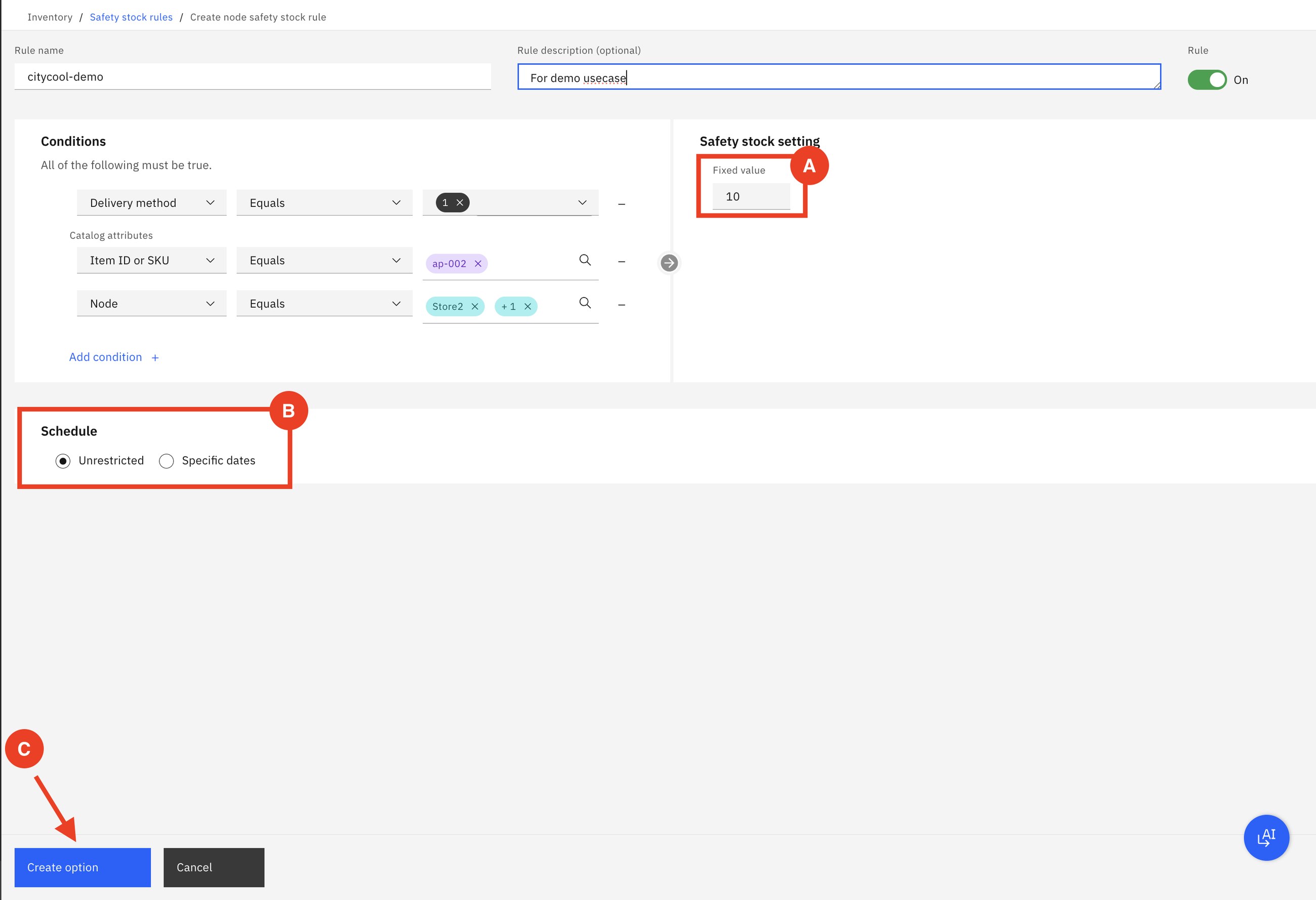
She goes back to the storefront. No code, no deployment, no nightly batch.
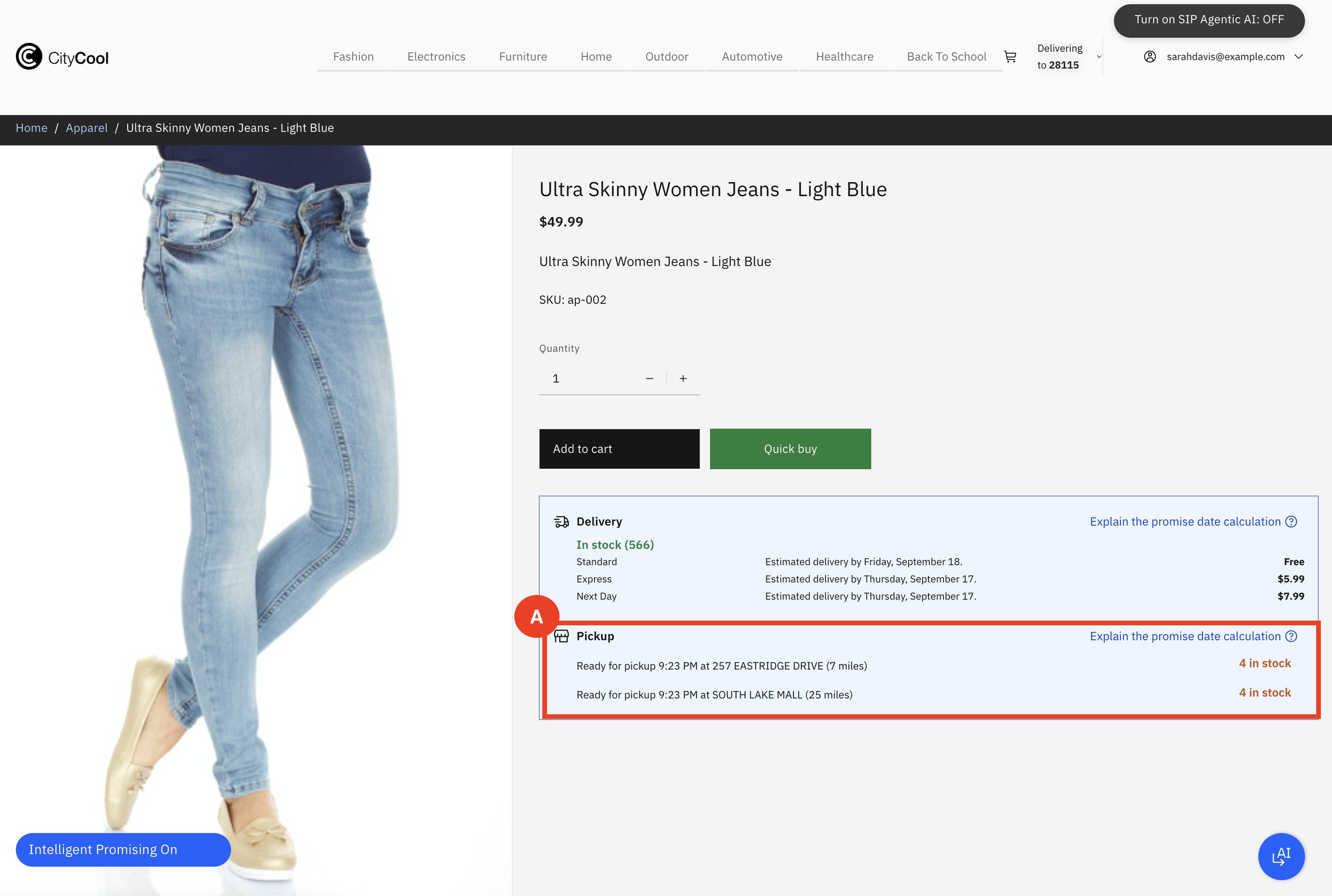
On hand for pickup: 14. Safety stock: 10. Available to promise online: 14 − 10 = 4. The other 10 are still physically in the store, for walk-in customers. A network rule can do the same with a percentage across all stores, for example 20% in peak season.
Stock on a shelf is not the same as stock you can sell. Some is promised to other orders, some is protected, some is on its way in. Sterling calculates what is truly left, per node, per delivery method and per date.
How to say it: "Who decides how much store stock the web shop may sell, and how fast can they change it when a product takes off?"
Part 3Service: when the customer calls
Everything in this part happens in Sterling Call Center. The agent works on the same order record as Fred and Tim.
7Order modification
SarahAnaya
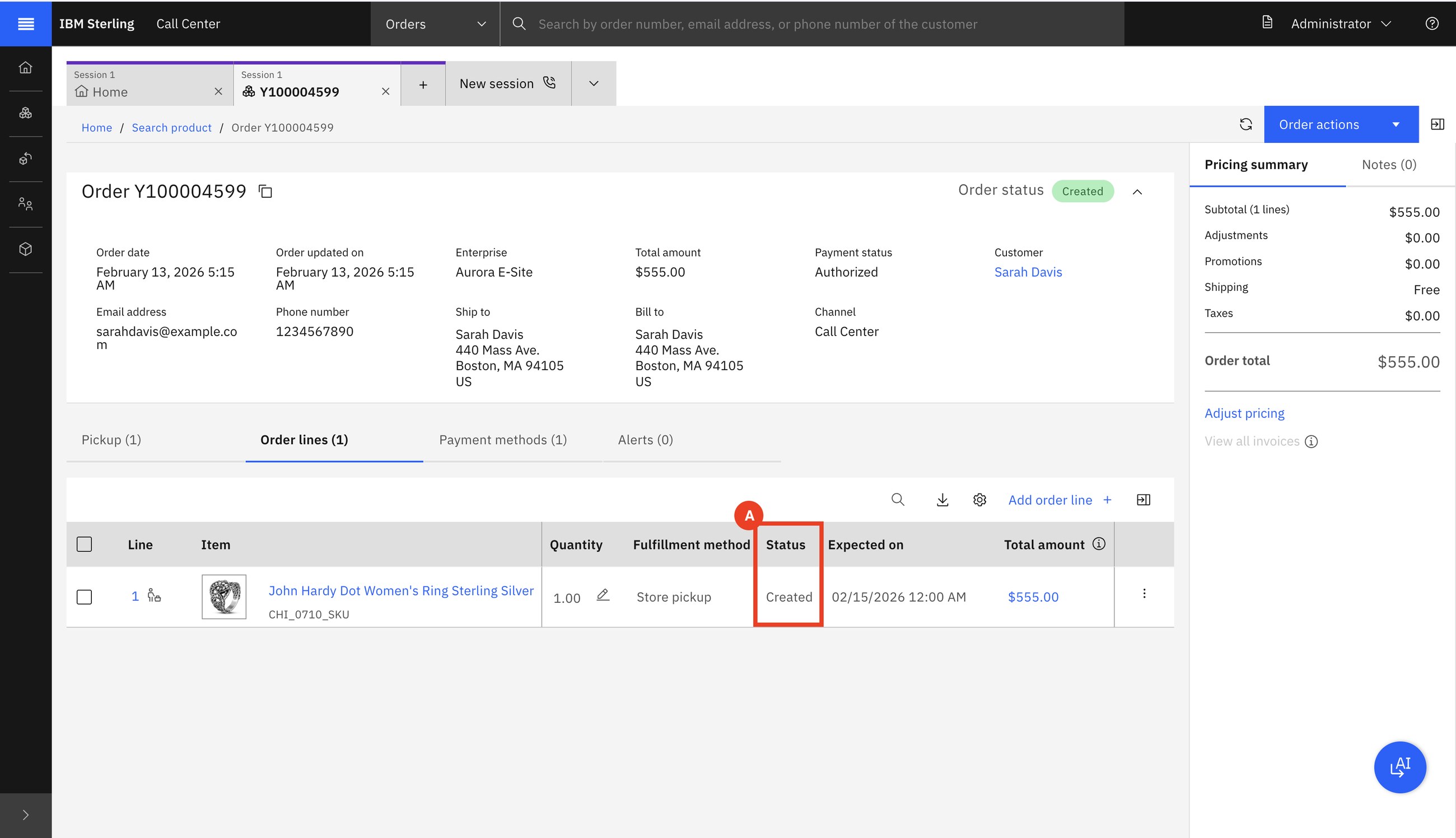
Sarah's order is scheduled but not released. She calls: remove one item, add another, and apply a coupon.
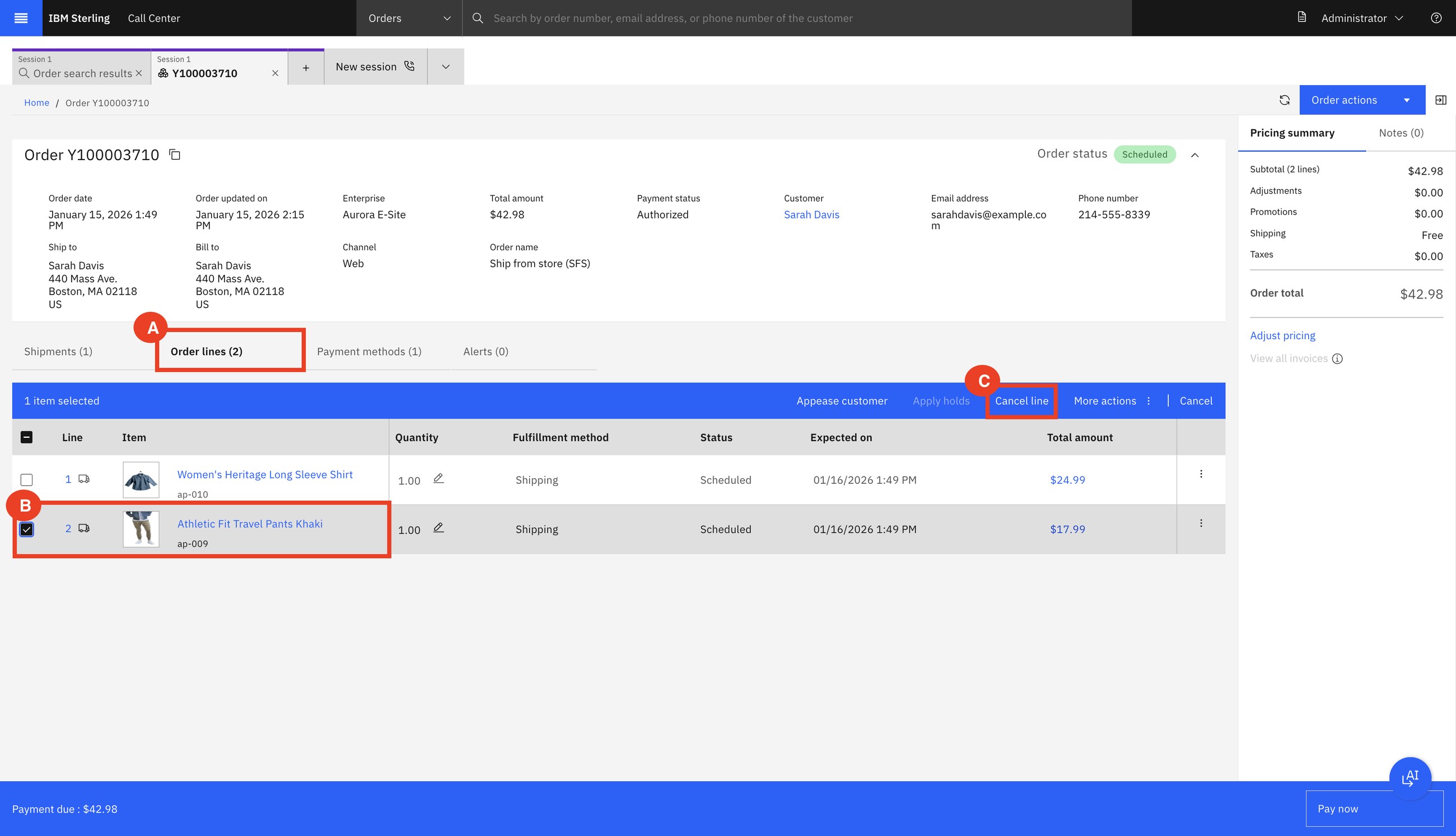
Anaya adds the new product, chooses home delivery, applies the coupon and takes the difference in payment.
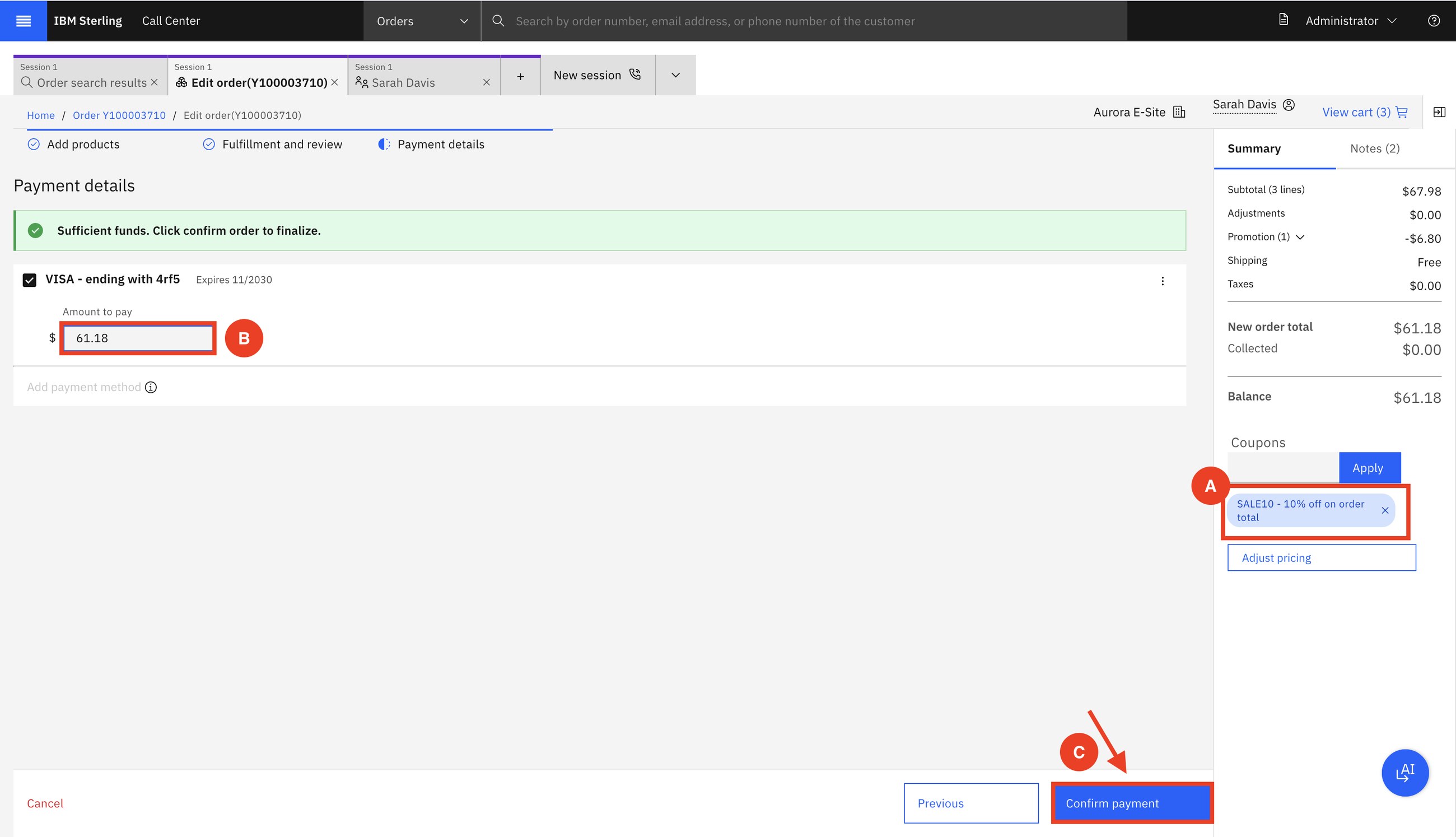
Because the order is only Scheduled, changing it is allowed. Once it is released to a node or shipped, the same buttons are no longer offered. The agent does not need to know the rule; the screen enforces it.
8Return order
SarahAnaya
Sarah received three furniture items and changed her mind. Anaya finds the order and starts a return.
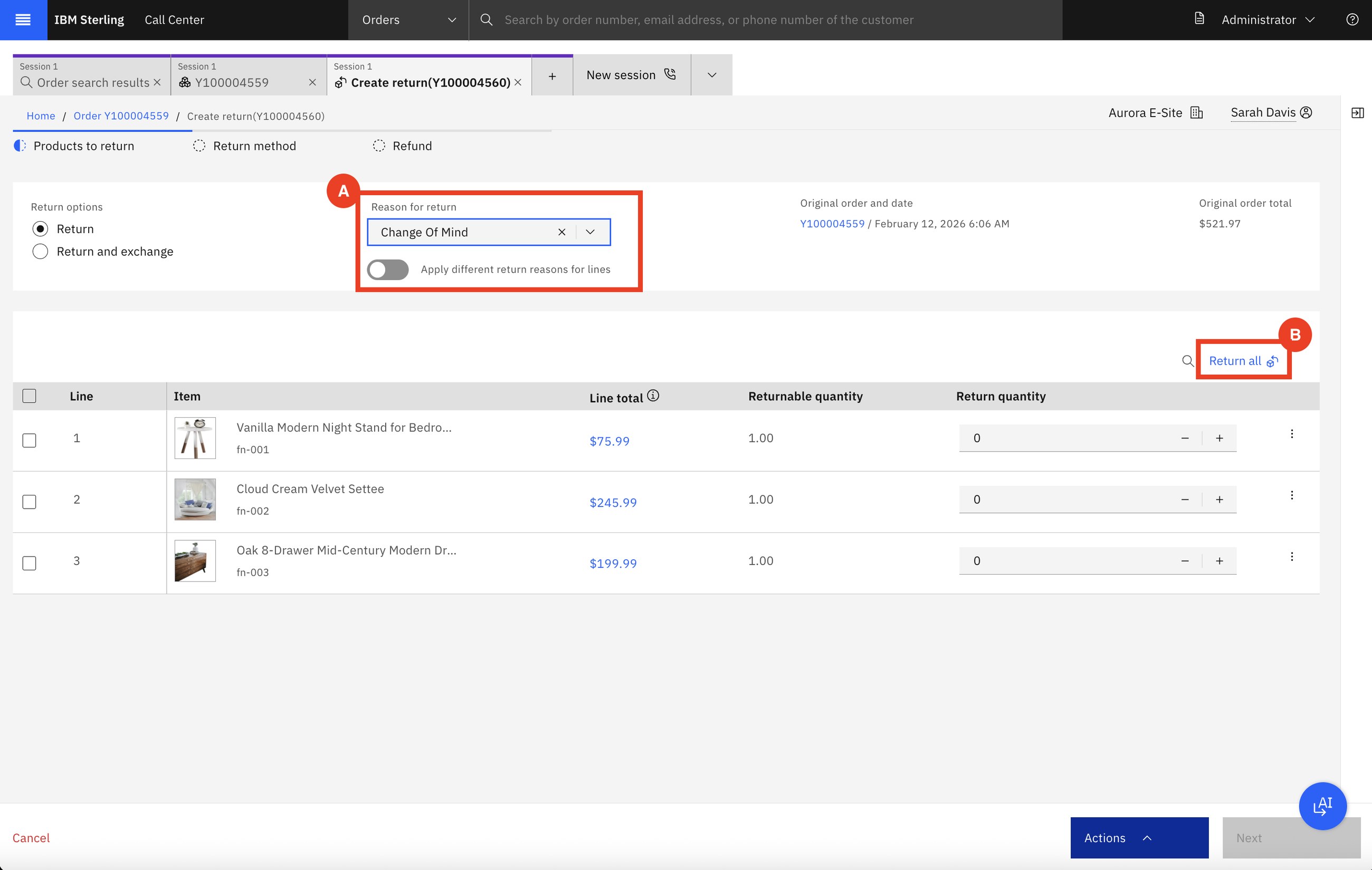
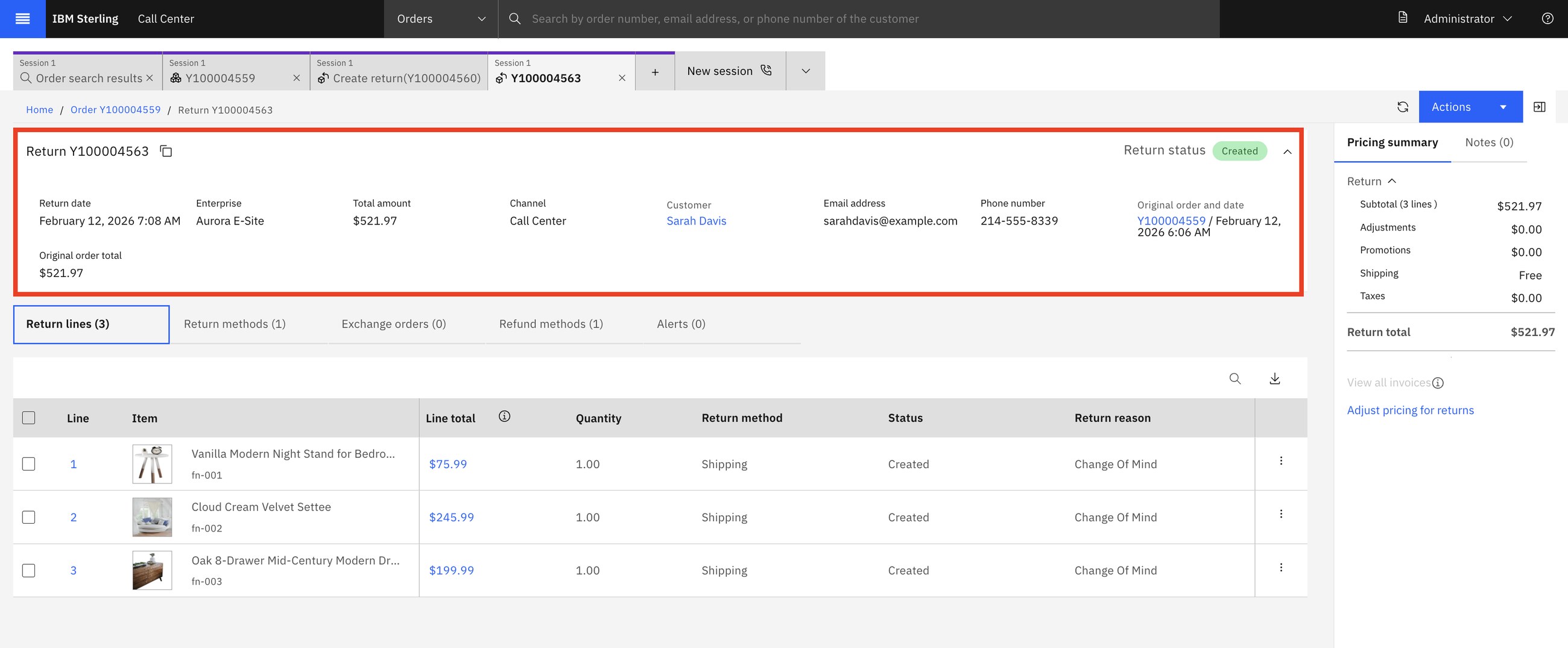
A return is an order too: it has lines, a status, a destination node and a refund. That is why Sterling can route returns with rules, just as it routes sales.
9Product browsing by the agent
SarahAnaya
Sarah has no order yet. She calls and asks for help finding a ring. The call center is also a sales channel.
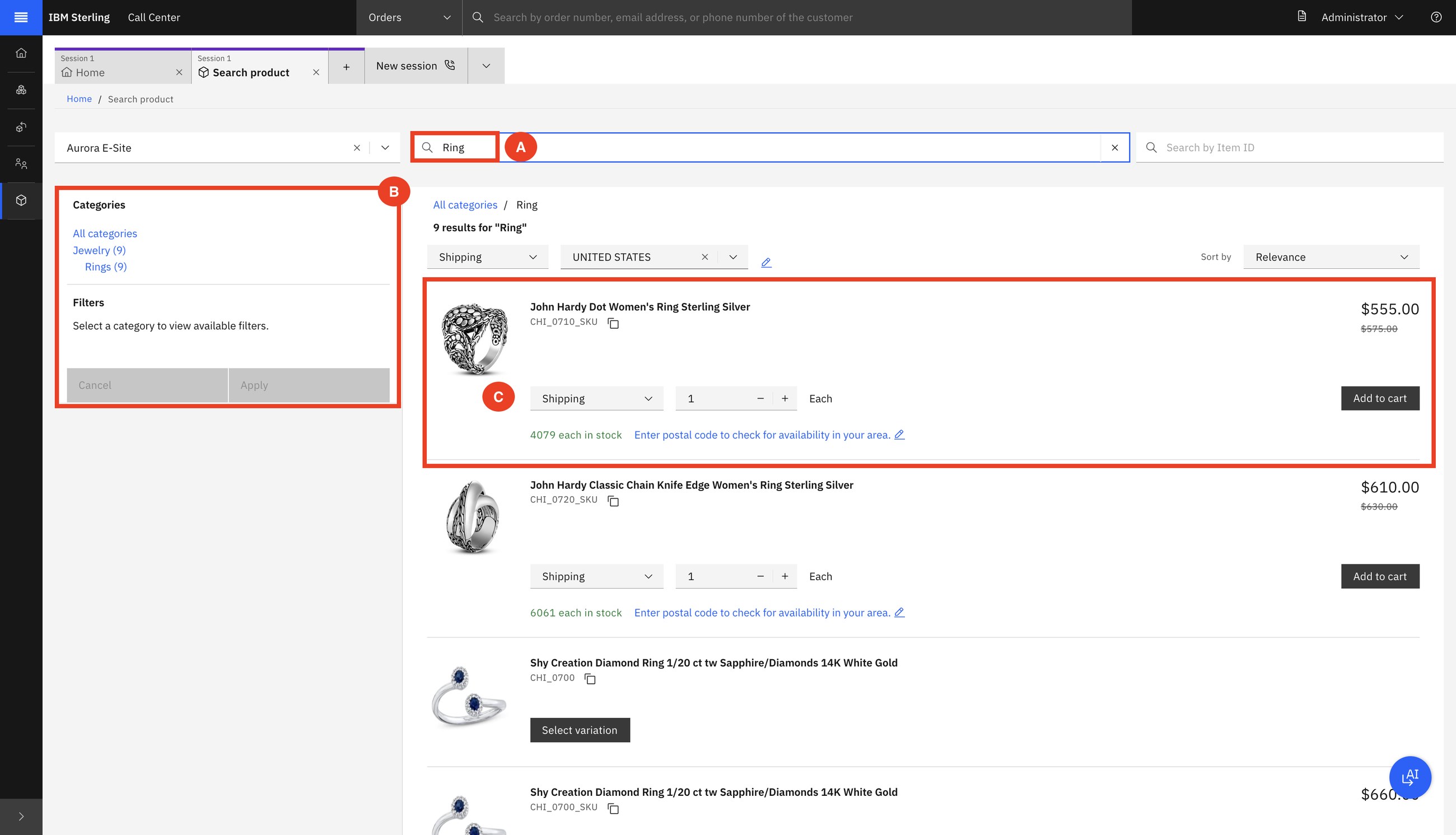
Anaya checks delivery against store pickup, picks what Sarah prefers, adds the item and takes payment.
10Change fulfilment method
SarahAnaya
Sarah ordered three items for delivery from the warehouse. Before they ship she would rather collect them in Boston.
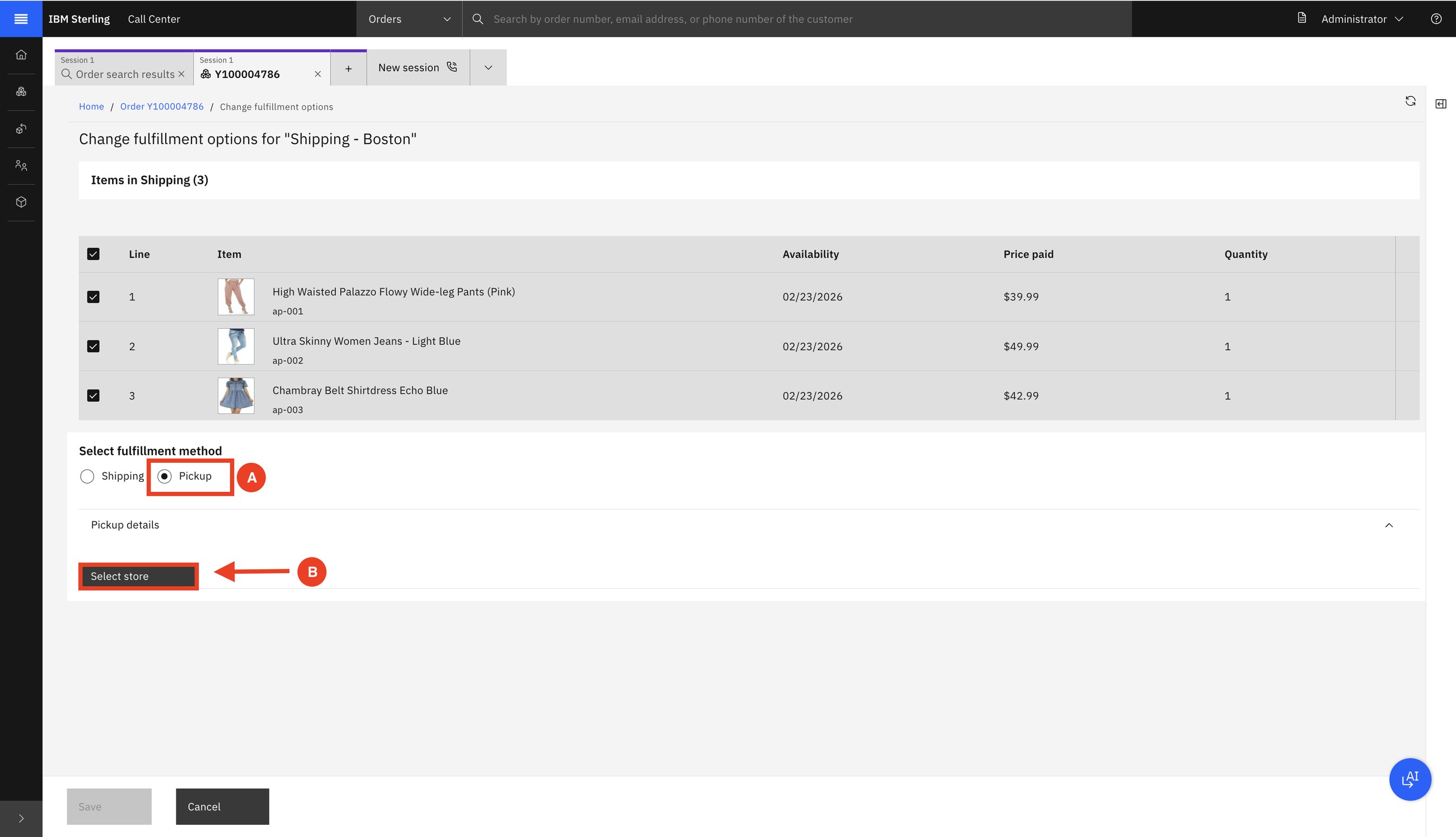
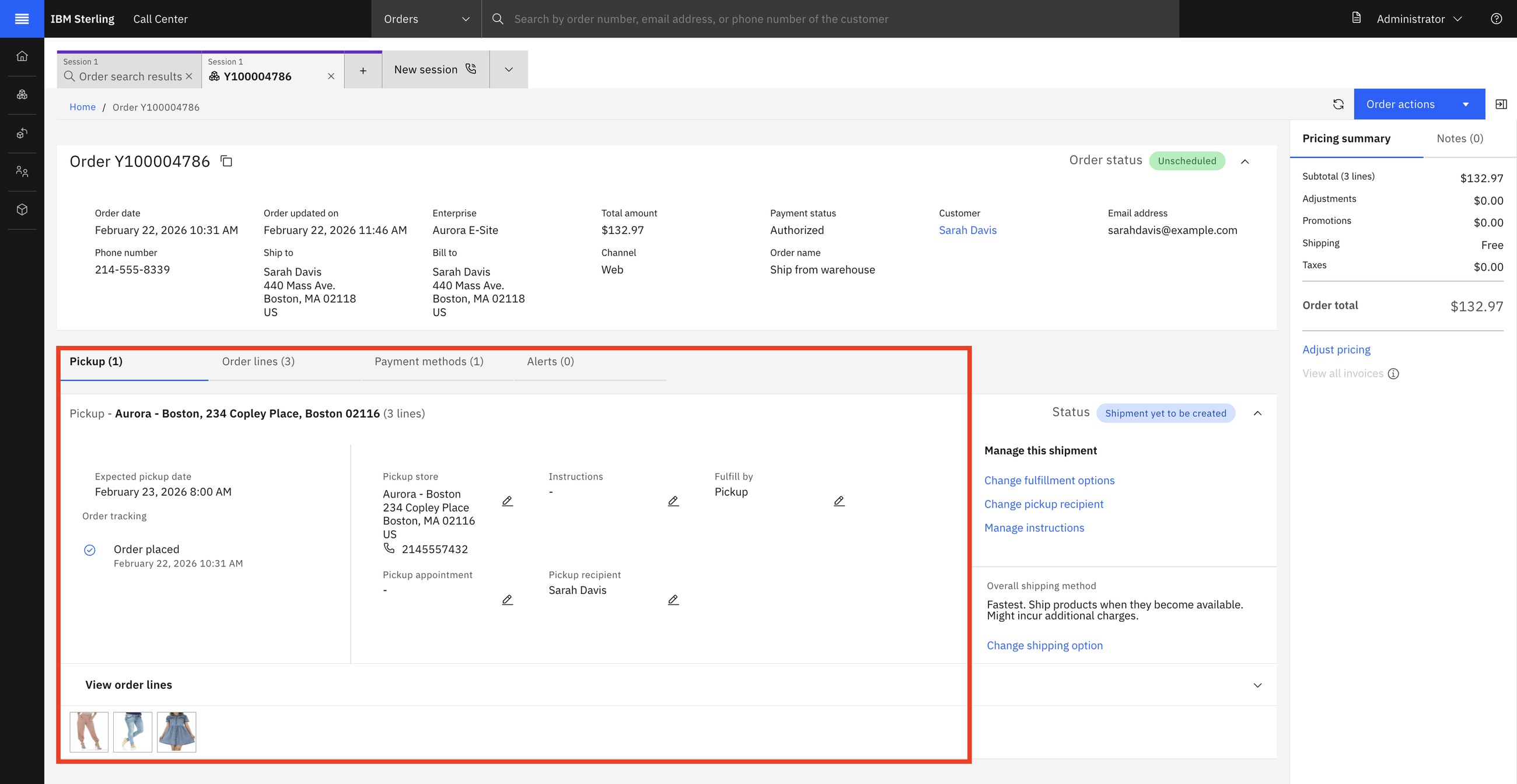
How to say it: "Can your customer service turn a delivery into a store pickup while the customer is on the phone?"
12Order search and appeasement
SarahAnaya
Sarah's order arrived, but the delivery was bad. Anaya wants to keep the customer.
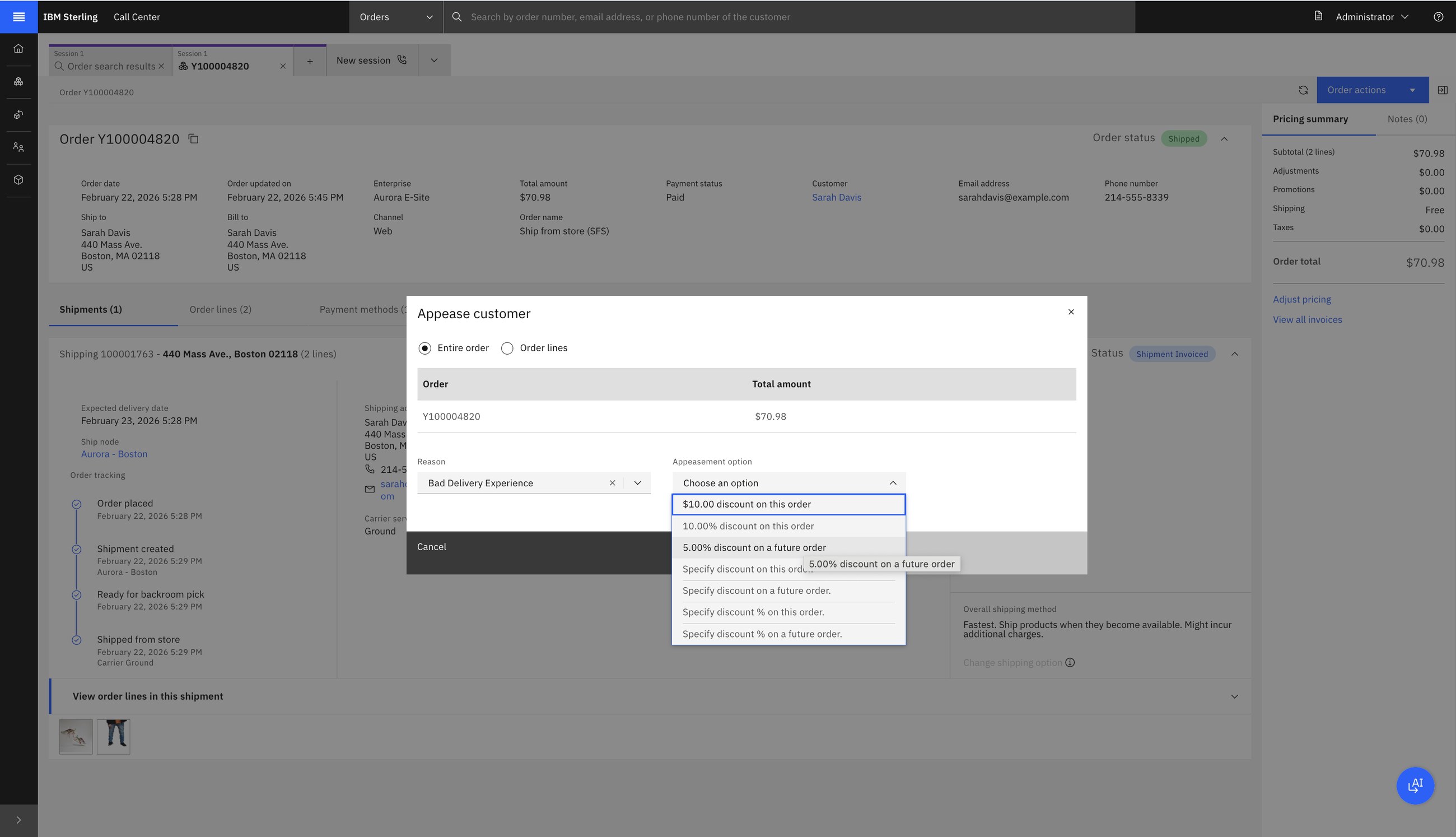
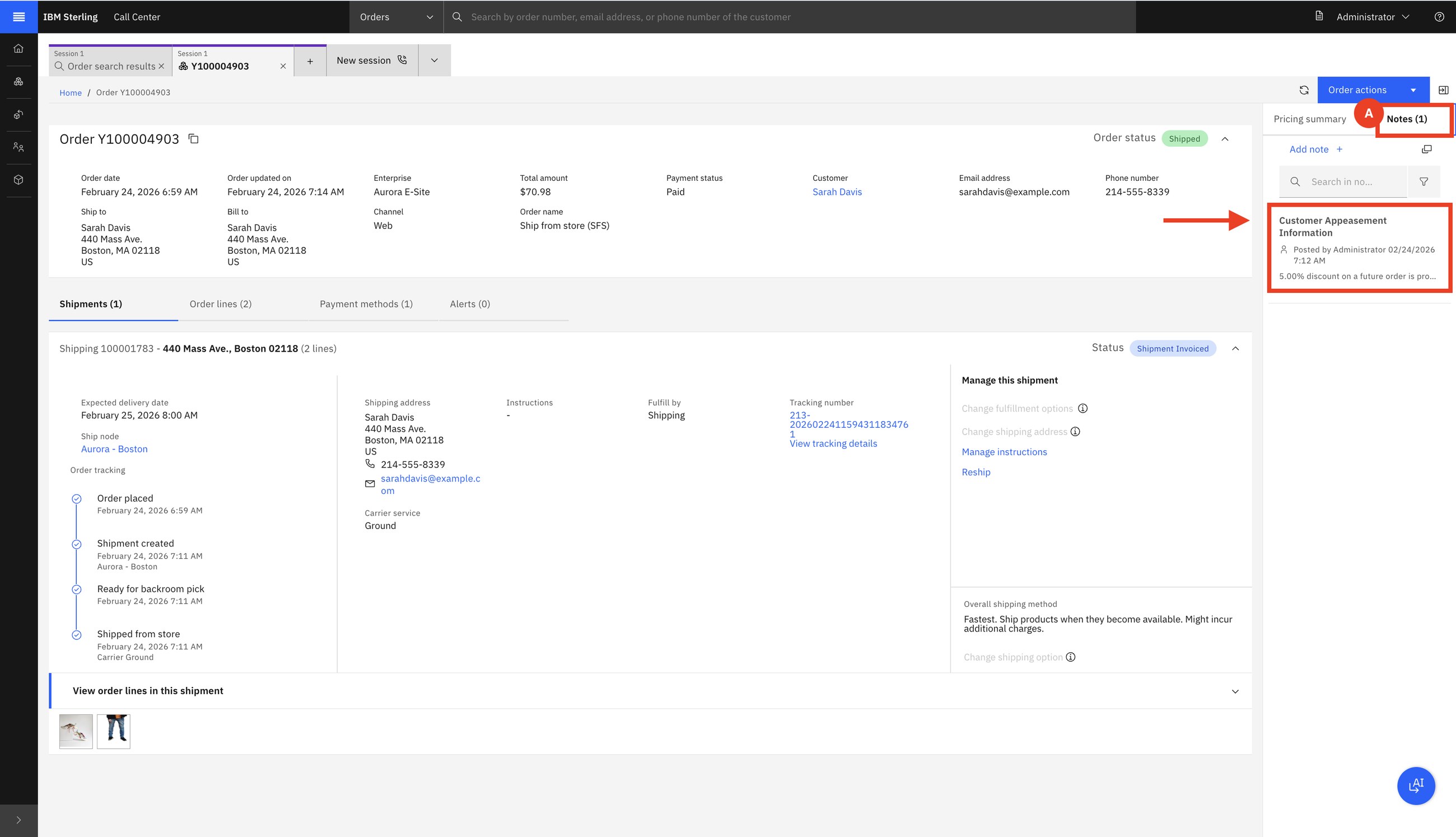
A goodwill gesture: a refund, a discount now or a discount on the next order. Sterling offers only what company policy allows for that reason, and keeps the trace.
16Order verifications (holds)
SarahFred
Not every order should flow straight through. This one was stopped three times at creation.
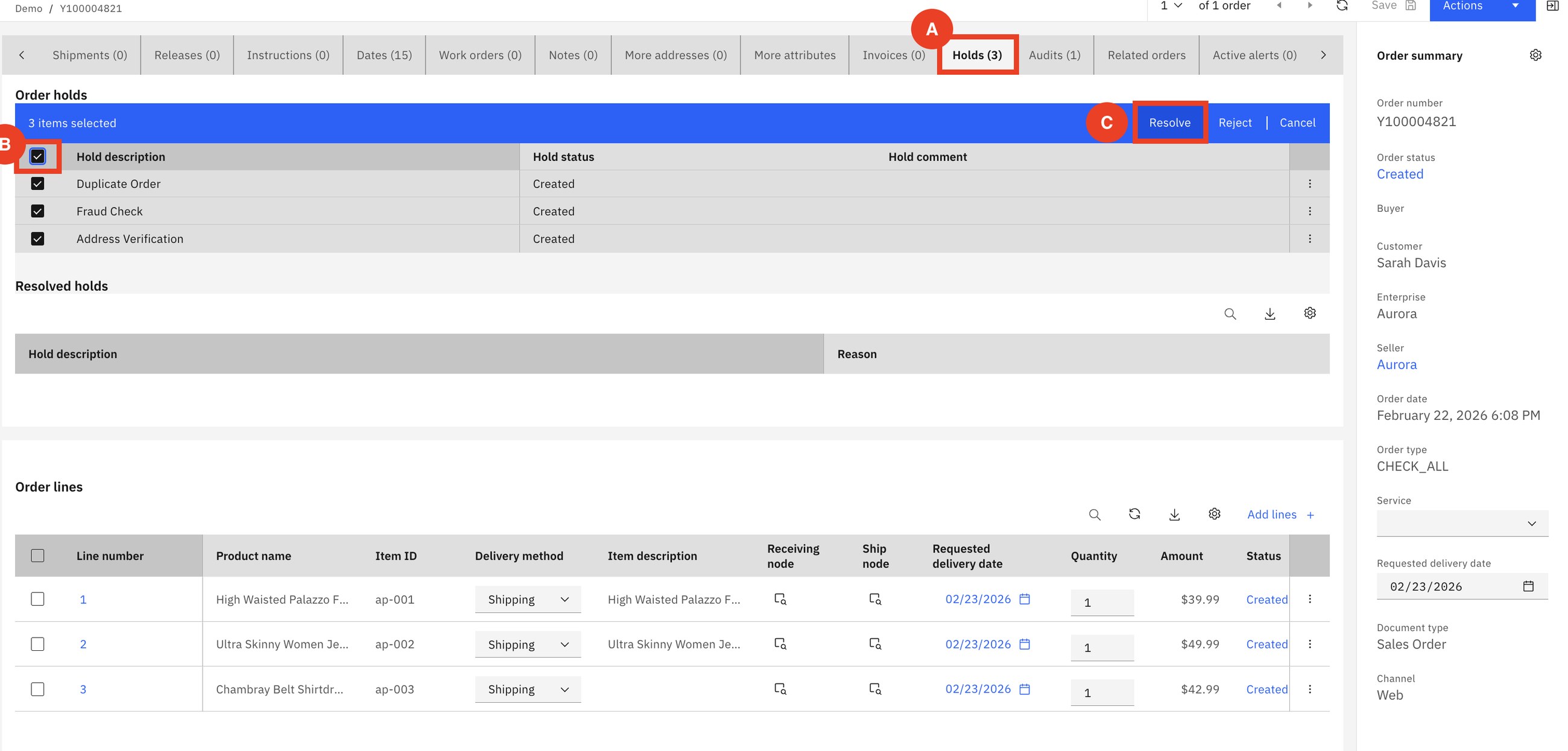
A hold freezes the order until it is resolved, either automatically (the fraud service answers) or by a person. Fred reviews, resolves with a comment, and the order continues to scheduling.
Holds are how the business inserts its own checks into the order's life: fraud, credit, duplicates, address, export control, manager approval. Each hold type says which steps it blocks and who may resolve it.
Part 4AI: agents that follow the rules
The newest scenarios add an AI assistant to Call Center and Order Hub. The important point for a seller: the assistant does not invent actions. It calls the same governed functions an agent would click.
11AI-assisted appeasement
Anaya
Three orders are late. The three customers are tagged by past behaviour: red, yellow, green. Anaya asks the assistant for a resolution on each.
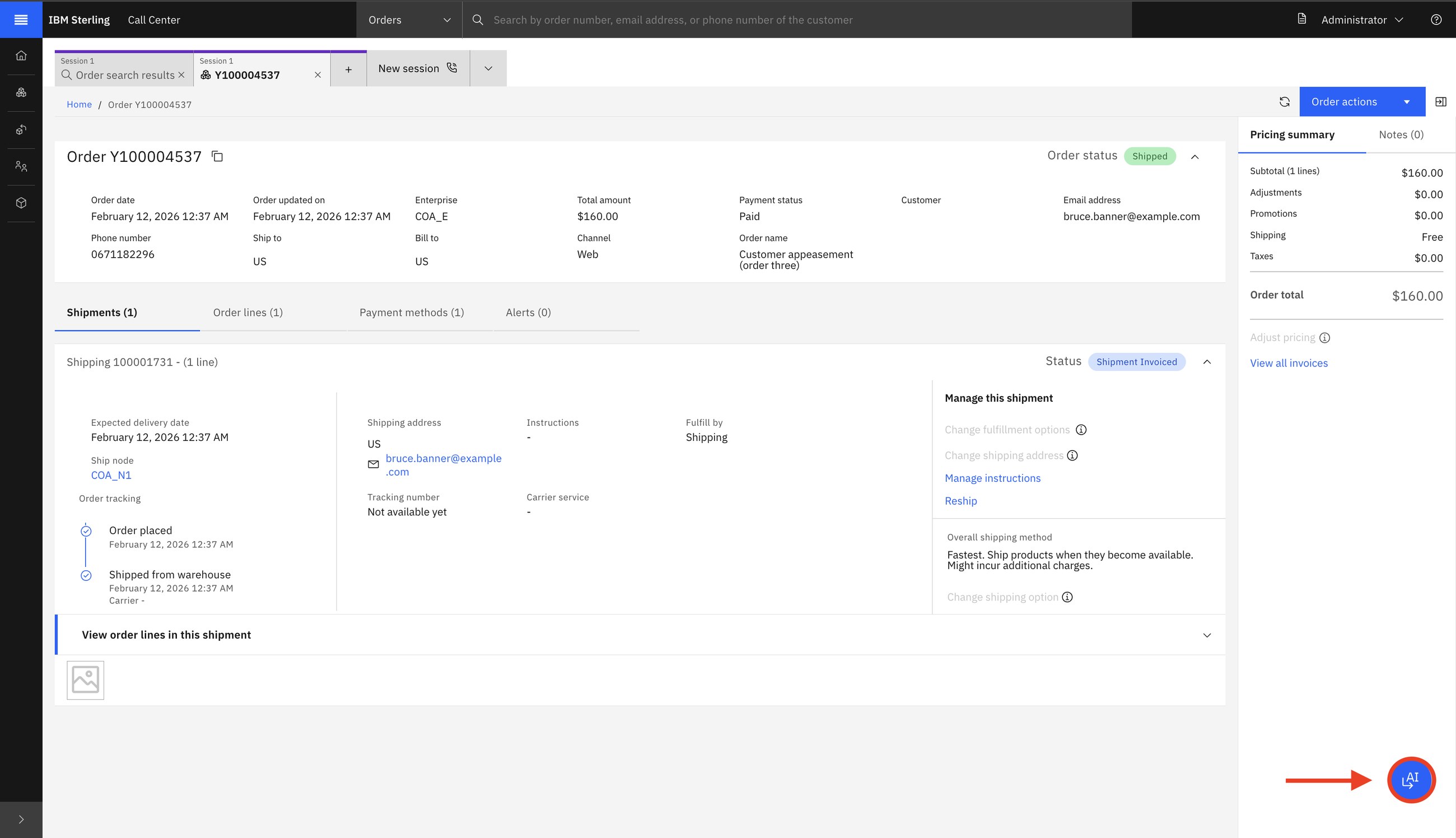
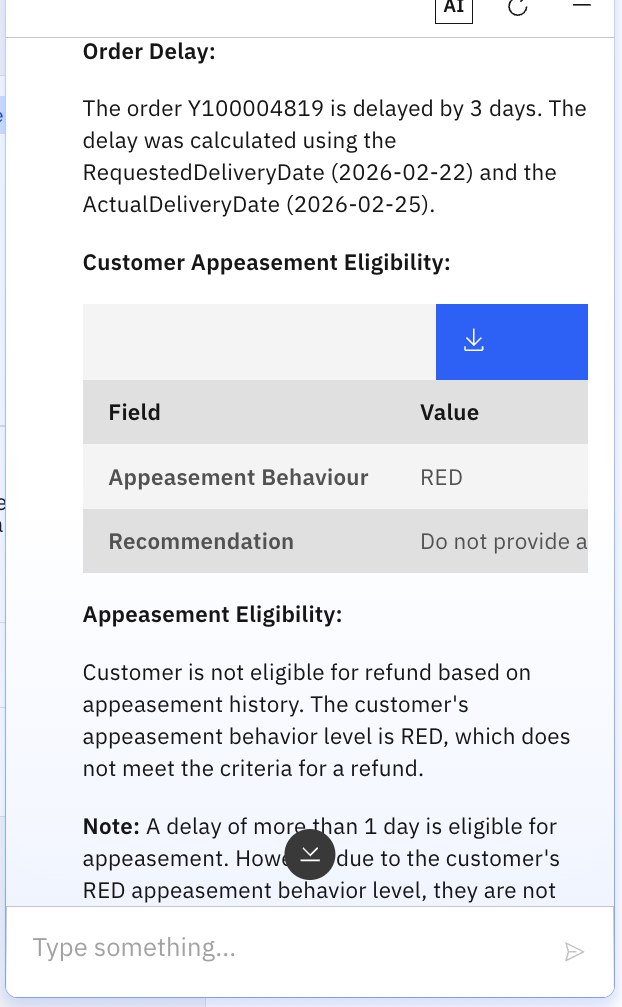
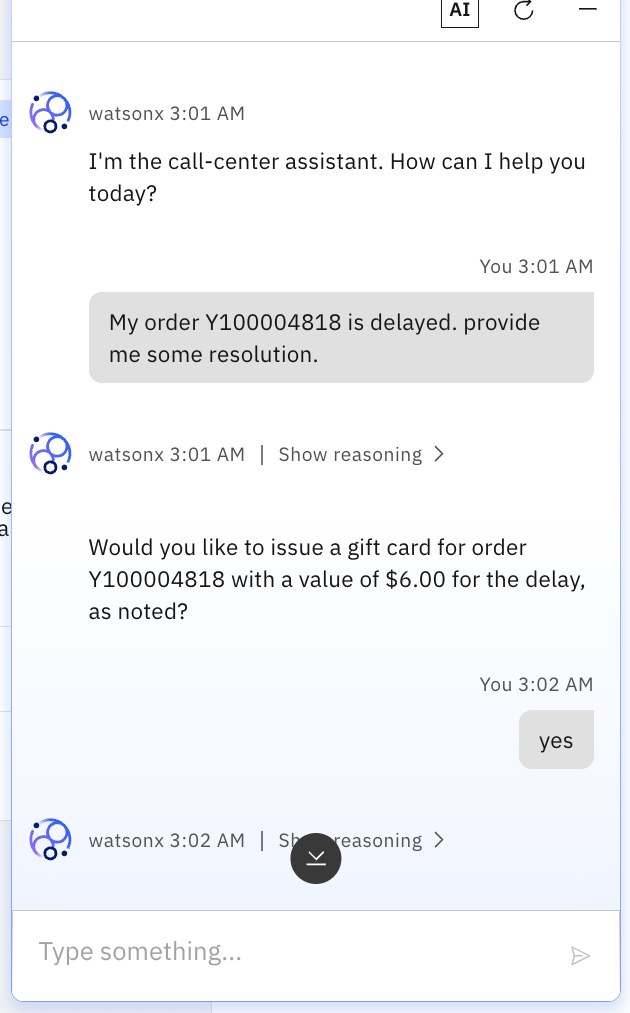
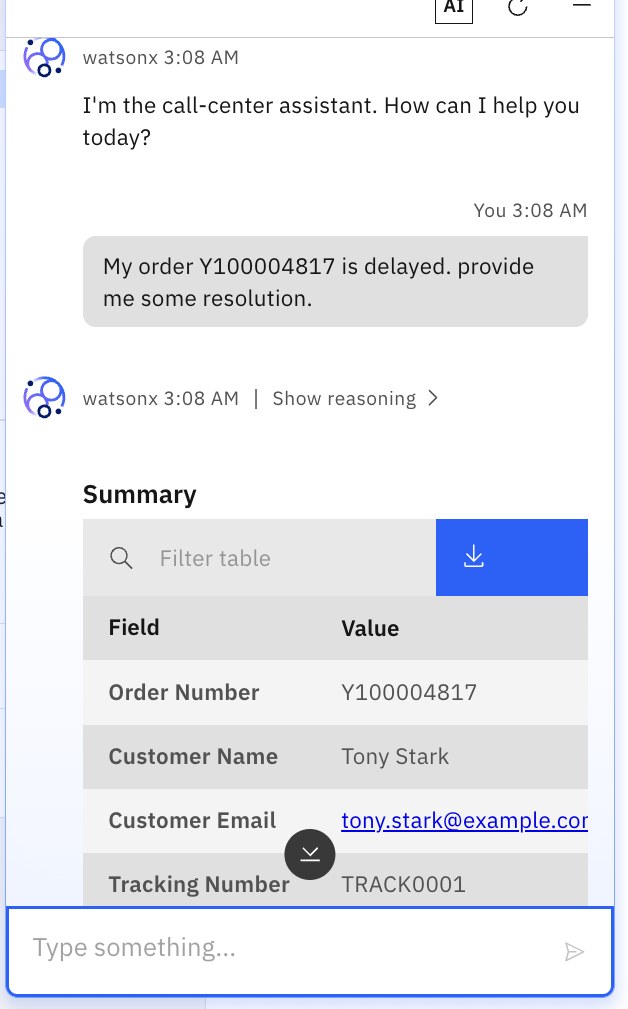
The assistant weighs the days of delay and the customer's value using the company's own runbook. Two agents asking about the same order get the same answer, and the agent still confirms before anything is applied.
15AI-assisted cancellation
SarahAnaya
Sarah wants to cancel. Anaya types it in plain words.
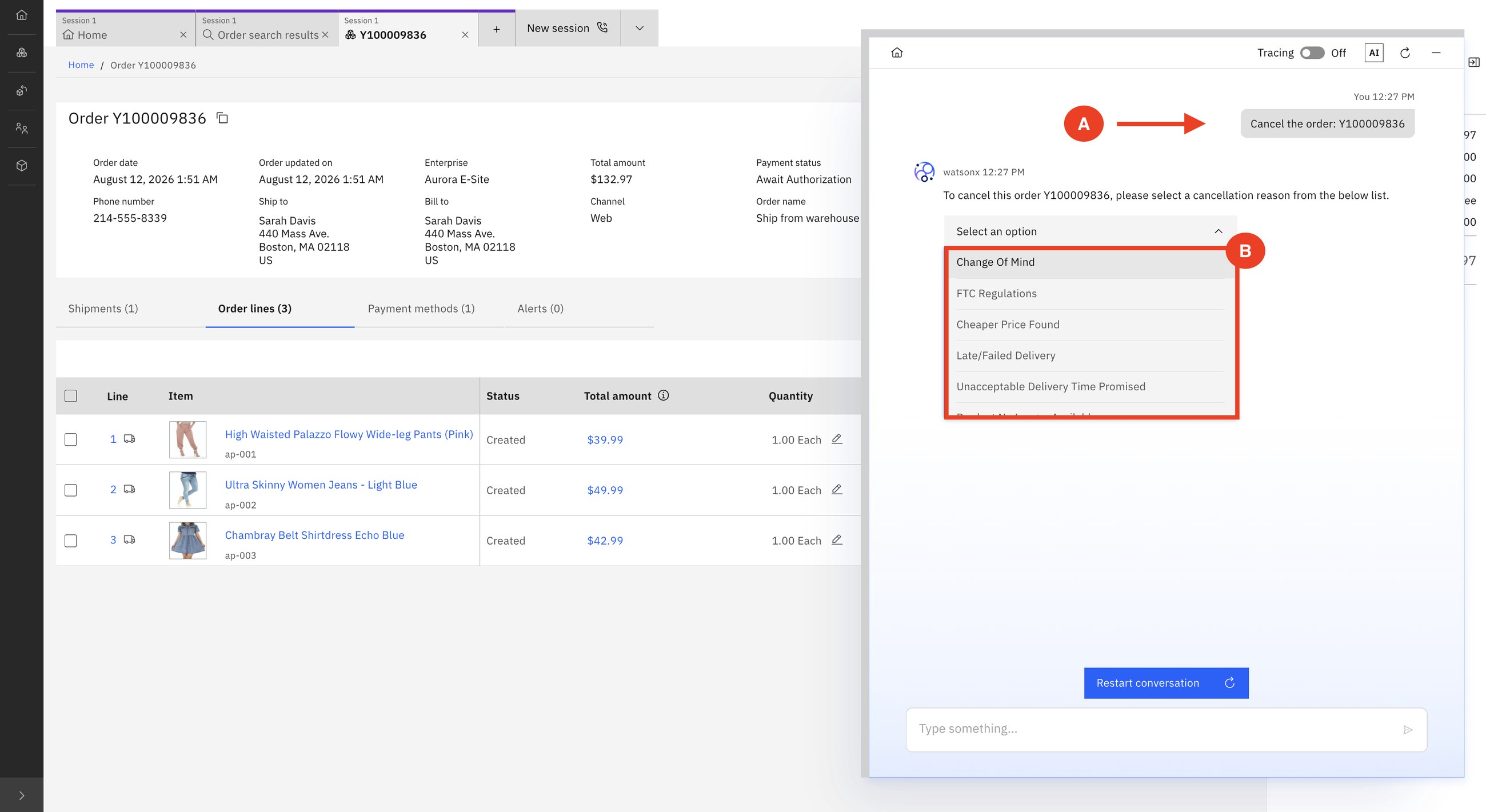
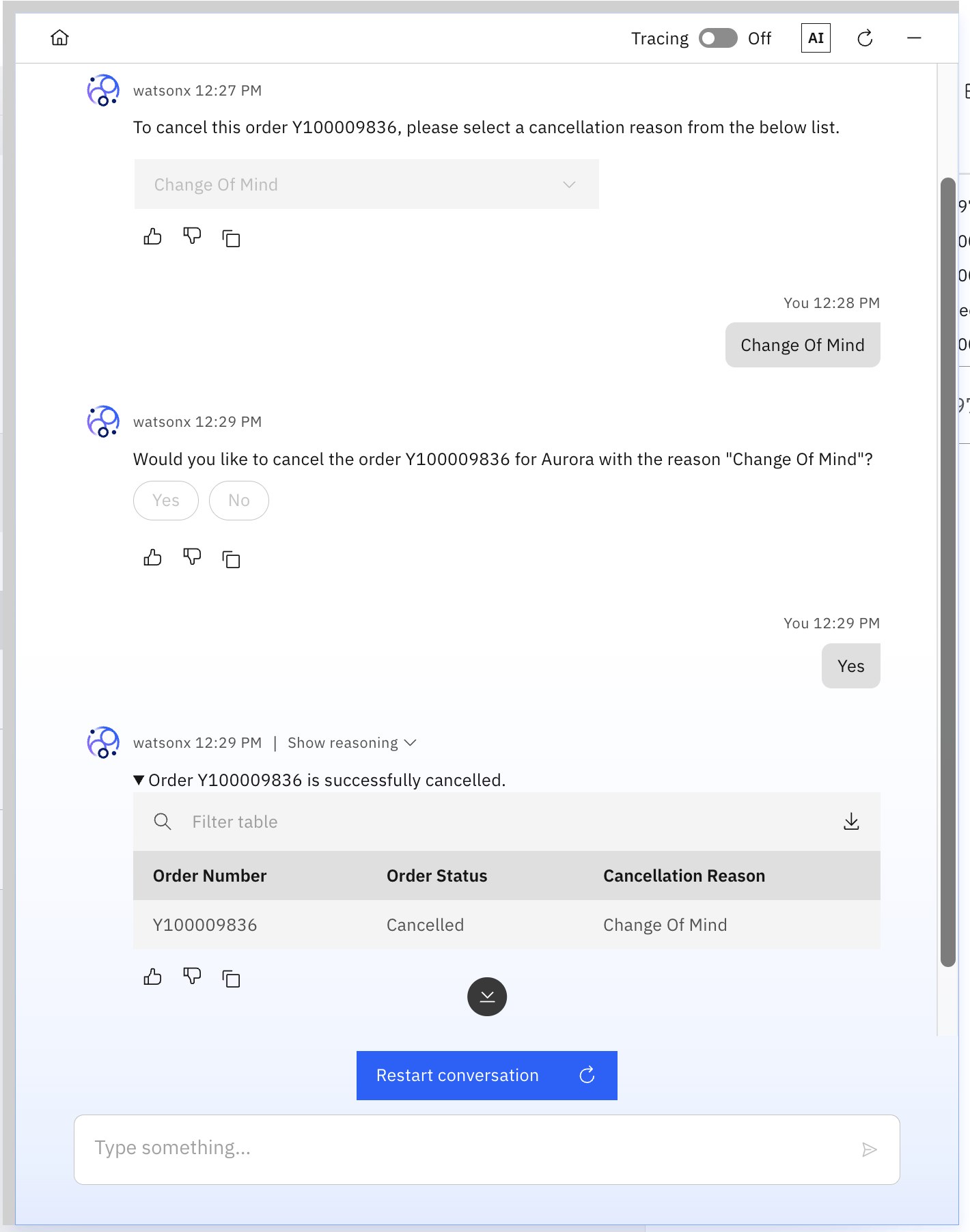
No reason codes to remember, no screens to navigate, and a mandatory confirmation before a change that affects the customer.
AIAgentic AI tools in Order Hub
Administratorpartner developer
Where do the assistant's abilities come from? From tools: named, described actions such as appease_customer, apply_coupon, cancel_order or get_node_availability. Order Hub has a place to see and manage them.
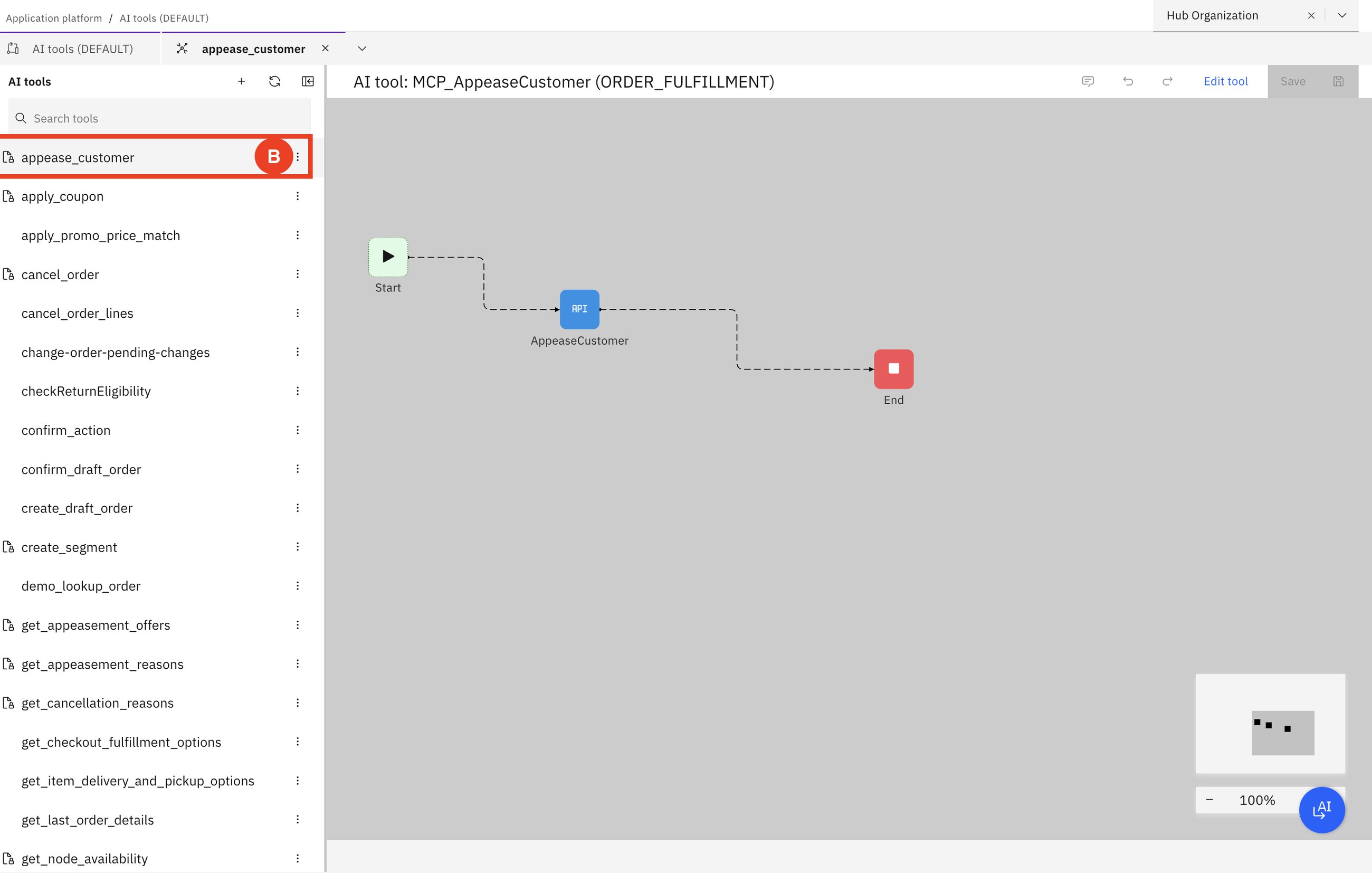
- IBM-provided tools and customer-created tools are marked differently.
- A customer can override an IBM tool's description, permissions or schema without touching IBM's original, compare the two, and revert.
- Customer tools can be created from Sterling's APIs and services, and deleted when no longer needed. IBM's cannot be deleted.
MCP (Model Context Protocol) is a standard way to describe an action so that any AI agent can use it. Sterling exposes order, return and inventory functions as such tools, with read/write permissions. The AI is only as powerful as the tools it is given, and the customer controls that list.
How to say it: "The assistant can only do what you have published as a tool, with the permissions you set. You extend it by configuration, not by rebuilding integrations."
Part 5B2B: orders that repeat
14B2B contract order
Sarah (buyer)KimFred
Sarah is now a procurement manager at New Wave Equipment. She needs car infotainment kits (a display, a rear camera and a wiring kit) every month. Kim creates a contract order: 100 of each, with a recurring delivery plan.
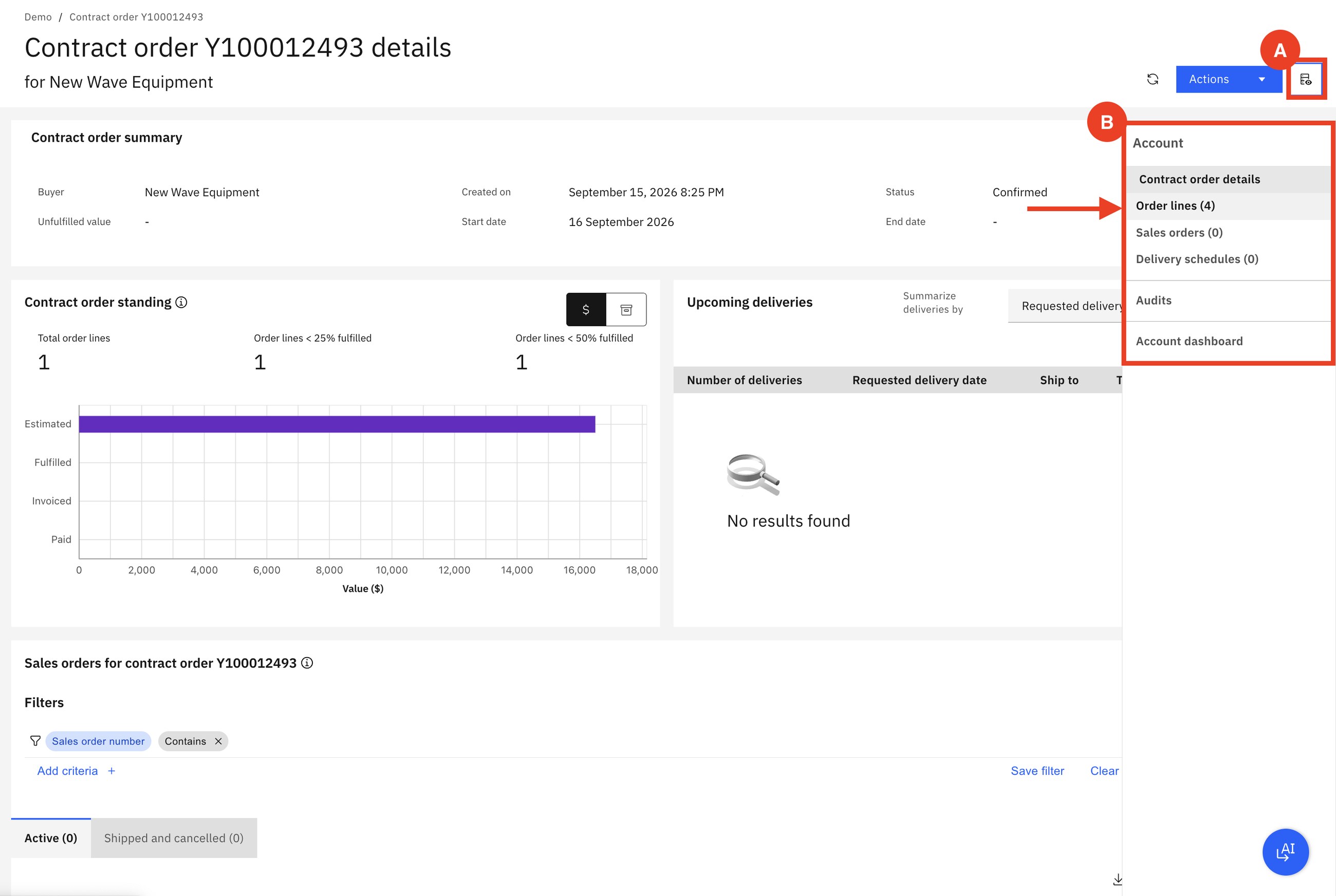
Kim defines the schedule: every month, 10 of each component, to one of the buyer's addresses. Sterling takes over from there.
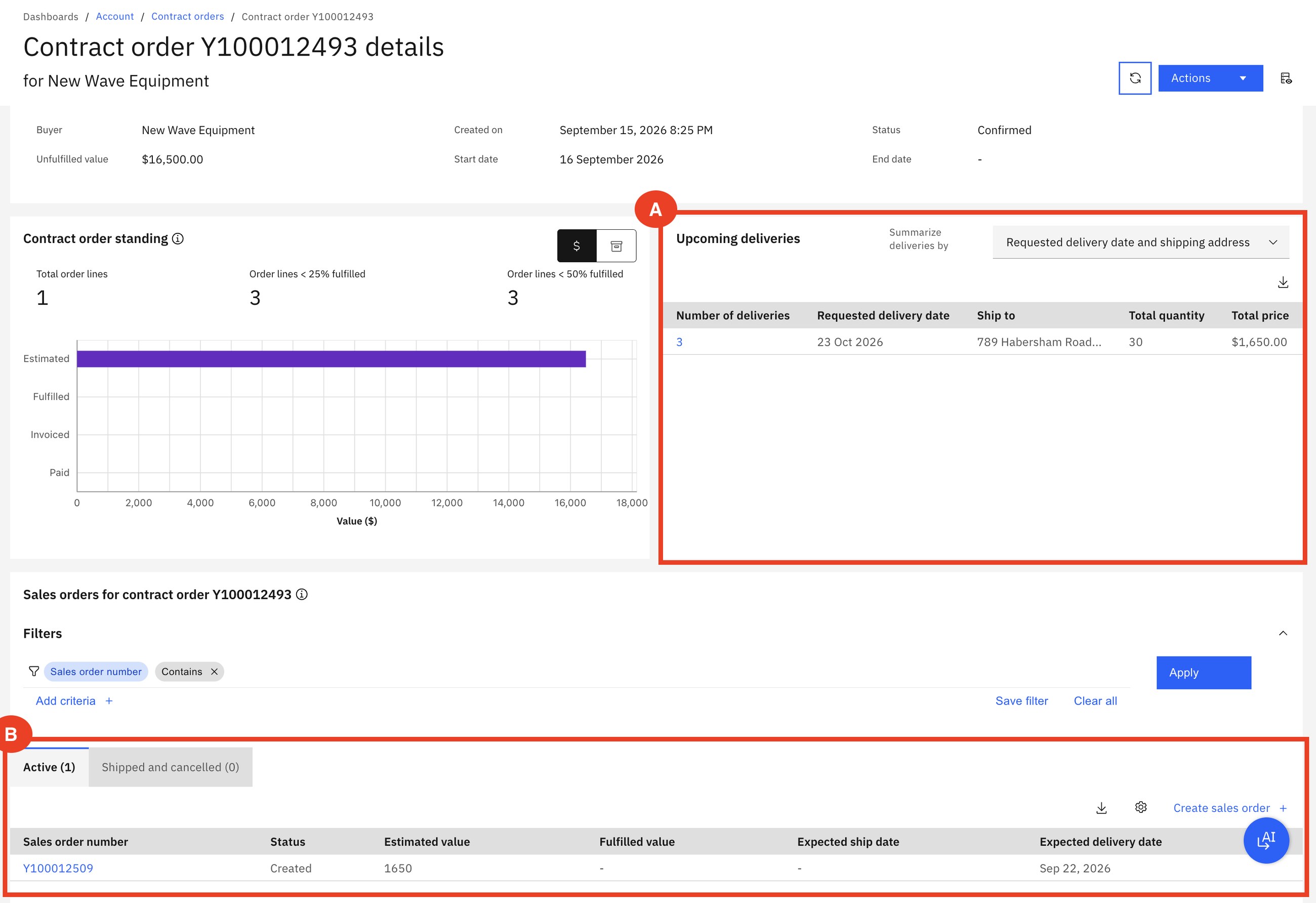
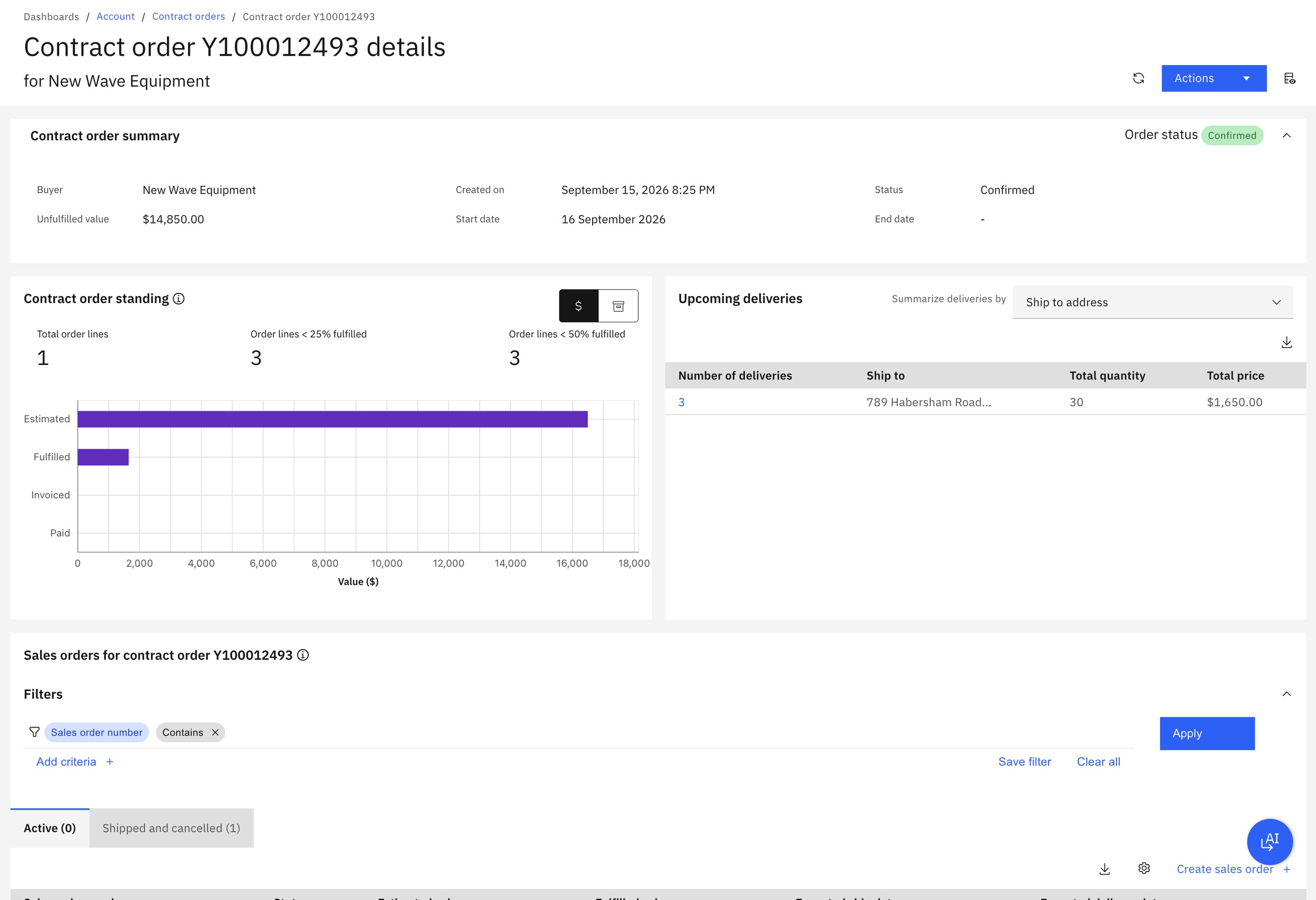
Delivery schedules appear 60 days before the delivery date. A sales order is created 7 days before it. A missed schedule can still be converted within 3 days. Each delivery is 30 units worth $1,650, so the contract's unfulfilled value goes from $16,500 to $14,850 after the first shipment.
The generated sales order is an ordinary order: Fred resolves holds, schedules, releases and ships it exactly as in scenario 1. Kim follows the account from a dashboard.
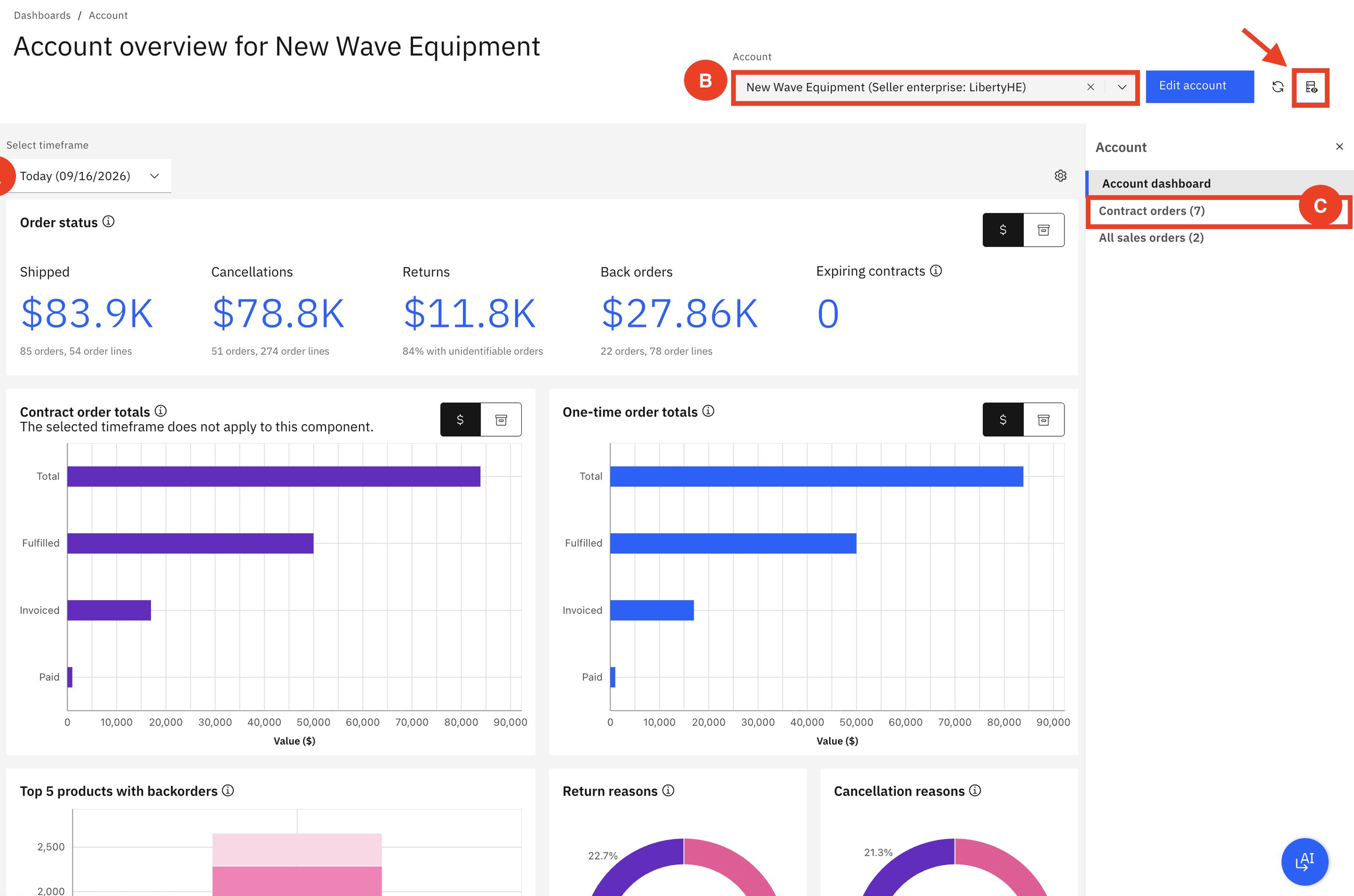
How to say it: "Do your business customers re-enter the same order every month? What if the contract created the orders by itself and both sides could see what is still to come?"
Behind the curtainWhere the decisions are configured
In every scenario, "Sterling decided". Here is where a business user tells it how. These screens are from a local Sterling 25.3 with a second demo company, Matrix.
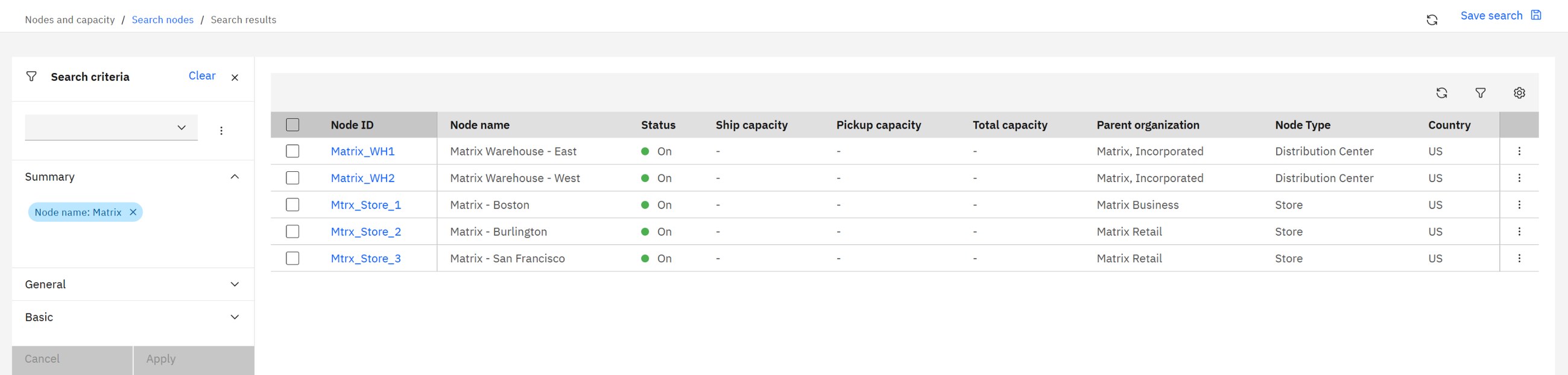
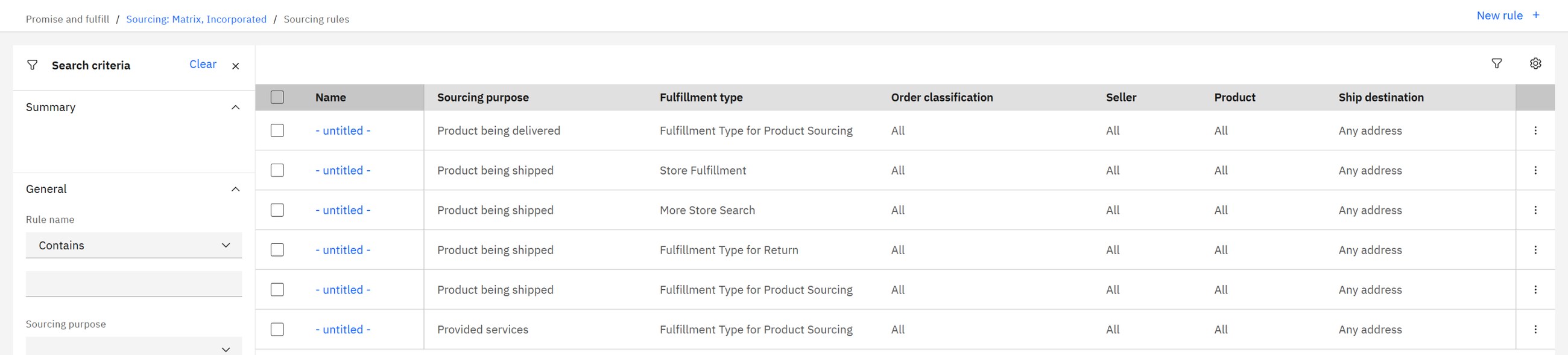
Typical rules, in plain words: "ship from the closest node that has everything", "prefer warehouses, use stores only if the warehouse is out", "never split into more than two parcels", "if nobody has it, buy it from the supplier". Change the rule and the next order behaves differently. No project, no release.
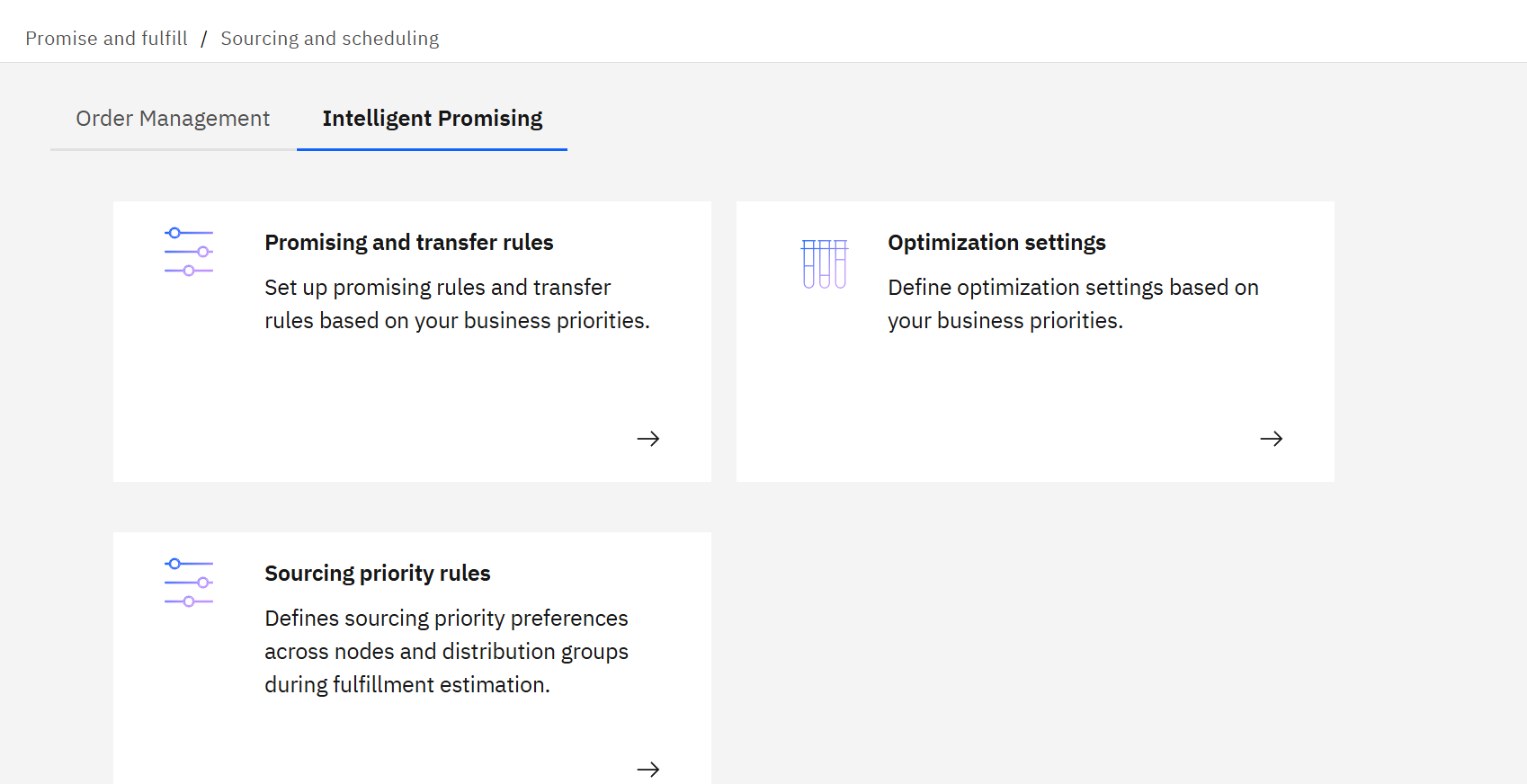
Rules pick a node that is allowed. Intelligent Promising picks the node that is best: it weighs shipping cost, distance, capacity, the risk of a markdown or a stock-out, and the promised date.
The differentiators, and the proof
| What sets Sterling apart | Where you saw it | What it means for the customer |
|---|---|---|
| One order record across channels | Order Hub, the store app and Call Center open the same order (1, 2, 7) | No reconciling copies; one answer whoever the customer asks |
| Real-time inventory across every node | Inventory search, promise dates on the storefront (4, 13) | Sell stock the web shop normally cannot see |
| Configurable sourcing and scheduling | Split orders, sourcing rules (4, behind the curtain) | Change fulfilment strategy in days, not in an IT project |
| Chained orders | Purchase, transfer and drop-ship orders created from one sales order (6) | Say yes when the item is not on your own shelf |
| Stores as fulfilment nodes | Pick, pack, ship, pickup, receive and put away in the store app (2, 3, 5) | Faster delivery without building new warehouses |
| Inventory protection by rule | Safety stock per item, store and delivery method (13) | Fewer broken promises, stock kept for walk-in customers |
| Service on the live order | Modify, return, change fulfilment, appease (7 to 12) | Shorter calls, fewer cancellations, retained customers |
| Pipelines and holds the business shapes | Fraud, duplicate and address holds (16) | The process fits the business, with control where it is needed |
| B2B and B2C on one platform | Contract orders, delivery schedules, account dashboard (14) | One system and one inventory for both businesses |
| Governed AI | Assistants that act through published tools and ask before acting (11, 15, AI) | Faster agents and consistent policy, without losing control |
How to spot a need
- "We show out of stock online while the stores are full."
- "Our web shop decides where to ship from, and it only knows one warehouse."
- "We want click and collect or ship-from-store, and our ERP cannot do it."
- "Customer service cannot see or change an order after it is placed."
- "Returns are handled on paper or in a separate tool."
- "Our business customers send the same order every month by email."
- "We bought another brand (or opened another country) and now have two of everything."
- "Every change to how we fulfil is an IT project."
Common mistakes when positioning it
- Calling it "order entry". Capture is the smallest part. The value is in promising and sourcing.
- Competing with the ERP. The ERP stays the system of record for finance and planning. Sterling sits in front of it and decides fulfilment.
- Competing with the web shop. The shop keeps the experience. Sterling gives it true availability and dates.
- Demoing only scenario 1. A warehouse shipping an order impresses nobody. Show the split order (4), the chained orders (6) or safety stock (13): that is where the engine is visible.
- Selling AI first. The assistants are convincing because the order engine underneath is governed. Show the engine, then the AI.
Check yourself
1. A customer asks: "We have SAP. Why would we need an OMS?"
The ERP records and plans. It was not built to promise against stock in every store and warehouse in real time, split and route orders by configurable rules, or drive store picking and call-center changes. The OMS does that and feeds the ERP.
2. What is the difference between scheduling and releasing an order?
Scheduling checks inventory and assigns a node and date to each line. Releasing sends the instruction to that node to start work. Between the two the order can still be changed easily.
3. In scenario 4, why did line 2 ship from store 3 and not from store 2?
The inventory search shows it: store 2 had none of that item and store 3 had 49. Sterling split the order into two releases, one per store.
4. In scenario 6, how many orders exist for Sarah's four items?
Four: her sales order, plus a purchase order, a transfer order and a drop-ship order, all created by Sterling and linked as chained orders.
5. A store has 14 of an item and a pickup safety stock of 10. What does the web shop show for pickup?
4. The other 10 are protected for walk-in customers.
6. Sarah wants to cancel one line. What decides whether Anaya can?
The line's status. While it is Created or Scheduled it can be changed; once released or shipped, the agent starts a return instead.
7. Why can the AI assistant be trusted to cancel an order?
It can only call tools the company has published, with their permissions, it offers only valid reasons, and it asks the agent to confirm before acting.
Glossary
- OMS
- Order management system: keeps the promise made to the customer, across channels and locations.
- Enterprise
- A business unit with its own rules, catalog and orders inside one Sterling system.
- Node
- Any location that holds stock or does fulfilment work: warehouse, store, supplier.
- ATP
- Available to promise: stock that can still be sold, per node and date.
- Safety stock
- Stock held back from sale, for example for walk-in customers.
- Sourcing
- Choosing which node fulfils each order line.
- Scheduling
- Committing a node and a date to each line.
- Release
- The instruction sent to a node to fulfil specific lines.
- BOPIS
- Buy online, pick up in store.
- SFS
- Ship from store: a store ships an online order.
- Putaway
- Moving received goods from the dock to their shelf location.
- Chained order
- An order Sterling creates to serve another one: a purchase, transfer or drop-ship order.
- Transfer order
- Moves stock from one of your nodes to another.
- Drop ship
- The vendor ships directly to the customer.
- Cross-docking
- Goods arrive at a warehouse and leave again without being stored.
- Hold
- A stop placed on an order (fraud check, approval) until it is resolved.
- Appeasement
- A goodwill refund or discount given to an unhappy customer.
- Contract order
- A B2B agreement for quantities over time, from which sales orders are generated.
- Delivery schedule
- A planned future delivery under a contract order.
- MCP tool
- A described, permissioned action that an AI agent may call.
- Intelligent Promising
- Sterling's optimisation layer for inventory visibility, promising and fulfilment.
Scenarios follow IBM's Sterling OMS demo guide; the explanations are the author's. Screens: IBM Sterling Order Management demo environment and Sterling 25.3 Developer Toolkit. All names, amounts and quantities are demo values.